Programming
- Updated2026-07-27
- 1 minute(s) read
This section contains information on programming NI high-speed digitizers. You can acquire data with an NI high-speed digitizer either programmatically or interactively.
Programmatically Acquiring Data using NI-SCOPE.
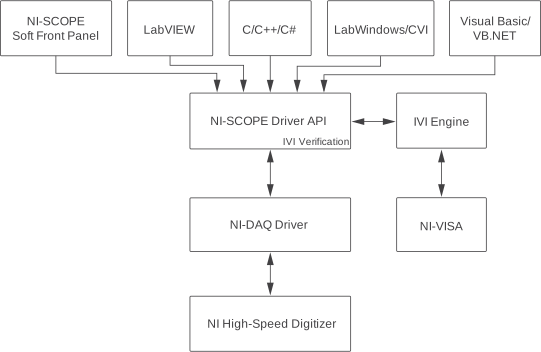
If you want to integrate a digitizer into your test and measurement application, you can program the device using National Instruments LabVIEW or LabWindows/CVI, C/C++, or Microsoft Visual Basic.
The following figure illustrates the relationship between your programming environment, NI‑DAQmx, and the digitizer.
Interactively Acquiring Data with the NI-SCOPE Soft Front Panel
If you are using the digitizer as a general-purpose digitizer, you can use the NI-SCOPE Soft Front Panel (SFP) to make measurements interactively without writing code. The NI-SCOPE SFP is a software application for NI high-speed digitizers. The NI-SCOPE SFP is a full-featured, easy-to-use interface with 40 waveform measurements that you can use immediately without learning a programming language.
To launch the NI-SCOPE SFP, go to Start»All Programs»National Instruments» NI-SCOPE»NI-SCOPE Soft Front Panel.
For more information, refer to the NI-SCOPE Soft Front Panel and InstrumentStudio.