Online NI Certification Exams
Overview
The online exam format allows you to take an NI Certification Exam from the convenience of your home or office in a secure online environment.
Contents
- Exam Process & Environment
- Exam Rules
- Preparing for Your Exam
- Exam Scheduling Process
- After Your Exam
Exam Process & Environment
NI has partnered with Examity, an online certification exam provider and your exam will be delivered through their exam environment.
- At the time of your exam, you will receive access to a secure virtual machine/exam portal with the necessary software, applications, and exam instructions.
- You will take your exam in a secure environment while a trained proctor monitors your screen and webcam remotely, ensuring that the exam integrity is maintained.
- For performance-based exams (CLD, CLA, CTD), the virtual machine is pre-installed with:
- The NI Software necessary for the exam (LabVIEW or TestStand),
- An “Exam” folder on the desktop containing seed files to be used during the exam,
- Other Windows standard programs (e.g.: MS Paint, Notepad),
- A PDF document with exam instructions.
IMPORTANT: for CLD, CLA and CTD you will not be able to use any keyboard shortcuts during the test in the virtual environment.
Exam Rules
- Internet connection: Online exams work best when you have a fast and stable internet connection. If you have a slow internet connection, you may experience some lag in your interactions with the online exam environment. This may impact your exam experience negatively for performance-based exams where moment-by-moment cursor location is critical. Please note that mobile hotspots are NOT allowed to be used for taking the exam.
- Computer requirements check: Perform a system compatibility check and verify your computer system meets all requirements that are necessary for online exams.
- Verification process: Please, arrive at your exam at least 15 minutes before your appointment and kindly note that the verification process before your exam can take up to 30 minutes. You may use any government issued photo ID as a valid form of ID to complete the verification process. Temporary IDs, soft copies, expired IDs and digital IDs are NOT allowed.
- Webcam: You need to have a webcam to enable remote proctoring. The proctor must be able to see you for the duration of the test. Webcam, speakers, and microphone must remain on throughout the test.
- Alone in the room: Ensure you are in a quiet, private space. If other people are present, the proctor will not start the exam. If someone walks into your room during the exam, the proctor may terminate the exam or give a warning, depending on whether exam-relevant communication appears to occur.
- Clear desk: Before starting the exam, the proctor will ensure your desk is clear of all items. No papers or books may be within reach. This includes blank paper to ensure that no notes on the exam are taken out of the exam environment. If you wish to take notes during the exam, you may use the applications that are installed in the exam environment. You are allowed to use a whiteboard, eraser, and one dry-erase marker for CLD, CLA, and CTD exams. You must clear the whiteboard in the presence of your proctor before leaving the exam session. You must show your computer screen to the proctor and underneath your laptop and your keyboard. You can do so by using a mirror, reflective surface, smartphone camera, or an external webcam. You must show the proctor that your phone is placed behind you and is outside of your arm’s reach.
- Power source: Make sure to connect your computer to a power source before the exam starts.
- Phone or Smartwatch: You are NOT allowed to use your phone or smartwatch during the exam.
- Headphones: You are allowed to use headphones throughout the duration of the exam.
- No dual monitors: You are allowed to use only one monitor during the online exam. You may use a separate monitor connected to your laptop via a docking station as long as your laptop screen is either closed or covered by a cloth. This is to ensure that only one active screen is available during the test.
- No leaving seat: During multiple choice exams (1 hour) you are not allowed to leave your seat. During performance-based exams (4 hours) you are allowed two (2) authorized breaks of no more than 10 minutes each. You are NOT allowed to leave your seat during the exam unless you are taking one of the authorized breaks. You must inform the proctor if you would like to take a break. Your exam timer will continue to run even when you avail an authorized break. Please note that breaks are optional, and the proctor will ask you to show the room and desk area once you are back before continuing with the exam.
- No talking: Do not read the exam prompt aloud or talk during the exam.
- Drinks: You are allowed to have a clear container with clear liquid on your desk.
- Calculator and/or notepad: You are allowed to use the calculator and notepad provided on the virtual machine/exam platform. Physical calculators or notepads are NOT allowed.
- Other Applications: You must show the proctor that all Chrome browser extensions except the Examity extension are disabled. You must show the proctor that no other software or applications are running. Please end all tasks not related to the exam including VPN connections. We recommend using a personal laptop or desktop.
Preparing for Your Exam
You can find the exam preparation materials by visiting our NI Certification webpage, selecting the exam of your choice and navigating to the “Prepare for the Exam” section:
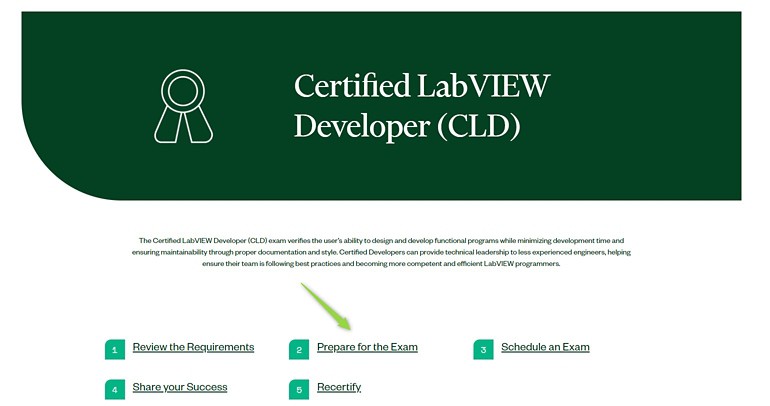
Figure 1: How to navigate to the preparation materials
Please note that – as indicated in the “Exam Rules” section of this document - physical calculators or notepads are NOT allowed to be used during online exams. You are allowed to use the calculator and notepad provided on the virtual machine/exam platform. We recommend to practice taking your notes on your computer in Notepad or MS Paint when taking the sample exams. Additionally, we recommend limiting your practice to a single monitor to simulate the online exam environment more accurately.
IMPORTANT: for CLD, CLA and CTD you will not be able to use any keyboard shortcuts during the test in the virtual environment.
Exam Scheduling Process
- Visit NI Certification webpage or NI Learner Dashboard.
- Find all the details about the NI Certification Program and select the exam of your interest.
- Make sure you have the prerequisite for taking the desired exam. If you have any questions about this, please contact certification@ni.com
- If you do not have an NI Profile, you will need to create one. Without an NI Profile, you will not be able to schedule your exam.
- Start your online exam registration by clicking on “Schedule an Exam”.
- More details about How to Schedule an exam can be found in section VI of the Exam Taker Guide.
- Rescheduling/ cancellation: If you would like to reschedule/cancel your scheduled exam appointment, you will need to do so at least twenty-four (24) hours before the scheduled exam start time, otherwise you will need to pay the full list price (or applicable amount of Education Services Credits). Exam registrations using NI Training Membership not timely canceled or rescheduled, as set above, will be invoiced the full list price of the exam.
For more information on Education Services Terms & Conditions, please click here.
After Your Exam
- Multiple-choice exams (CLAD, CLD-R, CLA-R, CTA, CLED1) can take 2-3 business days until you receive your results (including official NI certificate and badge) via email. If you did not meet the passing score, you will receive a message on your screen immediately after your exam indicating this. You will not receive a separate email.
- Performance-based exam submissions (CLD, CLA, CTD) can take up to 4 weeks and you will receive your results in an email from certification@ni.com indicating your result (passed or failed).
IMPORTANT: You MUST save your work within the exam time (4 hours) as per the instructions provided in the exam pack. NI will be unable to recover or grade your exam if you fail to comply.