Changing the Fan Mode Programmatically of a PXIe Chassis
Overview
Contents
Feature Details (C Language)
A feature was introduced in NI System Configuration 16.0 to allow users to programmatically change the fan speed control to a third mode, Safe Manual mode, on the PXIe-1085, PXIe-1086, and PXIe-1066DC chassis. Safe Manual mode allows the user to set a speed, in rpm, at which the fans should run. Your chassis' fan speed selector switch must be in Auto mode in order to utilize this mode. If the speed selector switch is set to High, the fans will continue to run at High regardless of the configured Safe Manual settings.
Note: If you set the speed below the maximum supported by your chassis, the fans will run above the user-defined speed if the intake air temperature necessitates it.
Use of this feature requires the following two properties within the System Configuration API:
| Property | Description | Values |
NISysCfgPxiFanModes | Fan Mode | NISysCfgPxiFanModesAuto (Default)NISysCfgPxiFanModesSafeManual |
NISysCfgPxiPropertyFanUserRpm | Speed, in rpm, that the fans should run at | Int* |
*The PXIe-1085 supports a maximum fan speed of 4600 rpm. The PXIe-1086 and PXIe-1066DC support a maximum fan speed of 3800 rpm.
Use the NISysCfgGetResourceProperty and NISysCfgSetResourceProperty functions to get or set the current value of these properties. Call NISysCfgSaveResourceChanges after setting these properties to write and save the property changes to the device. Once saved, these settings will persist between reboots. See the NI System Configuration API help that gets installed with the software for more information on using these functions.
Feature Details (LabVIEW)
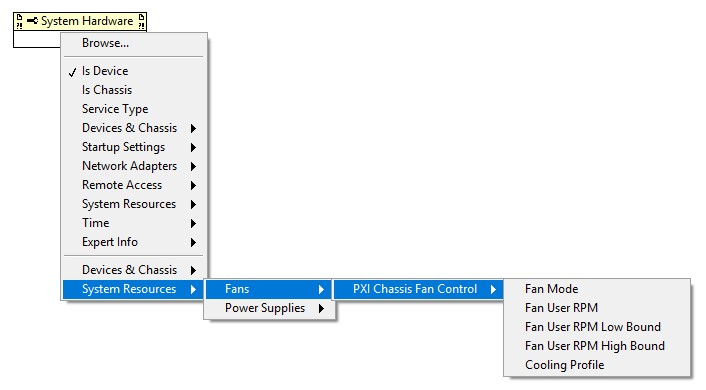
Similar functionality was introduced for LabVIEW in NI System Configuration 18.0. You can take advantage of this functionality by dropping a System Configuration Property Node onto the Block Diagram of your VI, and finding the appropriate properties in: System Resources >> Fans >> PXI Chassis Fan Control.
Setup
To get access to these properties, complete the following steps:
- Upgrade your host PC or controller to PXI Platform Services 16.0 or later (or PXI Platform Services 18.0 or later for LabVIEW functionality).
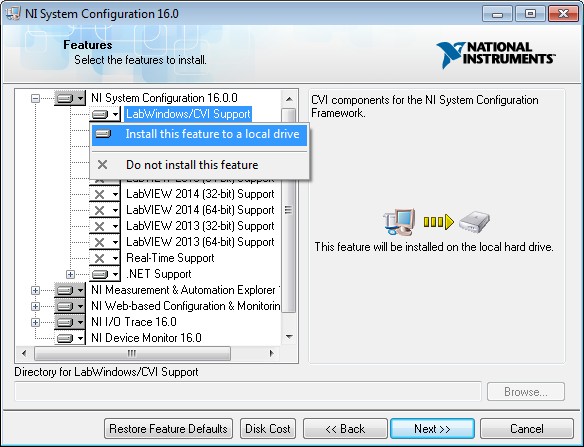
- Upgrade your host PC or controller to NI System Configuration 16.0 or later (or NI System Configuration 18.0 or later for LabVIEW functionality). If programming in C, make sure to enable the LabWindows/CVI (C) API support in the installer tree:
- If programming in C, include
nisyscfg.handnisyscfg_pxi.hin your source code. These files are installed at:
C:\Program Files (x86)\National Instruments\Shared\ExternalCompilerSupport\C\include\ -
Downloads

Requirements
Software
Application Software: LabWindows/CVI Full Development System 2017
Language(s): C
Hardware
Hardware Group: PXI/CompactPCI