Part 4: Removing Broken Aliases and Channel Mappings
- Updated2023-02-21
- 3 minute(s) read
In this section, the example code removes any aliases and channel mappings that broke while modifying the inputs and outputs of the DAQ device. Aliases and channel mappings can break when you remove channels that aliases or channel mappings link to.
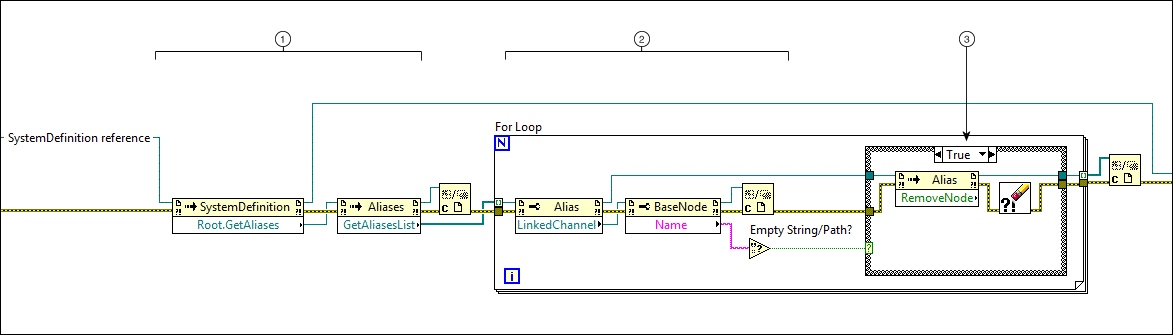
4a. Removing Unmapped Aliases
|
|
Find the aliases under the Aliases section of the system definition file. To do so, obtain references to the following items, in descending order:
|
|
|
Find any aliases without a channel by:
|
|
|
Remove any aliases without a channel using the RemoveNode method. |


4b. Removing Blank Channel Mappings

|
|
Obtain references to all of the channel mappings in the system definition. |
|
|
Create an array of any broken channel mappings by:
|
|
|
Delete channel mappings added to the array in the previous step. |
|
|
Save the system definition file. |

Related Links
Programming with the System Definition API in LabVIEW
Navigating the System Definition API
 |
Previous Step Part 3: Adding Digital Input and Output Channels to a DAQ Device |
Home LabVIEW Walkthrough: Modifying a DAQ Device in a System Definition File |