Part 3: Adding Digital Input and Output Channels to a DAQ Device
- Updated2023-02-21
- 5 minute(s) read
In this section, the example code adds and configures the digital inputs and outputs of a DAQ device:
- Adding a Digital Input Channel
- Adding a Digital Output Channel
- Adding Channel Mappings for DAQ Digital Inputs and Outputs
3a. Adding a Digital Input Channel to a DAQ Device

|
|
Obtain the reference to the existing Digital Input section under the DAQ device in the system definition using the GetDigitalInputSection method. |
|
|
Remove the existing Digital Input section using the RemoveNode method. Removing any existing digital input channels prevents conflicts between existing channels and channels you add. |
|
|
Create a new Digital Input section and add it to the DAQ device using the CreateDigitalInputs method. |
|
|
Create a new DAQ DIO port by initializing a new instance of the DAQDIOPort class. |
|
|
Create a new digital input channel by initializing a new instance of the DAQDigitalInput class. |
|
|
Add the new digital input channel to the DAQ DIO port using the AddDigitalInput method. |
|
|
Add the DAQ DIO port with the digital input channel to the Digital Input section using the AddDIOPort method. |
|
|
Create an alias and link it to the new channel by:
|


Related Links
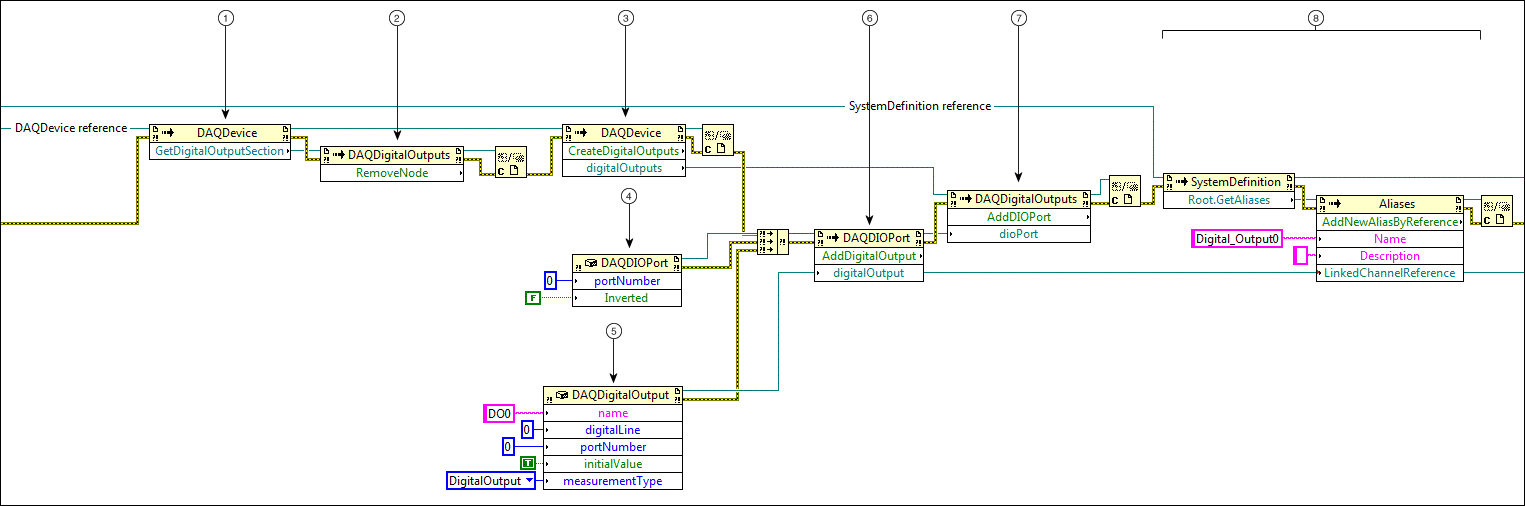
3b. Adding a Digital Output Channel to a DAQ Device
|
|
Obtain the reference to the existing Digital Output section under the DAQ device in the system definition using the GetDigitalOutputSection method. |
|
|
Remove the existing Digital Output section from the system definition using the RemoveNode method. Removing any existing digital output channels prevents conflicts between existing channels and channels you add. |
|
|
Create a new Digital Output section and add it to the DAQ device. |
|
|
Create a new DAQ DIO port by initializing a new instance of the DAQDIOPort class. |
|
|
Create a new digital output channel by initializing a new instance of the DAQDigitalOutput class. |
|
|
Add the new digital output channel to the new DAQ DIO port using the AddDigitalOutput method. |
|
|
Add the DAQ DIO port with the digital output channel to the new Digital Output section using the AddDIOPort method. |
|
|
Create an alias and link it to the new channel by:
|
Related Links
3c. Adding Channel Mappings for DAQ Digital Inputs and Outputs

|
|
Get the node path for the DO0 channel. |
|
|
Get the node path for the DI0 channel. |
|
|
Convert the node paths from strings to arrays using Build Array functions. |
|
|
Map DI0 to DO0 using the Root dottable property and AddChannelMappings method. |
|
|
Save the system definition file. |
Related Links
Programming with the System Definition API in LabVIEW
Navigating the System Definition API

