Arbitrary Sequence Mode
- Updated2025-10-10
- 3 minute(s) read
Arbitrary sequence output mode allows you to load multiple waveforms in the onboard memory of the signal generator.
A finite number of samples make a waveform. To generate these downloaded waveforms in a specific order, you must prepare a sequence, which contains a number of segments in a specific order. Each segment specifies a downloaded waveform, a number of loops to repeat the selected waveform, and a numeric offset in which a marker is generated by the instrument. The timing and behavior of the generation of a waveform sequence is dependent on the trigger mode selected.
| Waveform or Segment Type | Waveform or Segment Shape | Description |
|---|---|---|
| Waveform A |  |
A single cycle of a sine wave that is downloaded to onboard memory |
| Waveform B |  |
A single cycle of a ramp waveform that is downloaded to onboard memory |
| Waveform Segment 1 |  |
A segment created using Waveform A that repeats or loops three times |
| Waveform Segment 2 |  |
A segment created using Waveform B that loops twice |
| Waveform Segment 3 | 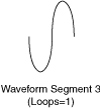 |
A segment created using Waveform A that loops only once |
| Sequence List or Waveform Linking |  |
The waveforms are linked in a sequence. The concept of using a sequence to generate waveforms is referred to as waveform sequencing or linking and looping waveforms. |
Segment Components
You create a sequence segment by segment. Each segment is made up of the following four components.
Refer to the niFgen Create Arbitrary Sequence or niFgen Create Advanced Arb Sequence VIs or the niFgen_CreateArbSequence or niFgen_CreateAdvancedArbSequence functions for more information about creating and configuring arbitrary sequences.