Create Shared Variable VI
- Updated2024-11-20
- 3 minute(s) read
Creates a shared variable of the given name and type in the specified process.
The shared variable that you want to create replaces an existing shared variable if the two shared variables have the same name.
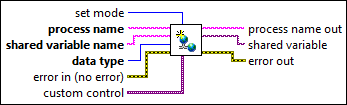
Inputs/Outputs
 set mode
—
set mode
—
set mode specifies whether to commit the shared variable immediately or hold the shared variable in memory temporarily.  process name
—
process name
—
process name specifies the name of the process whose variables this VI creates. This parameter must be a string of numbers and letters with or without spaces. Refer to the system tree in the NI Distributed System Manager to view a list of processes. You also can use the Get Process List VI to return a list of process names.
shared variable name
—
 data type
—
data type
—
data type specifies the data type of the variable you want to add.  error in (no error)
—
error in (no error)
—
error in describes error conditions that occur before this node runs. This input provides standard error in functionality.  custom control
—
custom control
—
custom control specifies a custom control you create. You must specify custom control if data type is custom.  process name out
—
process name out
—
process name out returns the process name you specified.  shared variable
—
shared variable
—
 error out
—
error out
—
error out contains error information. This output provides standard error out functionality. |
Create Shared Variable Details
For optimal performance, set the set mode input of this VI to buffer. Then use the Commit Shared Variables VI to commit multiple shared variables to the SVE simultaneously.