Create and Configure IO Server
- Updated2024-11-20
- 5 minute(s) read
Creates a new Modbus, Modbus Slave, or OPC Client I/O server and adds the I/O server to the Shared Variable Engine (SVE). You also can use this Express VI to configure or replace an existing I/O server.
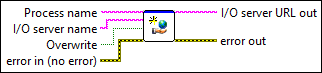
Dialog Box Options
Inputs/Outputs
 Address
—
Address
—
Specifies the address of this instance of the I/O server. This option appears if you select Modbus or Modbus Slave from the I/O server type pull-down menu in the configuration dialog box of this Express VI.  Overwrite
—
Overwrite
—
Specifies whether to replace an existing I/O server with the I/O server you want to create if the two I/O servers have the same name.  I/O server name
—
I/O server name
—
Specifies the name of the I/O server you want to configure or create. You can specify an I/O server in a hierarchy, for example, folder\server.
Serial port
—
Specifies the serial port this instance of the I/O server uses to communicate with the device. You can select a serial port in the range from COM1 to COM32. This option appears if you select Modbus Serial from the Model pull-down menu of the Configure Modbus I/O Server or Configure Modbus Slave I/O Server dialog box.
IP address
—
Specifies the IP address of the device with which the Modbus I/O server communicates. This option appears if you select Modbus Ethernet from the Model pull-down menu of the Configure Modbus I/O Server dialog box.
Prog ID
—
Specifies the ID of the OPC server. This option appears if you select OPC Client from the I/O server type pull-down menu in the configuration dialog box of this Express VI.  Reconnect poll rate
—
Reconnect poll rate
—
Specifies how often, in seconds, the SVE attempts to connect to an OPC server after losing the connection to the server. Enter a value of 0 if you do not want the SVE to retry the connection. This option appears if you select OPC Client from the I/O server type pull-down menu in the configuration dialog box of this Express VI.  error in (no error)
—
error in (no error)
—
error in describes error conditions that occur before this node runs. This input provides standard error in functionality.
Refresh rate
—
Specifies how often this instance of the I/O server refreshes the device, in seconds. This option appears if you select Modbus from the I/O server type pull-down menu in the configuration dialog box of this Express VI.
Machine
—
Specifies the name of the computer from which you can select an OPC server. This option appears if you select OPC Client from the I/O server type pull-down menu in the configuration dialog box of this Express VI.
Update rate
—
Determines the amount of time that passes before the OPC server communicates updated values to the SVE. This value is a requested update rate for the OPC server. The actual update rate returned by the OPC server is greater than or equal to this value. Entering a value of 0 returns the fastest update rate possible from the OPC server. This option appears if you select OPC Client from the I/O server type pull-down menu in the configuration dialog box of this Express VI.
Baud rate
—
Specifies the baud rate of this instance of the I/O server. You can select a value from 2400 to 115200. This option appears if you select Modbus Serial from the Model pull-down menu of the Configure Modbus I/O Server or Configure Modbus Slave I/O Server dialog box.
Deadband
—
Sets the percent change within a range that a value from the OPC server must change before the OPC server communicates the value to the SVE. This option appears if you select OPC Client from the I/O server type pull-down menu in the configuration dialog box of this Express VI.
Process name
—
Specifies the name of the existing process to which the I/O server belongs.  error out
—
error out
—
error out contains error information. This output provides standard error out functionality.  I/O server URL out
—
I/O server URL out
—
Returns the relative URL to the computer if the I/O server configuration is successful. Otherwise, I/O server URL out returns an empty string. The format of I/O server URL out is \\computer\process\IO_server. Wire I/O server URL out to the I/O server URL input of the Delete IO Server VI to remove the I/O server programmatically. |