SIT Update Indicator VI
- Updated2023-02-21
- 3 minute(s) read
SIT Update Indicator VI
Owning Palette: User Interface VIs
Requires: Simulation Interface Toolkit
Updates the host VI front panel indicators with values obtained from the SIT Read VI.
Place the SIT Update Indicator VI next to a Case Structure inside a For Loop. The iteration of the For Loop determines the signal value that this VI writes to the current indicator. The value wired to the selector terminal of the Case Structure determines the indicator that this VI updates. For example, Case 0 specifies the value and indicator that correspond with the first probed signal, Case 1 specifies the value and indicator that correspond with the second probed signal, and so on.
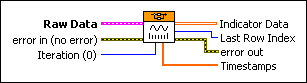
 |
Raw Data specifies the values and dimensions of all probed signals.
| ||||
 |
error in describes error conditions that occur before this node runs. This input provides standard error in functionality. | ||||
 |
Iteration specifies the index number of current probed signal that this VI is writing to an indicator. The default value is 0, which corresponds to the first signal probed. | ||||
 |
Indicator Data returns the values specific to the current signal. | ||||
 |
Last Row Index returns the index number of the last row of Indicator Data. Use Last Row Index if you are probing a scalar or one-dimensional signal and are interested in only the latest data from that signal. | ||||
 |
error out contains error information. This output provides standard error out functionality. | ||||
 |
Timestamps returns the simulation time steps at which this VI returned each row of the Indicator Data parameter. The ith element of the Timestamps parameter corresponds to the ith row of the Indicator Data parameter. |


Example
Refer to the updatingindicators VI in the labview\examples\Simulation Interface\Updating Indicators directory for an example of using the SIT Update Indicator VI.