LabVIEW Simulation Interface Toolkit API Reference

SIT Read VI

  • Updated2023-02-21
  • 4 minute(s) read

SIT Read VI

Owning Palette: User Interface VIs

Requires: Simulation Interface Toolkit

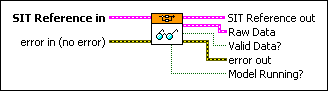
Reads data from all probed model signals.
Example

SIT Reference in specifies information about the current simulation.
TCP Connection specifies the TCP reference for the current connection to the SIT Server.
Model Name specifies the name of the current model.
Server Type specifies the type of execution host on which the SIT Server is running.

0Simulation Environment (default)—Specifies that the SIT Server is running on an execution host that is running The MathWorks, Inc. MATLAB® application software.
1MATRIXx—Specifies that the SIT Server is running on an execution host that is running Xmath. The LabVIEW Simulation Interface Toolkit does not currently support this option.
2RT—Specifies that the SIT Server is running on a real-time (RT) target.
error in describes error conditions that occur before this node runs. This input provides standard error in functionality.
SIT Reference out returns information about the current simulation.
TCP Connection returns the TCP reference for the current connection to the SIT Server.
Model Name returns the name of the current model.
Server Type returns the type of execution host on which the SIT Server is running.

0Simulation Environment (default)—Specifies that the SIT Server is running on an execution host that is running The MathWorks, Inc. MATLAB® application software.
1MATRIXx—Specifies that the SIT Server is running on an execution host that is running Xmath. The LabVIEW Simulation Interface Toolkit does not currently support this option.
2RT—Specifies that the SIT Server is running on a real-time (RT) target.
Raw Data returns the values and dimensions of all probed signals.
Data returns the values of all probed signals.
Dimensions returns the dimensions of all probed signals. Each element pair specifies the length and width of a signal.
Valid Data? is TRUE if the simulation returned valid data. If Valid Data? is FALSE, the simulation might not have provided any new signal values.
error out contains error information. This output provides standard error out functionality.
Model Running? returns TRUE if the simulation is running. Model Running? returns FALSE if the simulation is either paused or stopped. You can use the SIT Get Simulation State VI to determine the state of the simulation.

Example

Refer to the batch simulation VI in the labview\examples\Simulation Interface\Batch Simulation directory for an example of using the SIT Read VI.

Log in to get a better experience