Defining Linear Models Programmatically (Control Design and Simulation Module)
- Updated2023-03-14
- 2 minute(s) read
You can define models programmatically using the following methods:
- Wire a constant to the input of the function.
- Wire a model you constructed with the Model Construction VIs to the input of the function.
The following sections provide information about these methods.
Defining Linear Models Using a Constant
Complete the following steps to create a constant that represents the model.
- Define the model interactively.
- Click the Copy to Clipboard
 button in the configuration dialog box.
 - Select Terminal from the Parameter source pull-down menu.
- Click the OK button to close the configuration dialog box and return to the block diagram.
- Select Edit»Paste to paste a constant on the block diagram. This constant contains the terms you defined in step 1.
- Wire the output of the constant to the appropriate input of the linear model function.
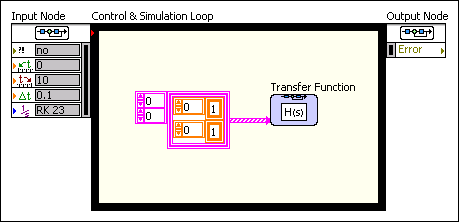
The following illustration shows a transfer function model as a block diagram constant.
Defining Linear Models Using the Control Design VIs
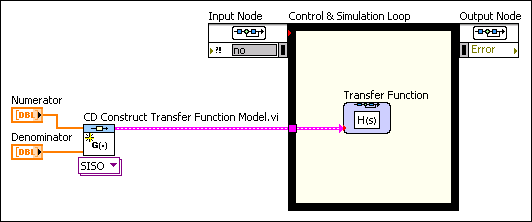
If you already have created a model using the Model Construction VIs, you can place that model on the block diagram and wire the output of the model to the input of the corresponding Simulation function. The Parameter source pull-down menu in the configuration dialog box of this function must be set to Terminal. The following block diagram shows how you can use the CD Construct Transfer Function Model VI to define a transfer function model.
You can use the Model Conversion VIs to convert model forms and representations on the simulation diagram. For example, you can wire a continuous controller model to the input of the CD Convert Continuous to Discrete VI. Then, wire the output of this VI to the input of a discrete Simulation function.