Replay and HIL AD Reference Architecture Example: Adaptive Cruise Control
- 更新时间2024-01-18
- 阅读时长3分钟
Replay and HIL AD Reference Architecture Example: Adaptive Cruise Control
Adaptive cruise control (ACC) is a driver-assistance function that offers an illustrative use case for the Replay and HIL AD Reference Architecture. ACC will be referenced as an example of how the Replay and HIL AD Reference Architecture could be used to build a test system to validate this functionality.
The resulting test system is based on PXI and Linux RT with all required hardware and software for controlling, configuring, communicating with, and powering the DUT. The test system accurately emulates the behavior of the sensors, communication buses, and I/O connected to the ADAS ECU and allows the ADAS ECU to be tested in a virtual environment. To create this test system, you must first understand the behavior of each sensor and connection to the ADAS ECU.
This implementation of ACC utilizes a combination of radar, lidar, and camera sensors that interact with the ADAS ECU to detect and react dynamically to obstacles in front of a vehicle while cruise control is enabled. The end result is that the vehicle attempts to maintain a specified speed but automatically accelerates or decelerates to maintain a safe following distance from any vehicles in the lane ahead. Refer to the following diagram representing a typical ACC implementation.
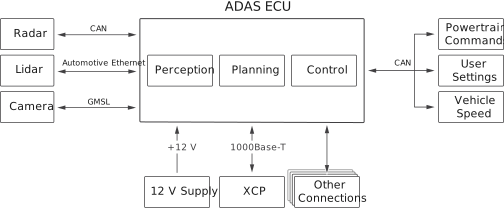
The ADAS ECU monitors the environment in front of the vehicle using radar, lidar, and camera sensors, which detect the presence and location of traffic in front of the vehicle. The ADAS ECU communicates with other ECUs in the vehicle to determine current vehicle speed and current cruise control settings set by the driver, as well as to command changes to the speed of the vehicle. The ADAS ECU also includes a diagnostic port and other connections used for non-ACC ADAS functions. The ADAS ECU is powered by a 12 V power supply. Refer to the following table for additional information about each of these connections.
| Communication Type | Communication Paths | Communication Characteristics |
|---|---|---|
| CAN (dedicated port) | Radar to ADAS ECU |
|
| CAN (shared port) | ADAS ECU to powertrain ECU |
|
| Powertrain ECU to ADAS ECU |
|
|
| Driver settings from dash ECU to ADAS ECU |
|
|
| GMSL | Front camera to and from ADAS ECU |
|
| Automotive Ethernet | Lidar to and from ADAS ECU |
|
| 1000Base-T | XCP diagnostic port to and from debug device |
|
| Power connection | Power source to ADAS ECU |
|