LabVIEW Walkthrough: Opening and Running a Project
- Updated2023-02-21
- 3 minute(s) read
Parent Topic: NationalInstruments.VeriStand.ClientAPI Namespace
You can use LabVIEW to access the NI VeriStand Execution .NET API and automate the operation of an NI VeriStand application.
 |
Note Creating and communicating with .NET objects in LabVIEW requires the .NET CLR 4.0 that installs with LabVIEW. You must use a .NET 2.0 configuration file if you want to load .NET 2.0 mixed-mode assemblies. |
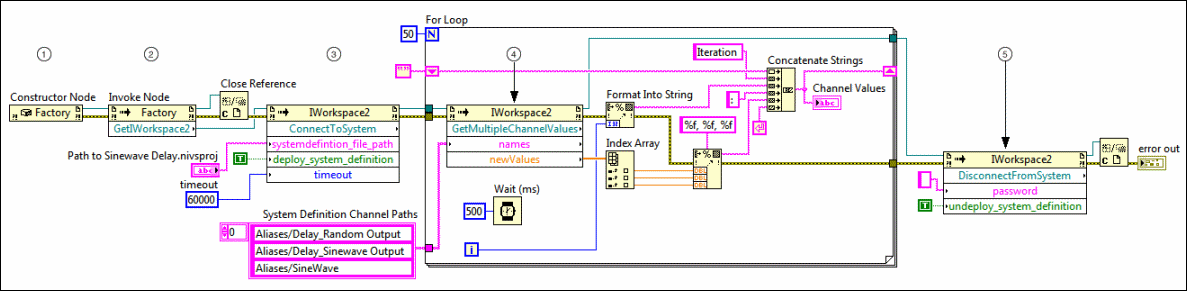
The following block diagram provides an example of using the Execution API to deploy a system definition file to a target running the VeriStand Gateway, read values from channels, and then undeploy the system definition file. This walkthrough uses the Sinewave Delay example project that NI VeriStand installs in the <Common Data>\Projects\Example directory.
|
|
Initializes a new instance of the Factory class, which provides access to the NI VeriStand system and the various interfaces available in the Execution API. Any code you write using this API must include a Factory constructor to access NI VeriStand. |
||
|
|
Gets the IWorkspace2 interface, which you can use to manage connections between the VeriStand Gateway and one or more targets, to start and stop basic Workspace operations, and to configure events for error and status notifications.
|
||
|
|
Connects the VeriStand Gateway to one or more targets and deploys the system definition file. Note that if you set the deploy_system_definition parameter to false, the target(s) must already be running the system definition file before you call this method. |
||
|
|
For fifty For Loop iterations, gets the values of the specified channels as the system definition file runs on the target. The remainder of the code in the For Loop creates and displays the channel values on the front panel in the format of Iteration 0: 0.925761, 4.791827, 1.957790.
|
||
|
|
Disconnects the VeriStand Gateway from all connected targets and undeploys the system definition file. |


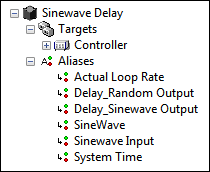
The following figure shows the Aliases section of the system definition file from this example, as displayed in the System Explorer configuration tree. Notice that alias paths in the previous block diagram reflect their names and location in the system definition file.