C# Walkthrough: Modifying Models in a System Definition File
- Updated2023-02-21
- 3 minute(s) read
You can use any .NET-compatible programming language to access the NI VeriStand System Definition .NET API and programmatically add, remove, and configure models in a system definition file.
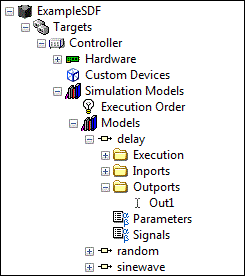
The example code in this topic, written in C#, uses the System Definition API to add a model, configure the inports and outports of the model, and remove a model. As you follow the example, notice that the hierarchy of classes reflect the hierarchy of nodes that appear in the System Explorer window, as shown in the following image.
public static void Main(string[] args)
{
// Locate the system definition file created for this example, ExampleSDF_ModifyModels.nivssdf.
string exampleSDFPath = "C:\\Users\\Public\\Documents\\National Instruments\\NI VeriStand 2014\\Examples\\System Definition API\\DotNET\\Modify Models\\ExampleSDF_ModifyModels.nivssdf";
// Open an existing system definition file from disk.
SystemDefinition exampleSDF = newSystemDefinition(exampleSDFPath);
// Instantiate class for the Models section of the system definition file.
Models modelsSection;
// Find the first target in the system definition file by traversing the following nodes in the system definition file, in descending order: root-level item, Targets section, all targets.
Target firstTarget = exampleSDF.Root.GetTargets().GetTargetList()[0];
// Get a reference to the first target's Models section.
modelsSection = firstTarget.GetSimulationModels().GetModels();
// Get the path for each of the example models that ship with NI VeriStand (Delay.dll, Random.dll, and Sinewave.dll).
string[] modeldllPaths = System.IO.Directory.GetFiles("C:\\Users\\Public\\Documents\\National Instruments\\NI VeriStand 2014\\Projects\\Example\\Models", "*.dll");
// Create an array of the model names. Additionally, create an array of aliases. You will link the aliases to channels later in the code.
string[] modeldllNames = new string[modeldllPaths.Length];
string[] modeldllAliases = new string[modeldllPaths.Length];
for (int i = 0; i <= modeldllPaths.Length - 1; i++)
{
int dllpathIndex = modeldllPaths[i].IndexOf("Models") + 7; // Add 7 to remove "Models/"
int dllpathLength = modeldllPaths[i].Length;
modeldllNames[i] = modeldllPaths[i].Substring(dllpathIndex, dllpathLength - dllpathIndex - 4); // Subtract 4 to remove ".dll"
modeldllAliases[i] = modeldllNames[i] + "_OutputAlias";
Console.Write("Adding new Model: " + modeldllNames[i]);
}
// Add each model to the system definition file using the Model constructor and AddModel method.
for (int i = 0; i <= modeldllPaths.Length - 1; i++)
{
modelsSection.AddModel(newModel(modeldllNames[i], string.Empty, modeldllPaths[i], 0, 1, 0, false, true, true));
}
// Link the first outport of each model to the corresponding alias in the array ModeldllAliases[] created previously.
for (int i = 0; i <= modeldllAliases.Length - 1; i++)
{
exampleSDF.Root.GetAliases().AddNewAliasByReference(modeldllAliases[i], string.Empty, modelsSection.GetModels()[i].GetOutportsSection().GetOutports()[0]);
}
//Remove the Delay model by name.
for (int i = 0; i <= modeldllNames.Length - 1; i++)
{
if (modelsSection.GetChildren()[i].Name == "Delay")
{
modelsSection.RemoveNode();
}
}
// After removing the Delay model, check if any aliases contain empty links. If a broken alias is found, remove the alias.
for (int i = 0; i <= modeldllAliases.Length - 1; i++)
{
if (exampleSDF.Root.GetAliases().GetAliasesList()[i].LinkedChannel.Name == string.Empty)
{
exampleSDF.Root.GetAliases().GetAliasesList()[i].RemoveNode();
}
}
>// Save the system definition file and handle any errors.
string error;
bool saveError = exampleSDF.SaveSystemDefinitionFile(exampleSDFPath, out error);
if (saveError == true)
{
Console.WriteLine("\n\nSystem Definition File saved successfully");
}
else
{
Console.WriteLine("\n\nThere was an error saving the System Definition" + error);
}
}