Test Signal Configuration XControl
- Updated2024-06-18
- 2 minute(s) read
Test Signal Configuration XControl
Owning Palette: Configuration Controls
Requires: Sound and Vibration Toolkit
Use this control to quickly configure audio test signals. This XControl provides front-panel access to the most common signal parameters and returns a signal configuration.
Configuring the Test Signal
This XControl creates a signal configuration which can be combined with other signal generation API to generate a test signal. This XControl supports the following test signal types:
- None—DC signal with no dynamic component
- Tone—Constant-frequency sinusoid
- Multitone—Multiple constant-frequency sinusoids summed together
- Discrete Sweep—Frequency sweep with discrete frequency transitions
- Continuous Sweep—Frequency sweep with smooth, continuous frequency transition
- Noise—Broadband noise with selectable white or pink frequency distribution
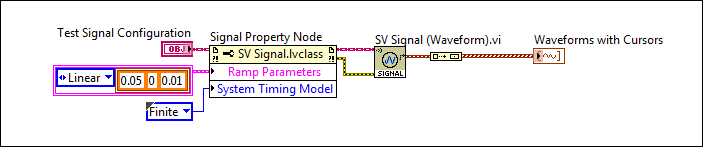
You can configure specific properties for each signal type on the front panel. Use the Sound and Vibration signal generation API to configure additional properties such as the duration of ramp up and ramp down and to select the appropriate system timing mode for your application.
Example: Simple Tone
Front Panel

Block Diagram
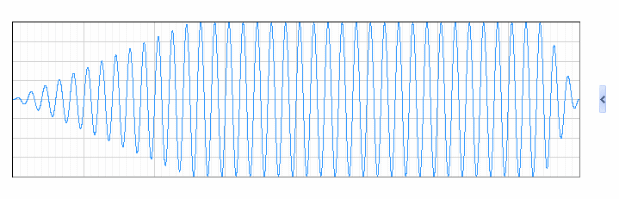
Signal Displayed on Graph
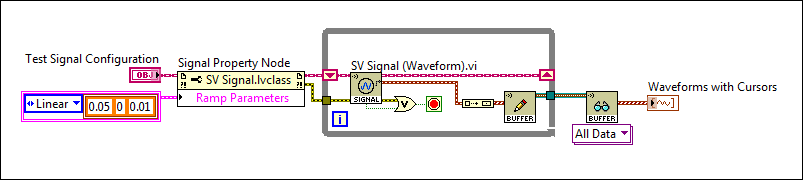
Application developers can enable other modes of operation such as a continuous generator by leaving the System Timing Model equal to the default output and putting a loop around the SV Signal (Waveform).vi
Example: Discrete Sweep
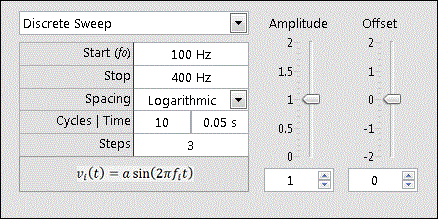
Here is an example of the function generator configuration and code to produce a discrete frequency sweep (also known as swept sine).
Front Panel
Block Diagram
Signal Displayed on Graph
