Octave Waterfall Graph
- Updated2024-06-18
- 4 minute(s) read
Octave Waterfall Graph
Owning Palette: Octave Spectra Controls
Requires: Sound and Vibration Measurement Suite
Displays multiple octave spectra in a three-dimensional plane to illustrate time-varying signals. You often use the Octave Waterfall Graph to study the evolution of an octave spectrum over time or other variables.
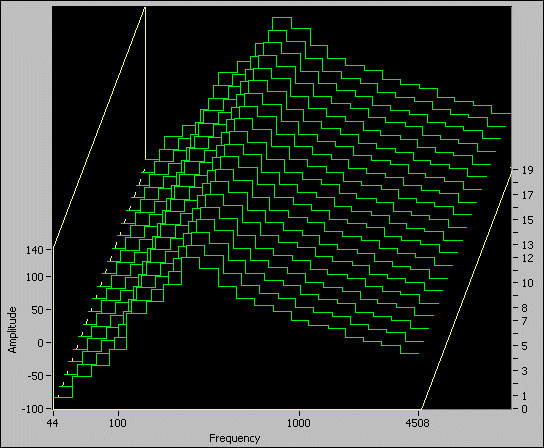
 |
Tip <Ctrl>-click and drag the plot area to change the perspective interactively. |
Properties
You can set Octave Waterfall Graph properties in the Graph Properties: Octave Waterfall Graph dialog box. You also can set the following Octave Waterfall Graph properties programmatically with the Property Node.
| Property | Description |
|---|---|
| Color:Background | Color of the background. |
| Color:Frame | Color of the frame. |
| Color:Plots | Color of the plot. |
| Perspective:Height % | Changes the vertical perspective of the graph. The percentage you enter is the ratio between the vertical edge of the frame and available vertical plot area. |
| Perspective:Width % | Changes the horizontal perspective of the graph. The percentage you enter is the ratio between the horizontal edge of the frame and available horizontal plot area. |
| Scale Range Change | Returns the event callback refnum to detect when the x-, y-, or z-axis range changes. This property returns the new range Minimum and Maximum. This property also returns the Kind of axis that changed. |
| Reverse Order | Reverses the order of the z-axis on the Octave Waterfall Graph. |
| Transparency | Transparency of the plots. When you set this property, each plot is completely visible regardless of position. Transparency increases the update rate of the graph. |
| X Scale:Autoscale | Scales the x-axis to fit the data automatically. |
| X Scale:Display Format:Format | Format of x-axis of the plot. You cannot wire a value of 4 to this property. This property returns a value of 4 if the format string contains text or the format string includes more than one format specifier. You can use one of the following formats:
|
| X Scale:Display Format:Precision | Number of digits after the decimal point. |
| X Scale:Format String | Format string of the x-axis of the scale. |
| X Scale:Name Label:Text | Text of the x-axis scale label. |
| X Scale:Name Label:Visible | Displays the x-axis scale label. |
| X Scale:Offset and Multiplier:Multiplier | Multiplier (dx), or interval, for scaling data using (dx)*X + X0. |
| X Scale:Offset and Multiplier:Offset | Offset (X0), or initial value, for scaling data using (dx)*X + X0. |
| X Scale:Range | Scale range using a cluster with subparameters Minimum and Maximum. |
| X Scale:Visible | Displays the x-axis scale. |
| Y Scale:Autoscale | Scales the y-axis to fit the data automatically. |
| Y Scale:Display Format:Format | Format of y-axis of the plot. You cannot wire a value of 4 to this property. This property returns a value of 4 if the format string contains text or the format string includes more than one format specifier. You can use one of the following formats:
|
| Y Scale:Display Format:Precision | Number of digits after the decimal point. |
| Y Scale:Format String | Format string of the y-axis of the scale. |
| Y Scale:Name Label:Text | Text of the y-axis scale label. |
| Y Scale:Name Label:Visible | Displays the y-axis scale label. |
| Y Scale:Offset and Multiplier:Multiplier | Multiplier (dy), or interval, for scaling data using (dy)*Y + Y0. |
| Y Scale:Offset and Multiplier:Offset | Offset (Y0), or initial value, for scaling data using (dy)*Y + Y0. |
| Y Scale:Range | Scale range using a cluster with subparameters Minimum and Maximum. |
| Y Scale:Visible | Displays the y-axis scale. |
| Z Scale:Autoscale | Scales the z-axis to fit the data automatically. |
| Z Scale:Display Format:Format | Format of z-axis of the plot. You cannot wire a value of 4 to this property. This property returns a value of 4 if the format string contains text or the format string includes more than one format specifier. You can use one of the following formats:
|
| Z Scale:Display Format:Precision | Number of digits after the decimal point. |
| Z Scale:Format String | Format string of the z-axis of the scale. |
| Z Scale:Name Label:Text | Text of the z-axis scale label. |
| Z Scale:Name Label:Visible | Displays the z-axis scale label. |
| Z Scale:Offset and Multiplier:Multiplier | Multiplier (dz), or interval, for scaling data using (dz)*Z + Z0. |
| Z Scale:Offset and Multiplier:Offset | Offset (Z0), or initial value, for scaling data using (dz)*Z + Z0. |
| Z Scale:Range | Scale range using a cluster with subparameters Minimum and Maximum. |
| Z Scale:Visible | Displays the z-axis scale. |