Creating an Analog Waveform
- Updated2025-10-08
- 16 minute(s) read
To create a new Analog waveform,
- Select the Modulation menu.
- Point to Generic and then click
Analog.
The Analog settings window appears.
Note: If Analog does not appear in the Generic menu, use the Tools menu to add Registered Plugins niAnalogGenPlugin.dll.
If example settings are available, you are offered a choice to Create a New Default Settings or select an Example Settings.

Fig. 8-1 The Main Modulation page.
The Analog Modulation system provides tabs for Modulation, RDS Common parameters, RDS Group version type parameters, Filter, IQ Impairments, and Graphics. Filter, IQ Impairments and Graphics are used in the same way as other modulation schemes. Refer to the RFmx Waveform Creator Help document for more information.
RDS Common Parameters

Fig. 8-9 RDS Common Parameters tab
This tab contains common parameters for the RDS mode of operation. This tab is disabled if the FM Mode on the main Modulation tab is not set to FM RDS.
Payload Type
The payload type can either be a Bit Source or a Message. When the payload type is set to Bit Source, no encoding is applied to the bits transmitted. The bit source can be configured to be one of the following:
- Zeros
- Ones
- PRBS
- Random
- User Data (From a file)
- Repeating pattern
When the Payload Type is set to Message, a fully coded RDS message is produced. The type of message produced is dependent on the Message Type parameter.
PI Code
The PI (Program identification code) is a 16 bit value used to identify a Program. The PI code can take any value form 0 to 65535. The Program area code is currently read only and is calculated from the PI Area code, PI Country code, and Program reference number.
PI Country Code
The PI Country code forms the first 4 bits of the PI code. The Country code is entered in hex and can take any value from 0x1 to 0xF.
PI Area Code
The PI area code forms Bits b11 to b8 (where b0 is the LSB) of the PI code. The PI area code can take one of the following values:
- Local = 0
- International = 1
- National = 2
- SupraRegion = 3
- R1 = 4
- R2 = 5
- R3 = 6
- R4 = 7
- R5 = 8
- R6 = 9
- R7 = 10
- R8 = 11
- R9 = 12
- R10 = 13
- R11 = 14
- R12 = 15
Program Reference Number
The program reference number is used to form the last 8 bits of the PI code. The program reference can take any value from 0 to 255.
Traffic Program
The Traffic Program (TP) is used to indicate whether the Program carries Traffic Announcements.
PTY Code
- Local = 0
- News = 1
- Current Affairs = 2
- Information = 3
- Sport = 4
- Education = 5
- Drama = 6
- Culture = 7
- Science = 8
- Varied = 9
- Pop Music = 10
- Rock Music = 11
- Easy Music = 12
- Light Classical = 13
- Seriously Classical = 14
- Other Music = 15
- Weather = 16
- Finance = 17
- Children = 18
- Social Affairs = 19
- Religion = 20
- Phone In = 21
- Travel = 22
- Leisure = 23
- Jazz Music = 24
- Country Music = 25
- National Music = 26
- Oldies Music = 27
- Folk Music = 28
- Documentary = 29
- Alarm Test = 30
- Alarm = 31
TMC ID
The TMC (Traffic message channel) ID. Is 12 bits long and can take any value from 0 to 4095. The TMC ID is used to from a Program Item number and slow labeling message (Version A). The TMC ID will only be transmitted when the variant code for the message is 1 (TMC ID)
EWS Channel ID
The EWS Channel ID is 12 bits long and can take any value from 0 to 4095.
The EWS Channel ID is used to from a Program Item number and slow labeling message (Version A). The EWS Channel ID will only be transmitted when the variant code for the message is 7 (Identification of EWS channel)
Transmitter Network Group Designation
The Transmitter group designation forms the first 3 bits of the paging information transmitted in every Version A Program Item number and slow labeling message. The Transmitter group designation can take any value from 0 to 7.
Battery Saving Internal
Forms the first 5 bits of the paging information transmitted in every Version A Program Item number and slow labeling message. Battery saving internal can take any value from 0 to 3.
Linking Actuator
The linking actuator is a single bit that is first bit transmitted in block 3 of every Version A Program Item number and slow labeling message. The value can be either 1 or 0.
Operator Paging Code
The operator paging code is used in two different variants of the version A Program Item number and slow labeling message. It is transmitted with the extended country code when the variant code for the message is 0 (OPC/ extended country). It is also transmitted when the variant code is 2 (Paging identification).
Paging Area Code
The paging area code is transmitted with the operator paging code in a version A Program Item number and slow labeling message. The paging area code is only transmitted when the message variant code is 2 (Paging identification).
Extended Country Code
The extended country code is transmitted with the operator paging code in a version A Program Item number and slow labeling message. The extended country code is only transmitted when the variant code for the message is 0 (Paging/ extended country) code. The extended country code is entered in hex and can take any value from 0 to 0xFF.
Language Code
The Language code is 12 bits long and can take any value from 0 to 4095. The Language code is used to from a Program Item number and slow labeling message (Version A). The Language code will only be transmitted when the variant code for the message is 3 (Language codes).
RDS Group Version Type Parameters
This tab contains key parameters for setting the Group Version and Type parameters of an RDS signal. If the Generation type in the main Modulation tab is not set to FM RDS, this tab will be disabled.
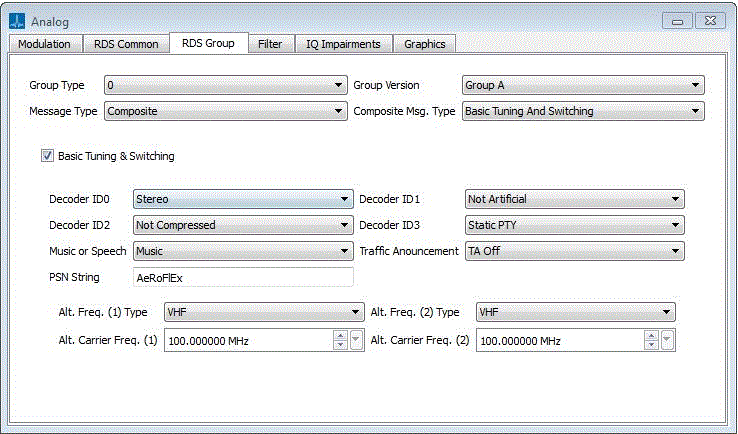
Fig. 8-2 RDS Group Version Type Parameters tab
Message Type
This specifies the type of message to transmit (when the payload type is Message). The Message Type can take one of the following values:
- Basic tuning and switching
- Radio Text
- Date and time
- PIN slow labeling code
- ODAAID
- EON
- PTYN
- Composite
When the Message Type is set to Composite, the Group type is ignored. Otherwise the selection of the Message Type is limited to the Message Type(s) transmitted using the specified Group type.
A composite message can be made up of any (non Composite message type). When the Message Type is set to Composite, the Composite Message Type drop-down menu appears. This can be used to configure the messages that make up the composite message.
Composite Message Type
A composite message can be made up of multiple messages. When the Message Type is set to Composite, the Composite Message Type drop-down menu appears. This can be used to configure the messages that make up the composite message. Each of the messages in the composite message can be included/excluded by switching the message on /off.
Group Type
The group type can take one of the following values:
- 0 :- Basic tuning and switching
- 1 :- PIN slow labeling code
- 2 :- Radio Text
- 3 :- (Version A only) ODAAID
- 4 :- (Version A only) Date and time
- 10 :- (Version A only) PTYN
- 14 :- EON
Basic Tuning and Switching

Fig. 8-3 Basic Tuning and Switching Parameters
Group Version
The group version can be A or B. The group B version of the message does not transmit Alternative frequency information.
Decoder ID
The decoder ID transmits information about the signal to help the receiver decode it properly. The decoder ID is made up of the following fields.
Decoder ID0
This can be set to Stereo or Mono.
Decoder ID1
This can be set to Artificial or Not-Artificial.
Decoder ID2
This can be set to Compressed or Non-Compressed
Decoder ID3
This can be set to static PTY or dynamic PTY. This field indicates whether the PTY is transmitted. The PTY(s) Referenced in an eon messages can change.
Music or Speech
This can be set to Music or Speech, and indicates whether music or speech is being transmitted.
Traffic Announcement
This parameter is used to set the TA bit and can be set to On or Off. This is used in conjunction with TP bit to transmit information regarding traffic announcements.
PSN String
This is string of 8 characters in length. This is used to indicate the Programme service name.
Alternative Frequencies(Version A only)
It is possible to configure 2 alternative frequencies. For each alternative frequency the following fields can be set:
Frequency Type
This can be LF, MF, or VHF. This specifies the type of alternative frequency.
Carrier Frequency
The alternative carrier frequency can be between 153 kHz and 107.9 MHz
Programme Item number and slow labelling message

Fig. 8-4 Programme Item Number and Slow Labelling message screen.
Group Version
The group version can be A or B. Version B of the message does not transmit slow labeling.
Variant Code (Version A only)
The variant code specifies the type of information to be transmitted in the message. The variant code can take the following values:
- Extended Country Code
- TMC ID
- Paging ID
- Language Code
- Not Assigned
- Not Assigned 1
- Broadcaster
- EWS Channel
Radio Text

Fig. 8-5 Radio Text screen.
Group Version
The group version can be A or B. Version B of this message transmits text at half the rate of the version A.
Text A/B
This field can be set to A or B. In an RDS signal the A/B field would change from A to B or vice versa when the radio text string needs to be cleared.
Radio Text String
This is a string. This is contains the RDS text to transmit.
ODAAID (Open Data Application Identifier)

Fig. 8-6 ODAAID screen
Open data applications are applications that are not part of the RDS standard. An Open application identifier message is used to identify groups that are used to transmit data for an open data application.
Group Version
This message can only be transmitted using the Group version A.
Application Group Type Code
This indicates the Group type (and version) code that will be used to transmit the open application data. This field can take one of the following values:
- 3B
- 4A
- 4B
- 5A
- 5B
- 6A
- 6B
- 7A
- 7B
- 8A
- 8B
- 9A
- 9B
- 10A
- 10B
- 11A
- 11B
- 12A
- 12B
- 13A
- 13B
- 14A
- 14B
- 15A
- 15B
- Fault
ODA ID (Open Data Application) ID
This field is 16 bits long and can be set to any value from 0 to 65535. This field is used to identify the application that will transmit the data.
ODA AID Message Bits
This is a 16 bit value that contains message bits for the Open data application. This field can take any value from 0 to 65535.
PTYN (Programme Type Name)

Fig. 8-7 PTYN screen
Group Version
This message can only be transmitted using group version A
PTY Name
This field can be set to A or B. In an RDS signal the A/B field is changed from A to B or vice versa when ever the PTY name is changed
PTYN String
This is an 8 character string used to describe the programme type.
EON (Enhanced Other Networks Information)

Fig. 8-8 EON Screen.
A Version A and A version B of this message exist. Version B of this message does not transmit the EON information field or the EON Variant code.
EON Information (Version A Only)
This field contains the EON information. This field is a 16 bit value and can take any value from 0 to 65535. The meaning of the bits transmitted in this field depends on the EON variant code.
EON Variant Code (Version A Only)
This specifies the type of EON information that is transmitted in this massage. The EON variant code can be set to any value from 0 to 15.
PI Code Other Network
This is a 16 bit value used to identify a Programme transmitted on the other network. The PI code can take any value form 0 to 65535. The Programme area code is currently read only and is calculated from the PI Area code, PI Country code, and Programme reference number.
PI Country Code Other Network
This is the PI country code for the other network. The PI Country code forms the first 4 bits of a PI code. The value is entered in hex and can take any value from 0x1 to 0xF.
PI Area Code Other Network
This is the PI area code for the other network. The PI area code forms Bits b11 to b8 (where b0 is the LSB) of a PI code. The PI area code can take one of the following values:
- Local = 0
- International = 1
- National = 2
- SupraRegion = 3
- R1 = 4
- R2 = 5
- R3 = 6
- R4 = 7
- R5 = 8
- R6 = 9
- R7 = 10
- R8 = 11
- R9 = 12
- R10 = 13
- R11 = 14
- R12 = 15
Programme Reference Number Other Network
This is the programme reference for the other network. The programme reference number is used to form the last 8 bits of a PI code. The programme reference can take any value from 0 to 255.
TP (Traffic Programme) Other Network
The Traffic Programme (TP) is used to indicate whether the other network is transmitting a Programme that carries Traffic announcements.
TA (Traffic Announcements) Other Network
This is used to indicate the sate of the TA bit on the other network. The TA bit is used in conjunction with TP bit to transmit information regarding traffic announcements.
PTY Code Other Network
This is the PTY code for the other network. A PTY code indicates the type of programme that is being transmitted the programme type is a 5 bit value and can take one of the following values:
- None = 0
- News = 1
- Current Affairs = 2
- Information = 3
- Sport = 4
- Education = 5
- Drama = 6
- Culture = 7
- Science = 8
- Varied = 9
- Pop Music = 10
- Rock Music = 11
- Easy Music = 12
- Light Classical = 13
- Seriously Classical = 14
- Other Music = 15
- Weather = 16
- Finance = 17
- Children = 18
- Social Affairs = 19
- Religion = 20
- Phone In = 21
- Travel = 22
- Leisure = 23
- Jazz Music = 24
- Country Music = 25
- National Music = 26
- Oldies Music = 27
- Folk Music = 28
- Documentary = 29
- Alarm Test = 30
- Alarm = 31
FM Parameters
Input Mode
The input mode configures how the left/right channels are configured the input mode can take on of the following values:
Off (no audio) Left only Right only Left = Right Left = - Right Left and Right The input mode parameter is only applicable when a stereo signal is being transmitted (When the Generation Type is set to FM Stereo/FM RDS). If the Generation Type is set to FM mono, the Input Mode is ignored and the Modulating Signal is configured using the parameters for the Left channel. The following table shows how the FM stereo channels are configured for a given input mode. It is worth noting that when the input mode is Left = Right, or Left = -Right the parameters for the right channel are ignored and the signal that is transmitted on the Right channel is worked out from the configuration of the Left channel.

Table 8-1 how the FM stereo channels are configured for a given input mode
The mono component in a FM stereo signal consists of the Left channel + the Right channel. The stereo component in a FM stereo signal consists of the Left channel - the Right channel. This means that when the input mode is Left = Right no stereo component will get transmitted, and when the input mode is Left = - Right no mono component is transmitted.
Left and Right Channel Parameters
In case of FM Stereo, you can configure the FM Left and Right Channel parameters by selecting the FM Left Right Parameters button. This will display the dialog shown below.

Fig. 8-10 Left Right Channel Parameters screen
If you are configuring an FM Mono signal, this screen shows only a single set of Frequency, amplitude, and Phase controls.
The following parameters can be configured for both the left and the right channels.
Modulating Frequency
This specifies the frequency of the tone to be transmitted on the channel. The modulating frequency can be in the range 100 Hz to 15 KHz.
Amplitude
This parameter specifies the amplitude of the tone to be transmitted. This parameter is only useful when both the left and right channels are being transmitted. By configuring the amplitude of the left / right channel, it is possible to configure the balance between the left and right channel.
Initial Phase
This parameter specifies the starting phase of the tone. The initial phase can be between +/- 2π radians.
Deviation Parameters
You can specify the deviation specific parameters of an FM signal by pressing the FM Deviation parameters button. This will display the screen shown in the following figure.

Fig. 8-11 FM Deviation Parameters Screen
Frequency Deviation
The frequency deviation is specified in Hz and can take a value between 1Hz and 5 MHz.
In a Mono signal, the frequency deviation is the maximum frequency deviation (The maximum amount the modulated signal deviates from the carrier).
In a FM Stereo or FM RDS signal, the frequency deviation parameter specifies the amount of deviation that is applied to the audio signal. The amount of pilot and/or RDS deviation can be specified separately.
In a FM stereo signal, the maximum possible total deviation = audio frequency deviation + pilot deviation.
In a RDS signal, the maximum possible total deviation = audio frequency deviation + pilot deviation + RDS deviation.
For the maximum total deviation to occur all the subcarriers of the signal have to peak at the same time. For example, in a RDS system the audio the pilot and the RDS carriers would all have to be at there peak value for the maximum possible deviation to occur. If the peaks of the subcarriers do not line up the total deviation may be less than the potential maximum.
Pilot Frequency Deviation
The pilot frequency deviation controls how much the pilot signal causes the modulated signal to deviate from the carrier. The value is specified in Hz and can take any value from 0 to 75 kHz
Pre-emphasis Filter Parameters
You can edit the Pre-emphasis parameters of an FM signal by clicking on the FM Pre-Emphasis Parameters button. This will show the screen shown in the following figure.

Fig. 8-12 FM Pre Emphasis Parameters screen.
Pre Emphasis
Pre Emphasis can be set to one of the following values:
- None
- 50μs
- 75μs
When Pre Emphasis is set to None, no Pre Emphasis is applied; otherwise the pre-emphasis characteristic of the sound signal is identical to the admittance-frequency curve of a parallel resistance-capacitance circuit having a time constant of 50μs or 75μs
Pre Emphasis Gain Type
The Pre Emphasis Gain type can be one of the following values:
- Not Normalized
- Normalized
When the Pre Emphasis Gain type is normalized, the Gains due to Pre Emphasis are scaled relative to the Pre Emphasis Reference frequency. Otherwise they are not. If the gain is normalized all Pre Emphasis gains will be divided by the gain that would be applied to the Pre Emphasis Reference frequency.
In normalized mode, signals transmitted at the Pre Emphasis Reference frequency will be transmitted at 0 dB; Signals which require more gain than the Reference frequency (higher frequencies) will be transmitted with a positive gain; and Signals which require less gain than the Reference frequency (lower frequencies) will be transmitted with a negative gain.
Pre Emphasis Reference Frequency
When the Pre Emphasis Gain type is Normalized, this parameter specifies the frequency to use to normalize the Pre Emphasis Gain (see description of Pre Emphasis Gain type). The value is specified in Hz and can take a value between 100 Hz to 15 kHz.
AM Parameters
This section lets you configure the modulation parameters of the AM DSB Signal. It comprises the following controls.
Fig. 8-13 AM Modulation Screen
Modulation Index
This parameter specifies the ratio of the unmodulated carrier amplitude to the amplitude deviation for which the modulated carrier wave reaches its minimum value. The Modulation Index can be in the range of 0 to 1.
Message Frequency
This parameter specifies the frequency of the message signal to be transmitted on the channel. The message frequency can be in the range of 150 Hz to 50 KHz.
Number of Samples
This parameter specifies the number of samples to generate. The minimum value that can be set is 100.
Sampling Rate
This is a read-only parameter which displays the sampling rate of the generated signal.
Number of Message Samples
This is a read-only parameter which displays the actual number of samples generated.
Signal Length
When the Generation Mode is Manual, you can set the Signal Length. The sampling frequency is specified in seconds, and can take no less than 10 ms. When in Manual mode, no checking is done to ensure the signal wraps.
Sampling Frequency
When the Generation mode is Manual, you can set the sampling frequency. The sampling frequency is specified in Hz. The sampling frequency does not have an upper and lower limit. But if the sampling frequency is set to less than 4×, the bandwidth obtained from Carson’s rule a conflict will be raised.
Generation Mode
The Generation Mode can either be Auto or Manual.
In Auto mode, the signal length and sampling frequency are automatically calculated. In Manual mode, the sampling frequency and signal duration are user-defined.
When in Auto mode, length of the signal is set so that the signal will always wrap. For an FM signal, the calculation used to automatically set the sampling frequency is based on Carson’s bandwidth rule. Carson’s rule states that 98% of the signal power will be contained in a bandwidth of 2*(fm+ΔF). Where fm= the highest modulating frequency, and ΔF = the frequency deviation. The sample rate is set to 4 × The bandwidth obtained from Carson’s rule. If this calculation returns a value of less than 768kHz then the sampling rate will be set to 768kHz.
Generation Type
Currently the Generation Type can be set to FM Mono, FM Stereo, FM RDS, or AM DSB.