NI-9402 Getting Started
- Updated2022-08-10
- 2 minute(s) read
NI-9402 Getting Started
NI-9402 Pinout

| Signal | Description |
|---|---|
| DIO | Digital input/output signal connection |
| GND | Ground connection |
Connecting Digital Devices to the NI-9402
You can connect digital devices to the NI-9402.
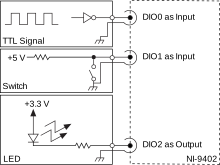
Each channel has a DIO pin to which you can connect a digital input or output device through a 50 Ω BNC cable. You can configure each DIO channel of the NI-9402 in software for input or output. Changing the direction on any channel will not affect the direction on the other channels. Refer to the software help for information about configuring channel direction.
NI-9402 Block Diagram
Each channel on the NI-9402 can be configured in software for input or output. Changing the direction on any channel does not affect the direction on other channels.

- Line direction logic enables/disables the line input and output transceiver. Setting the I/O line as input enables the input transceiver and disables the output receiver, and vice versa when the I/O line is set as output.
- The output impedance of the NI-9402 is 50 Ω, so the characteristic impedance of the BNC cable should be matched to 50 Ω to ensure optimal signal integrity.