NI-9375 Getting Started
- Updated2024-02-15
- 6 minute(s) read
NI-9375 Getting Started
Connector Types
The NI-9375 has more than one connector type: NI-9375 with spring terminal and NI-9375 with DSUB. Unless the connector type is specified, NI-9375 refers to all connector types.
The NI-9375 with spring terminal is available in two types: push-in spring terminal and spring terminal. The push-in type spring terminal connector is black and orange. The spring terminal connector is black. NI-9375 with spring terminal refers to both types unless the two types are specified. Differences between the two types of spring terminal connectors are noted by the connector color.
NI-9375 Block Diagram
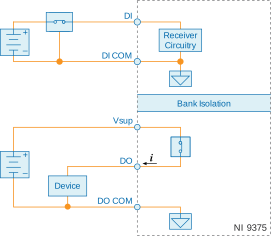
- The bank of 16 digital input channels and the bank of 16 digital output channels on the NI-9375 are isolated from each other and isolated from earth ground.
- The NI-9375 internally limits current signals connected to DI.
- The NI-9375 has sinking inputs. Sinking inputs provide a path to COM when the sourcing device connected to the NI-9375 drives current or applies voltage to DI.
- The NI-9375 has sourcing outputs. Sourcing outputs drive current from Vsup to DO when the channel is on.
Allowable Current Per Module
The NI-9375 has a per module continuous output current specification. Use the following equation to determine whether the total module current of your loads for channels that are turned on are within the specification.
For example, an NI-9375 with spring terminal with two channels at 250 mA, six channels at 125 mA, and eight channels at 62 mA has the following per module continuous output current.
NI-9375 with Spring Terminal (Black Connector) Pinout

| Signal | Description |
|---|---|
| DI | Digital input signal connection |
| DI COM | Common reference connection for the digital inputs |
| DO | Digital output signal connection |
| DO COM | Common reference connection for the digital outputs |
| NC | No connection |
| Vsup | Voltage supply connection |
NI-9375 with Push-in Style Spring Terminal (Black/Orange Connector) Pinout
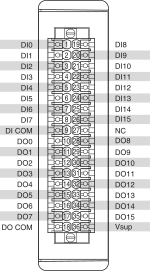
| Signal | Description |
|---|---|
| DI | Digital input signal connection |
| DI COM | Common reference connection for the digital inputs |
| DO | Digital output signal connection |
| DO COM | Common reference connection for the digital outputs |
| NC | No connection |
| Vsup | Voltage supply connection |
NI-9375 with DSUB Pinout

| Signal | Description |
|---|---|
| DI | Digital input signal connection |
| DI COM | Common reference connection for the digital inputs |
| DO | Digital output signal connection |
| DO COM | Common reference connection for the digital outputs |
| NC | No connection |
| Vsup | Voltage supply connection |
Sourcing-Output Connections
You can connect 2- and 3-wire sourcing-output devices to the NI-9375.
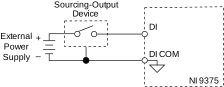
The NI-9375 channel registers as ON when the sourcing-output device drives enough current or applies enough voltage to DI. If no device is connected to DI, the channel registers as OFF.
Connecting Digital Devices
You can connect a variety of industrial devices, such as solenoids, motors, actuators, relays, and lamps to the NI-9375. You must connect an external power supply to the NI-9375. The power supply provides the current for the output channels.

Ensure that the devices you connect to the NI-9375 are compatible with the output specifications of the NI-9375. Refer to the device specifications at ni.com/docs for output specifications.
Protecting the Digital Outputs from Flyback Voltages
If the channel is switching an inductive or energy-storing device such as a solenoid, motor, or relay, and the device does not have flyback protection, install an external flyback diode.

Connecting Wires to the NI-9375 with Spring Terminal (Black Connector)
What to Use
- NI-9375 spring terminal black connector
- 0.08 mm2 to 1.0 mm2 (28 AWG to 18 AWG) copper conductor wire with 7 mm (0.28 in.) of insulation stripped from the end
- Flathead screwdriver with a 2.3 mm x 1.0 mm (0.09 in. x 0.04 in.) blade, included with the NI-9375
What to Do
Complete the following steps to connect wires to the spring terminal connector.
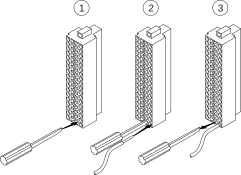
- Insert the screwdriver into a spring clamp activation slot to open the corresponding connector terminal.
- Press a wire into the open connector terminal.
- Remove the screwdriver from the activation slot to clamp the wire into place.
Connecting Wires to the NI-9375 with Push-in Style Spring Terminal (Black/Orange Connector)
What to Use
- NI-9375 spring terminal black/orange connector
- 0.14 mm2 to 1.5 mm2 (26 AWG to 16 AWG) copper conductor wire with 10 mm (0.394 in.) of insulation stripped from the end
- Ferrules (optional)
What to Do
| Option | Description |
|---|---|
| When using a solid wire or stranded wire with a ferrule | Push the wire into the terminal when using a solid wire or stranded wire with a ferrule |
| When using a stranded wire without a ferrule | Press the push button and then push the wire into the terminal |
High-Vibration Application Connections
If your application is subject to high vibration, NI recommends that you use the NI-9940 backshell kit to protect connections to the NI-9375 with spring terminal.
I/O Protection
Each DO channel on the NI-9375 has circuitry that protects it from overcurrents resulting from a short-circuit or faulty loads.
When a short circuit is present on a digital output channel, the DO channel cycles off and on until the short circuit is removed or the current returns to an acceptably low level. An overcurrent state can affect the performance of the NI-9375 and other modules in the system. To ensure safe and proper operation, the digital outputs should not exceed the maximum continuous output current specification.
Conformal Coating
The NI-9375 is available with conformal coating for additional protection in corrosive and condensing environments, including environments with molds and dust.
In addition to the environmental specifications listed in the NI-9375 Safety, Environmental, and Regulatory Information, the NI-9375 with conformal coating meets the following specification for the device temperature range. To meet this specification, you must follow the appropriate setup requirements for condensing environments. Refer to Conformal Coating and NI RIO Products for more information about conformal coating and the setup requirements for condensing environments.
| Operating humidity (IEC 60068-2-30 Test Db) | 80 to 100% RH, condensing |