Eye Diagram Support VI
- Updated2023-02-21
- 7 minute(s) read
Eye Diagram Support VI
Owning Palette: Eye Diagram Measurements VIs
Requires: Jitter Analysis Toolkit
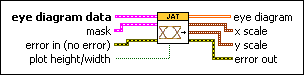
Formats data about waveform segments and optionally, a mask and eye height and width lines, into an array of values you can plot on an eye diagram.
 | Note This VI appears on the block diagram when you add an eye diagram to the front panel. On the Controls palette, select Addons»Jitter Analysis to navigate to the eye diagram indicator. |
 |
eye diagram data is a cluster of data that defines the eye diagram you want to plot.
| ||||||||||||||||||||||||||||||||||||||
|
mask defines a region in the eye diagram you want to compare with waveform segments. Use the Eye Pattern Mask Definition VI to generate this cluster.
| ||||||||||||||||||||||||||||||||||||||
 |
error in describes error conditions that occur before this node runs. This input provides standard error in functionality. | ||||||||||||||||||||||||||||||||||||||
 |
plot height/width, if TRUE, specifies you want to plot lines that represent the minimum height and width of the eye opening in the eye diagram. If plot height/width is TRUE but the values of height or width in the eye diagram data cluster are FALSE, this VI runs normally but does not plot height or width lines. | ||||||||||||||||||||||||||||||||||||||
 |
eye diagram returns an array of values you can wire to an eye diagram to plot the waveform segments. This array corresponds to the 2D histogram array, but the values in eye diagram are scaled to fall between 0 and 1. The numbers in the array represent the intensity of the plot in locations within the eye diagram. The indexes of the elements in the 2D array set the plot locations for the values. | ||||||||||||||||||||||||||||||||||||||
 |
x scale returns offset and multiplier values you can use to scale the eye diagram. You can use this cluster with the Offset and Multiplier property to set the offset and multiplier of the x-axis in the eye diagram.
| ||||||||||||||||||||||||||||||||||||||
|
y scale returns offset and multiplier values you can use to scale the eye diagram. You can use this cluster with the Offset and Multiplier property to set the offset and multiplier of the y-axis in the eye diagram.
| ||||||||||||||||||||||||||||||||||||||
 |
error out contains error information. This output provides standard error out functionality. |


Eye Diagram Support Details
Before you use the Eye Diagram Support VI, use the Eye Data Generation VI and other Eye Diagram Measurements VIs to construct the eye diagram data. The following block diagram illustrates a common workflow for the Eye Diagram Measurements VIs, including how to set the scale offset and multiplier of the eye diagram.

Examples
Refer to the following VIs for examples of using the Eye Diagram Support VI:
- Basic Eye Diagram VI: labview\examples\Jitter Analysis\Eye Diagram Measurements
- Mask and Limit Test VI: labview\examples\Jitter Analysis\Eye Diagram Measurements