Configuring the Functionality of a DSP48E or DSP48E1 Slice
- Updated2025-09-18
- 6 minute(s) read
After you add a DSP48E or DSP48E1 function to a block diagram, double-click the function to launch its configuration dialog box. The first page is the Function page, which you use to configure the overall behavior of the function.
The values of the opmode, alumode, and carryinsel inputs determine the functionality of DSP48E and DSP48E1 slices. The value of the inmode input affects the DSP48E1 slice. You can let LabVIEW configure these terminals by selecting either Configure for Arithmetic or Configure for Logic from the pull-down menu on the Function page. If you choose one of these options, LabVIEW sets these values appropriately after you configure the arithmetic or logical expression as the following sections describe.
Configuring a DSP48E or DSP48E1 Function for Arithmetic Expressions
If you select Configure for Arithmetic, the function computes the following arithmetic expression:
p = (+/NOT z) +/– (x+y + carryin)
where:
- NOT z is equivalent to –z – 1.
-
z, x+y, and
carryin are variables for which you select constant
values, such as 0, or data sources, such as the value of a function terminal or
computation. The values and/or sources you specify for these arguments determine
the functionality of the slice. You can remove z or
x+y from the equation by specifying the value as
0.Note
- The sources available for carryin depend on the values you specify for z and x+y. Therefore, NI recommends specifying z and x+y before specifying carryin.
- (DSP48E) Refer to Table 1-10 in the Virtex-5 FPGA XtremeDSP Design Considerations User Guide, available on the Xilinx Web site at www.xilinx.com, for information about the different sources of carryin. The manual lists this terminal as CARRYINSEL. (DSP48E1) Refer to Table 1-11 in the Virtex-6 FPGA DSP48E1 Slice User Guide for this information.
- p is the numerical result of this equation.
Configuring the Pre-Adder of a DSP48E1 Slice
To use the pre-adder of a DSP48E1 slice, set the value of x+y to m, where m = (d + a) * b. d, a and b can be either 0 or different stages in the d, a, and b input terminals' data paths. The following dialog box shows a sample configuration that uses the pre-adder:

Refer to the following sections of the Virtex-6 FPGA DSP48E1 Slice User Guide for more information about the pre-adder:
- "Pre-adder"
- "Pre-Adder Block Applications"
Common DSP48E Arithmetic Configurations
The following dialog boxes show common arithmetic configurations of DSP48E functions:
Multiply

Multiply-accumulate

Multiply-add

Multiply-subtract

One-Step Counter
-
Function page:

-
Terminals page:

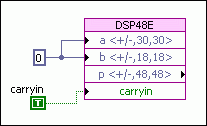
- On the block diagram, wire a TRUE constant to the carryin
terminal and 0 to the a and
b input terminals:
n-Step Counter/Accumulator
-
Function page:

- On the block diagram, wire a control to the c input:
c represents the number of steps for the counter. The function accumulates the value of c. Note In this configuration, the carryin terminal is not displayed, which means LabVIEW sets it to a constant value of FALSE.
Common DSP48E1 Arithmetic Configurations
The following dialog boxes show common arithmetic configurations of DSP48E1 functions:
Multiply

Multiply with Pre-Adder

Multiply-accumulate

Multiply-add

Multiply-subtract

Configuring a DSP48E or DSP48E1 Function for Logical Expressions
If you select Configure for Logic, the function compares Logic x to Logic z and returns the result as p. You must specify the sources of Logic x and Logic z along with the comparison operator, as the following illustration shows:

Configuring the Behavior of a DSP48E or DSP48E1 Function While a VI is Running
To change the behavior of a DSP48E or DSP48E1 slice while a VI is running, you first must select Custom Configuration in the configuration dialog box. After you select this option, LabVIEW shows the opmode, alumode, and carryinsel terminals on the block diagram. LabVIEW also shows the inmode terminal for DSP48E1 functions. You then must wire values to these terminals to obtain the configuration you want. Because this configuration is programmatic, you can change the behavior of a single DSP48E or DSP48E1 slice while the FPGA VI is running.
- "ALUMODE Inputs"
- "Carry Input Logic"
- "Two-Input Logic Unit"
- "X, Y, and Z Multiplexer"
VHDL Equivalent of LabVIEW Options
To view the VHDL equivalent of a configuration, click the VHDL Instantiation tab. Refer to Table 1-3 in either the Virtex-5 FPGA XtremeDSP Design Considerations User Guide or the Virtex-6 FPGA DSP48E1 Slice User Guide, available on the Xilinx Web site at www.xilinx.com, for information about specific attributes. The following table shows the attributes that correspond to each option in LabVIEW.
- "Single Instruction, Multiple Data (SIMD) Mode"
- "Single Instruction Multiple Data (SIMD) Arithmetic"