SI Get Orders of System Model VI
- Updated2023-03-14
- 25 minute(s) read
SI Get Orders of System Model VI
Owning Palette: Model Management VIs
Requires: Advanced Signal Processing Toolkit or Control Design and Simulation Module
Obtains the orders of a system model. You must manually select the polymorphic instance to use.
SI Get Orders of AR Model

 |
system model contains information about the model structure, nominal or estimated parameters, identification result, and so on.
|
||
 |
error in describes error conditions that occur before this node runs. This input provides standard error in functionality. | ||
 |
order of AR model returns the order of the AR model. | ||
 |
error out contains error information. This output provides standard error out functionality. |

SI Get Orders of ARX Model (SISO)

|
system model contains information about the model structure, nominal or estimated parameters, identification result, and so on.
|
||||||
|
error in describes error conditions that occur before this node runs. This input provides standard error in functionality. | ||||||
 |
orders of ARX model returns the orders and delay of the ARX model.
| ||||||
|
error out contains error information. This output provides standard error out functionality. |
SI Get Orders of ARX Model (MISO)

|
system model contains information about the model structure, nominal or estimated parameters, identification result, and so on.
|
||||||
|
error in describes error conditions that occur before this node runs. This input provides standard error in functionality. | ||||||
 |
orders of ARX model returns the orders and delays of the ARX model.
| ||||||
|
error out contains error information. This output provides standard error out functionality. |

SI Get Orders of ARX Model (MIMO)

|
system model contains information about the model structure, nominal or estimated parameters, identification result, and so on.
|
||||||
|
error in describes error conditions that occur before this node runs. This input provides standard error in functionality. | ||||||
|
orders of ARX model returns the orders and delays of the ARX model.
| ||||||
|
error out contains error information. This output provides standard error out functionality. |

SI Get Orders of ARMAX Model (SISO)

|
system model contains information about the model structure, nominal or estimated parameters, identification result, and so on.
|
||||||||
|
error in describes error conditions that occur before this node runs. This input provides standard error in functionality. | ||||||||
|
orders of ARMAX model returns the orders and delay of the ARMAX model.
| ||||||||
|
error out contains error information. This output provides standard error out functionality. |
SI Get Orders of ARMAX Model (MISO)

|
system model contains information about the model structure, nominal or estimated parameters, identification result, and so on.
|
||||||||
|
error in describes error conditions that occur before this node runs. This input provides standard error in functionality. | ||||||||
|
orders of ARMAX model returns the orders and delay of the ARMAX model.
| ||||||||
|
error out contains error information. This output provides standard error out functionality. |
SI Get Orders of OE Model (SISO)

|
system model contains information about the model structure, nominal or estimated parameters, identification result, and so on.
|
||||||
|
error in describes error conditions that occur before this node runs. This input provides standard error in functionality. | ||||||
|
orders of OE model returns the orders and delay of the output-error (OE) model.
| ||||||
|
error out contains error information. This output provides standard error out functionality. |
SI Get Orders of OE Model (MISO)

|
system model contains information about the model structure, nominal or estimated parameters, identification result, and so on.
|
||||||
|
error in describes error conditions that occur before this node runs. This input provides standard error in functionality. | ||||||
|
orders of OE model returns the orders and delay of the output-error (OE) model.
| ||||||
|
error out contains error information. This output provides standard error out functionality. |
SI Get Orders of BJ Model (SISO)

|
system model contains information about the model structure, nominal or estimated parameters, identification result, and so on.
|
||||||||||
|
error in describes error conditions that occur before this node runs. This input provides standard error in functionality. | ||||||||||
|
orders of BJ model returns the orders and delay of the Box-Jenkins (BJ) model.
| ||||||||||
|
error out contains error information. This output provides standard error out functionality. |
SI Get Orders of BJ Model (MISO)

|
system model contains information about the model structure, nominal or estimated parameters, identification result, and so on.
|
||||||||||
|
error in describes error conditions that occur before this node runs. This input provides standard error in functionality. | ||||||||||
|
orders of BJ model returns the orders and delay of the Box-Jenkins (BJ) model.
| ||||||||||
|
error out contains error information. This output provides standard error out functionality. |
SI Get Orders of GL Model (SISO)

|
system model contains information about the model structure, nominal or estimated parameters, identification result, and so on.
|
||||||||||||
|
error in describes error conditions that occur before this node runs. This input provides standard error in functionality. | ||||||||||||
|
orders of GL model returns the orders and delay of the general-linear (GL) model.
| ||||||||||||
|
error out contains error information. This output provides standard error out functionality. |
SI Get Orders of GL Model (MISO)

|
system model contains information about the model structure, nominal or estimated parameters, identification result, and so on.
|
||||||||||||
|
error in describes error conditions that occur before this node runs. This input provides standard error in functionality. | ||||||||||||
|
orders of GL model returns the orders and delay of the general-linear (GL) model.
| ||||||||||||
|
error out contains error information. This output provides standard error out functionality. |
SI Get Orders of SS Model (SISO)

|
system model contains information about the model structure, nominal or estimated parameters, identification result, and so on.
|
||
|
error in describes error conditions that occur before this node runs. This input provides standard error in functionality. | ||
|
number of states returns the number of states in the state-space (SS) system model. | ||
|
error out contains error information. This output provides standard error out functionality. |
SI Get Orders of SS Model (MISO)

|
system model contains information about the model structure, nominal or estimated parameters, identification result, and so on.
|
||
|
error in describes error conditions that occur before this node runs. This input provides standard error in functionality. | ||
|
number of states returns the number of states in the state-space (SS) system model. | ||
|
error out contains error information. This output provides standard error out functionality. |
SI Get Orders of SS Model (MIMO)

|
system model contains information about the model structure, nominal or estimated parameters, identification result, and so on.
|
||
|
error in describes error conditions that occur before this node runs. This input provides standard error in functionality. | ||
|
number of states returns the number of states in the state-space (SS) system model. | ||
|
error out contains error information. This output provides standard error out functionality. |
SI Get Orders of TF Model (SISO)

 |
input type specifies whether to obtain the orders of the transfer function between the stimulus and the response of the system model or of the transfer function between the noise and the response of the system model.
|
||||
|
system model contains information about the model structure, nominal or estimated parameters, identification result, and so on.
|
||||
|
error in describes error conditions that occur before this node runs. This input provides standard error in functionality. | ||||
|
orders of transfer function model returns the orders of the transfer function (TF) model.
| ||||
|
error out contains error information. This output provides standard error out functionality. |
SI Get Orders of TF Model (MISO)

|
input type specifies whether to obtain the orders of the transfer function between the stimulus and the response of the system model or of the transfer function between the noise and the response of the system model.
|
||||
|
system model contains information about the model structure, nominal or estimated parameters, identification result, and so on.
|
||||
|
error in describes error conditions that occur before this node runs. This input provides standard error in functionality. | ||||
 |
orders of transfer function model returns the orders of the transfer function (TF) model.
| ||||
|
error out contains error information. This output provides standard error out functionality. |
SI Get Orders of TF Model (MIMO)

|
input type specifies whether to obtain the orders of the transfer function between the stimulus and the response of the system model or of the transfer function between the noise and the response of the system model.
|
||||
|
system model contains information about the model structure, nominal or estimated parameters, identification result, and so on.
|
||||
|
error in describes error conditions that occur before this node runs. This input provides standard error in functionality. | ||||
 |
orders of transfer function model returns the orders of the transfer function (TF) model.
| ||||
|
error out contains error information. This output provides standard error out functionality. |
SI Get Orders of ZPK Model (SISO)

|
input type specifies whether to obtain the number of poles and zeros of the transfer function between the stimulus and the response of the system model or of the transfer function between the noise and the response of the system model.
|
||||
|
system model contains information about the model structure, nominal or estimated parameters, identification result, and so on.
|
||||
|
error in describes error conditions that occur before this node runs. This input provides standard error in functionality. | ||||
|
orders of zero-pole-gain model returns the orders of the zero-pole-gain (ZPK) model.
| ||||
|
error out contains error information. This output provides standard error out functionality. |
SI Get Orders of ZPK Model (MISO)

|
input type specifies whether to obtain the number of poles and zeros of the transfer function between the stimulus and the response of the system model or of the transfer function between the noise and the response of the system model.
|
||||
|
system model contains information about the model structure, nominal or estimated parameters, identification result, and so on.
|
||||
|
error in describes error conditions that occur before this node runs. This input provides standard error in functionality. | ||||
|
orders of zero-pole-gain model returns the orders of the zero-pole-gain (ZPK) model.
| ||||
|
error out contains error information. This output provides standard error out functionality. |
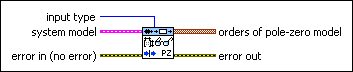
SI Get Orders of ZPK Model (MIMO)
|
input type specifies whether to obtain the number of poles and zeros of the transfer function between the stimulus and the response of the system model or of the transfer function between the noise and the response of the system model.
|
||||
|
system model contains information about the model structure, nominal or estimated parameters, identification result, and so on.
|
||||
|
error in describes error conditions that occur before this node runs. This input provides standard error in functionality. | ||||
|
orders of zero-pole-gain model returns the orders of the zero-pole-gain (ZPK) model.
| ||||
|
error out contains error information. This output provides standard error out functionality. |
Example
Refer to the Read Information from Model VI in the labview\examples\System Identification\Getting Started\General.llb for an example of using the SI Get Orders of System Model VI.