CD Pole Placement VI
- Updated2023-03-14
- 4 minute(s) read
CD Pole Placement VI
Owning Palette: State Feedback Design VIs
Requires: Control Design and Simulation Module
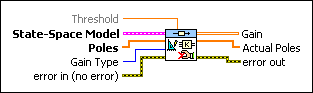
Determines the Gain that places the closed-loop poles at desired locations in a system with full state feedback. You can use this VI with multiple-input multiple-output (MIMO) systems. However, if you have a single-input single-output system, use the CD Ackermann VI.
 |
Threshold specifies the tolerance, which is the maximum difference between the Poles you specify and the poles this VI calculates. This VI displays a warning if the calculated poles are not within the tolerance of the specified poles. | ||||||
 |
State-Space Model contains a mathematical representation of and information about the system of which this VI places closed-loop poles in desired locations using the Gain in the state feedback. You also can use pole placement to calculate the estimator gain and set the pole locations of the full state observer. | ||||||
 |
Poles specifies the poles this VI defines for the closed-loop system. | ||||||
 |
Gain Type specifies the type of gain this VI returns in the Gain parameter. Use the Controller Gain with the CD State-Space Controller VI. Use the Observer Gain (Predictive) and the Observer Gain (Current) with the CD Discrete Observer function and the Continuous Observer function. For discrete systems, the Observer Gain (Predictive) relates to the Observer Gain (Current) through the following relationship: Observer Gain (Predictive) = A . Observer Gain (Current). For continuous systems, the notion of current and predictive time does not apply, so specifying either observer gain returns the correct gain value.
|
||||||
 |
error in describes error conditions that occur before this node runs. This input provides standard error in functionality. | ||||||
 |
Gain returns the feedback gain, according to the value you specify for the Gain Type parameter, that produces a closed-loop system such that the poles are equal to the values you specify in the Poles parameter. | ||||||
 |
Actual Poles are the eigenvalues of the closed-loop system matrix Ã. The definition of à depends on the value you specify for the Gain Type parameter. If Gain Type is Controller Gain, à = A – BK. If Gain Type is Observer Gain (Predictive), à = A – LC, where L is the Gain this VI returns. If Gain Type is Observer Gain (Current), à = A – LCA. |
||||||
 |
error out contains error information. This output provides standard error out functionality. |
CD Pole Placement Details
This VI does not support delays unless the delays are part of the mathematical model that represents the dynamic system. To account for the delays in the synthesis of the controller, you must incorporate the delays into the mathematical model of the dynamic system using the CD Convert Delay with Pade Approximation VI (continuous models) or the CD Convert Delay to Poles at Origin VI (discrete models). Refer to the LabVIEW Control Design User Manual for more information about delays and the limitations of Pade Approximation.