Concept
- Updated2025-05-20
- 30 minute(s) read
The supports teaching the fundamentals of measurements and instrumentation for common electrical and physical phenomenon. You can explore the full signal chain using real sensors and signal conditioning elements, with complete signal access at the inputs and outputs of each section. Extensible courseware, a rich set of experiments, and an open architecture supporting custom software and hardware extensions enable teaching concepts from basic sensor operation to advanced automated measurement techniques.
The signal chain elements can be configured to support a wide variety of sensor types, allowing you to measure phenomenon such as voltage, current, resistance, force, strain, temperature, vibration, pressure, light intensity, and many more.
Hardware Overview
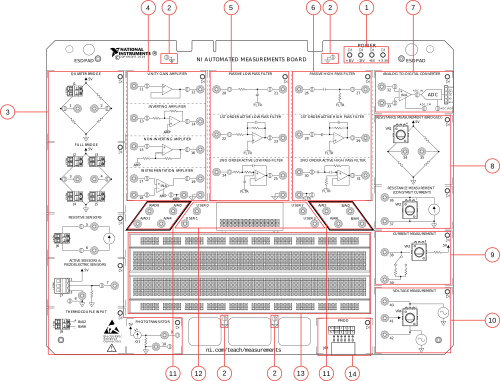
- Power Rail LEDs
- Ground Test Hooks
- Sensor Section
- Amplifier Section
- Low Pass Filter Section
- High Pass Filter Section
- Analog to Digital Converter Section
- Resistance Measurement Section
- Current Measurement Section
- Voltage Measurement Section
- Measurement I/O Section
- Electrical Expansion Section
- Solderless Breadboard/Mechanical Expansion
- Pmod Connectivity
Software Support
Comprehensive resources are available at ni.com/teach/measurements. These include extensible courseware, consisting of a series of labs covering the fundamentals of measurements technology. Labs include theory, hands on experimentation, and student assessments to check for understanding. Resources also include an extensive set of LabVIEW experiments, each focused on a particular learning objective. These range from basics of voltage measurement to complete signal chain use for common sensors such as strain gauges and thermistors. Finally, custom experiments and automated measurement systems can be created through the full support of LabVIEW RT and LabVIEW FPGA programmability.
Hardware Description
- Electrical fundamentals
- Signal chain elements
- Prototyping expansion
- Pmod expansion
The electrical fundamentals section teaches concepts related to measuring voltage, current, and resistance. The signal chain elements section teaches circuit elements used to interface with common sensors including excitation, amplification, filtering, and analog to digital conversion. The prototyping expansion section provides an area for creating custom signal conditioning circuitry, as well as the ability to integrate these custom circuits with the built-in signal conditioning elements. The Pmod section provides an alternative method for making electrical and physical measurements, with small modules that typically integrate some or all of the necessary signal chain elements required for a particular measurement. The block diagram below illustrates how the sections interact with the NI ELVIS III resources:

A typical experiment consists of connecting measurement IO to various combinations of circuit elements using banana plug cables[1]1 Ensure that the contact length of the banana plug cable used does not exceed 9 mm. . The LabVIEW based experiments automate the acquisition and generation of signals necessary to perform the experiment. LEDs on the board illuminate to indicate which circuit elements are used by a given experiment, simplifying experiment setup.
Measurement I/O
The measurement I/O section consists of multiple analog input and analog output channels accessed through banana plug connectors. This provides simple connectivity to the other sections of the board, both for making measurements and generating stimuli. These channels are provided by the NI ELVIS III Control I/O, and are directly routed to the banana plugs from the board edge connector.

- Bank A analog input
- Bank B analog input
- Bank A analog output
The analog input section consists of two identical banks of analog inputs. Each bank includes an ADC, gain stage, mode selection, and channel multiplexer. The gain stage determines the input range for the conversion (±10 V, ±5 V, ±2 V, ±1 V). The mode selection controls whether the input is configured for single ended or differential measurement. A single ended measurement measures the difference between the selected signal and ground. A differential measurement measures the difference between the selected signal and its associated signal pair. The differential pairs are AI0/AI4, AI1/AI5, AI2/AI6, and AI3/AI7. The channel multiplexer is used to select the active channel. The two banks can operate independently from each other, or synchronously to provide simultaneous sampling on two channels.

Only channels A/AI0, A/AI2, A/AI4, A/AI6, B/AI0, and B/AI4 are exposed through the banana plugs while channels A/AI1 and A/AI5 are exposed through the fixed solderless breadboard strip. The other channels are used for other operations on the board. Refer to the Programming Details for a complete listing of NI ELVIS III channel assignments.
The analog output section consists of two identical channels of analog output. Each channel consists of a DAC and output buffer with a fixed +/-10V output range. There are no configuration settings for the analog output channels.

Specifications
| |||||||||
| |||||||||
Voltage Measurement
The voltage measurement section consists of a potentiometer driven by two voltage sources. Each source can generate arbitrary AC or DC signals, and all three terminals of the potentiometer can be measured through the banana plugs. This section can be used to demonstrate a wide variety of measurement principles, such as analog input range, resolution, and scanning vs simultaneous architectures.


Once the voltage sources are configured, you can vary the output of the middle terminal by manually turning the potentiometer. The three terminals are intended for measurement purposes only. Do not drive any voltages into these terminals. The 10 kΩ resistors provide short circuit protection, but may impact measurement quality when connected to a low impedance measurement device or circuit. For best measurement quality connect directly to a RIO analog input or oscilloscope channel.
The voltage sources are software programmable and can be independently configured to create a wide variety of circuit configurations. Some simplified representative circuits (protection resistors not shown for clarity) are as follows:

Specifications
Potentiometer resistance | 10 kΩ ±20% |
Voltage source output range | ±10 V |
Current Measurement
The current measurement section uses a sense resistor to measure the current flowing through a variable resistance connected to a power rail. You can turn the potentiometer to change the resistance, which will result in a change in current. By measuring the voltage across the known value of the sense resistor, Ohm's law can be used to calculate the current flow.


The nominal resistance of this circuit ranges from 464 Ω to 10.464 kΩ. The discrete resistor is included to limit the current draw from the supply when the potentiometer is turned down to its minimum value. You can programmatically select between two sense resistors, one 10 Ω the other 1 kΩ. This allows you to explore the effects of different valued sense resistors on measurement precision, noise, accuracy, and more. The two terminals are intended for measurement purposes only, and for best results a differential measurement should be used. Do not drive any voltages into these terminals. The 4.7 kΩ resistor to the banana plug protects the sense resistors in case of a short to a voltage rail. Very little current normally flows through this resistor so it does not impact the measurement results.
Specifications
Potentiometer resistance | 10 kΩ ±20% |
Fixed resistor | 464 Ω |
Sense resistor | 10 Ω, 1 kΩ (software selectable) |
Fixed power rail | 5 V |
Resistance Measurement
There are two common methods for measuring resistance. In one, a constant current source is applied to the resistor under test and the voltage is measured across the resistor. The resistance can be calculated using Ohm's law. In the other, the resistor is placed in a Wheatstone bridge and the resistance can be calculated based on the voltage measured across the center taps of the bridge. These techniques can be applied not only to actual resistors, but to resistive based sensors such as strain gauges and thermistors.

Wheatstone Bridge Resistance Measurement
This section includes a potentiometer connected as one leg of a Wheatstone bridge. The differential voltage across the center taps of the bridge can be measured at the banana plugs.

The two terminals are intended for measurement purposes only, and for best results a differential measurement should be used. Do not drive any voltages into these terminals. The 4.7 kΩ resistors to the banana plugs provide short circuit protection. Very little current normally flows through these resistors so they do not impact the measurement results.
Specifications
Potentiometer resistance | 10 kΩ ±20% |
Fixed bridge resistors | 4.7 kΩ |
Excitation voltage | 5 V |
Constant Current Resistance Measurement
This section includes a potentiometer connected with a constant current source. The voltage across the two terminals of the potentiometer can be measured at the banana plugs.

The two terminals are intended for measurement purposes only, and for best results a differential measurement should be used. Do not drive any voltages into these terminals. The 4.7 kΩ resistor to the banana plug protects the potentiometer in case of a short to a voltage rail. Very little current normally flows through this resistor so it does not impact the measurement results.
Specifications
Potentiometer resistance | 10 kΩ ±20% |
Constant current source range | 100 µA to 550 µA |
Sensor Connectivity
The sensor section consists of various sensor interfacing circuits to support commonly used sensors such as strain gauges, RTDs, piezoelectric sensors, phototransistors and thermocouples. You can experiment with various kinds of sensors and explore their characteristics. The output signal from a sensor can be connected to the input of other sections such as filters and amplifiers sections for further signal conditioning.

There is an LED in the upper right-hand corner of every section. Software can turn on the LED to indicate that the current experiment is making use of that sensor.
Quarter Bridge
This section consists of a quarter bridge for strain gauge measurements. The quarter bridge is based on the concept of a Wheatstone bridge, it includes one arm with two matched resistors and a 350 Ω quarter bridge completion resistor at the other arm. You can connect a 350 Ω strain gauge to the terminal block so that the bridge is balanced when the strain gauge is not stressed. Output of the quarter bridge is the differential voltage across the center taps of the bridge accessible at the banana plugs.

Full-bridge/Half-bridge
The full bridge is also based on the concept of the Wheatstone bridge with four terminal blocks available at the legs. You can connect 4 strain gauges, one to each of the terminal blocks and attach the strain gauges to the experiment under test. This configuration can return a more sensitive strain reading compared to the quarter bridge strain measurement.

There are three types of strain configurations, where two of them are the quarter bridge and full bridge introduced above. The third configuration is called a half bridge, it includes one arm with matching resistors while the other arm is open for mounting two strain gauges of the same resistance.

To achieve a half bridge configuration, you can install fixed resistors of the same value to the two terminal blocks on the same arm and two strain gauges on the other arm. Alternatively, you can use the arm with the fixed resistors in the quarter bridge section to complete the bridge. In that case, your bridge outputs would be between the two external strain gauges (banana jacks 3 or 4) and on banana jack 2.
Resistive Sensor
This section consists of a programmable constant current source for resistive sensor measurements. It is used for the excitation of resistive sensors in which resistance will change more significantly, e.g. thermistors and RTDs.

2-Wire Piezoelectric Sensor/3-Wire Active Sensor
This section consists of the circuit to support 2 or 3 pin active and passive sensors.

For a 3-wire active sensor such as a Hall Effect sensor, there is a 5 V supply to power the sensor. The center pin is meant for the output signal connection. There is a 10 MΩ pull down resistor meant for biasing the piezoelectric sensor. The output connection is protected by a 4.7 kΩ resistor.
Thermocouple
This section consists of a terminal block to accommodate thermocouple measurements and a temperature sensor to support Cold Junction Compensation. The thermocouple inputs are wired directly into the NI ELVIS III's differential AI port, AI2. Use twisted pair thermocouple wire or route the thermocouple wires together in a common sleeve to minimize noise pickup.
Phototransistor
This section consists of a phototransistor to detect the ambient light intensity. The current flowing through the phototransistor varies with the ambient light intensity, producing a varying voltage measurement across the 100 kΩ bottom resistor. A TEMT6200FX01 phototransistor is installed on board to demonstrate the concept. When the illuminance increases, the photo current flowing through the phototransistor also increases, and the voltage measurement across the 100 kΩ resistor increases.

Amplification
The amplification section consists of four independent amplifiers. These include a unity gain amplifier, inverting amplifier, non-inverting amplifier, and instrumentation amplifier. The inverting and non-inverting amplifiers have programmable high and low gains to optimize the output range of the amplifiers to the input range of other circuit elements. You can explore the electrical characteristics of each amplifier individually, cascade them together, or use the amplifier(s) with other elements on the board as part of a more complex signal chain. The input of an amplifier can be driven by a variety of sources, including an analog output, a function generator output, or the output of other circuit elements. The output of an amplifier can be monitored by an analog input, an oscilloscope channel, and/or be connected to the inputs of other circuit elements.

All four amplifiers share a common reference signal. In most experiments the amplifier reference should be connected to analog ground. If an experiment requires the amplifier to be referenced to an offset voltage, that voltage (instead of analog ground) can be connected to the amplifier reference.
Unity Gain Amplifier
The unity gain amplifier, also referred to as a voltage follower, sets the output voltage to match the input voltage. A unity gain amplifier is commonly used to prevent a load from negatively impacting the signal characteristics of a high impedance source signal. It often provides a high current gain, allowing a low current source to drive a load requiring higher current capabilities.

The output of this amplifier is short circuit protected by the 928 Ω resistor on the output of the op-amp.
Specifications
Input/Output range, relative to ground | ±11 V |
Output current | 3 mA |
Gain | 1 |
Output polarity | Non-inverting |
Inverting Amplifier
The inverting amplifier creates the output by applying a negative gain to the input signal. This inverts the output relative to the input and allows the output to be amplified.

The gain for this amplifier is software selectable. When the switch is open the amplifier has a gain of -2, when it is closed it has a gain of -10. The output of this amplifier is short circuit protected by the 928 Ω resistor on the output of the op-amp.
Specifications
| |||||||
Output range, relative to ground | ±11 V | ||||||
Output current | 3 mA | ||||||
Gain | -2, -10 (software selectable) | ||||||
Output polarity | Inverting | ||||||
Non-inverting Amplifier
The non-inverting amplifier creates the output by applying a positive gain to the input signal. The gain of a non-inverting amplifier is always >= 1. When configured as a gain of 1 the amplifier is usually referred to as a voltage follower or unity gain amplifier.

The gain for this amplifier is software selectable. When the switch is open the amplifier has a gain of 2, when it is closed it has a gain of 10. The output of this amplifier is short circuit protected by the 928 Ω resistor on the output of the op-amp.
Specifications
| |||||||
Output range, relative to ground | ±11 V | ||||||
Output current | 3 mA | ||||||
Gain | 2, 10 (software selectable) | ||||||
Output polarity | Non-inverting | ||||||
Instrumentation Amplifier
An instrumentation amplifier is a differential amplifier with very high input impedances that is particularly well suited to applications requiring high accuracy and stability. It is commonly implemented with three op-amps and a set of well matched, precision resistors.

The output of this amplifier is the difference between the source inputs Input+ and Input-. It is a non-inverting output with a gain of 1. The output of this amplifier is short circuit protected by the 928 Ω resistor on the output of the op-amp.
Specifications
Input/Output range, relative to ground | ±11 V |
Output current | 3mA |
Gain | 1 |
Output polarity | Non-inverting |
Filtering
The filtering section consists of six independent filters. These include a low pass and high pass version of a passive filter, 1st order active filter, and 2nd order active filter. You can explore the electrical characteristics of each filter individually, cascade a low pass and high pass filter to create a band pass filter, or use the filter(s) with other elements on the board as part of a more complex signal chain. The input of a filter can be driven by a variety of sources, including an analog output, a function generator output, or the output of other circuit elements. The output of a filter can be monitored by an analog input, an oscilloscope channel, and/or be connected to the inputs of other circuit elements.

All six filters share a common reference signal. In most experiments the filter reference should be connected to analog ground. If an experiment requires the filter to be referenced to an offset voltage, that voltage (instead of analog ground) can be connected to the filter reference.
Passive Low Pass Filter
A low pass filter allows signals lower than the cut off frequency to pass through while blocking signals that are higher than the cutoff frequency. A passive filter uses only discrete components, and does not include any active components such as an operational amplifier.


This circuit is commonly referred to as an RC low pass filter. It is a 1st order filter as it only contains a single reactive element (the capacitor, and therefore a single pole).
Specifications
Input range, relative to ground | ±11 V |
Cut-off frequency | 3.3 kHz @ -3 dB |
Stopband roll-off | -20 dB/decade |
Output polarity | Non-inverting |
Active 1st Order Low Pass Filter
A low pass filter allows signals lower than the cut off frequency to pass through while blocking signals that are higher than the cutoff frequency. In addition to discrete components, an active filter includes active components such as operational amplifiers in their design. These active components serve to reduce the impact of the load impedance on the filter characteristics, and can also provide amplification to the signal.


This circuit is a 1st order active low pass filter. The active portion is implemented with an inverting op-amp configuration, so the output will be inverted relative to the input. The output of this filter is short circuit protected by the 928 Ω resistor on the output of the op-amp.
Specifications
Input/output range, relative to ground | ±11 V |
Output current | 3 mA |
Cut-off frequency | 3.3 kHz @ -3 dB |
Stopband roll-off | -20 dB/decade |
Output polarity | Inverting |
Active 2nd Order Low Pass Filter
A low pass filter allows signals lower than the cut off frequency to pass through while blocking signals that are higher than the cutoff frequency. In addition to discrete components, an active filter includes active components such as operational amplifiers in their design. A 2nd order filter is characterized by two poles which together, produce a roll-off of -40 dB/decade in the filter stopband.


This circuit is a 2nd order active low pass filter. The active portion is implemented with a non-inverting op-amp configuration, so the output will be the same polarity relative to the input. The output of this filter is short circuit protected by the 928 Ω resistor on the output of the op-amp.
Specifications
Input/output range, relative to ground | ±11 V |
Output current | 3 mA |
Cut-off frequency | 3.3 kHz @ -6 dB |
Stopband roll-off | -40 dB/decade |
Output polarity | Non-inverting |
Passive High Pass Filter
A high pass filter allows signals higher than the cut off frequency to pass through while blocking signals that are lower than the cutoff frequency. A passive filter uses only discrete components, and does not include any active components such as an operational amplifier.


This circuit is commonly referred to as an RC high pass filter. It is a 1st order filter as it only contains a single reactive element (the capacitor, and therefore a single pole).
Specifications
Input range, relative to ground | ±11 V |
Cut-off frequency | 64 Hz @ -3 dB |
Stopband roll-off | 20 dB/decade |
Output polarity | Non-inverting |
Active 1st Order High Pass Filter
A high pass filter allows signals higher than the cut off frequency to pass through while blocking signals that are lower than the cutoff frequency. In addition to discrete components, an active filter includes active components such as operational amplifiers in their design. These active components serve to reduce the impact of the load impedance on the filter characteristics, and can also provide amplification to the signal.


This circuit is a 1st order active high pass filter. The active portion is implemented with an inverting op-amp configuration, so the output will be inverted relative to the input. The output of this filter is short circuit protected by the 928 Ω resistor on the output of the op-amp.
Specifications
Input/output range, relative to ground | ±11 V |
Output current | 3 mA |
Cut-off frequency | 64 Hz @ -3 dB |
Stopband roll-off | 20 dB/decade |
Output polarity | Inverting |
Active 2nd Order High Pass Filter
A high pass filter allows signals higher than the cut off frequency to pass through while blocking signals that are lower than the cutoff frequency. In addition to discrete components, an active filter includes active components such as operational amplifiers in their design. A 2nd order filter is characterized by two poles which together, produce a roll-off of -40 dB/decade in the filter stopband.


This circuit is a 2nd order active high pass filter. The active portion is implemented with a non-inverting op-amp configuration, so the output will be the same polarity relative to the input. The output of this filter is short circuit protected by the 928 Ω resistor on the output of the op-amp.
Specifications
Input/output range, relative to ground | ±11 V |
Output current | 3 mA |
Cut-off frequency | 64 Hz @ -6 dB |
Stopband roll-off | 40 dB/decade |
Output polarity | Non-inverting |
Analog to Digital Converter
The analog to digital conversion section consists of an instrumentation amplifier connected to a successive approximation analog to digital convertor (ADC). You can provide an analog signal into the instrumentation amplifier while monitoring the digital protocol from the ADC.

Connectivity is provided to allow a logic analyzer to monitor the digital signals, allowing for low level exploration of the protocol. The conversion sequence consists of pulsing the convert pin, waiting a fixed period of time, then performing a SPI read from the ADC. Additional probe points are provided at the output of the instrumentation amplifier, the reference for the ADC, and the mid-point of the reference which serves as the ADC input common mode voltage. Do not drive any voltages into these terminals.

This timing diagram shows a conservative use of the ADC to better illustrate the protocol and simplify the experiment setup. You do not need to use these exact timing values. However, if you choose to deviate from these values (faster or slower) you should carefully review the datasheet for the ADC and the NI ELVIS III DIO timing specifications in the NI ELVIS III Manual to ensure correct operation.
Specifications
ADC | Analog Devices AD7091R |
Input range, relative to ground | +9 V/-5 V |
Input resolution | 12 bits |
Input differential range | ±4.5 V |
INA gain | 0.25 |
Maximum sample rate | 1 kHz |
Digital interface | 3.3 V LVTTL |
Electrical Expansion
The electrical expansion section enables you to build your own circuitry for independent use or for integration with other signal chain elements built into the board. A fixed solderless breadboard strip exposes analog inputs, digital I/O, analog and digital ground, as well as connectivity to user defined banana plugs to simplify integration with the rest of the board. These channels are provided by the NI ELVIS III Control I/O, and are directly routed to the solderless breadboard from the board edge connector. A large, removable solderless breadboard is available for your custom circuits.

- Fixed solderless breadboard with I/O
- User banana plug connectivity
- Removable solderless breadboard
There are two analog input channels, A/AI1 and A/AI5. They can be configured as a single differential pair or two single ended inputs, and for input ranges of ±10 V, ±5 V, ±2 V, or ±1 V. They share the same analog input subsystem as the bank A analog input described in the measurement I/O section. Refer to the Programming Details for a complete listing of NI ELVIS III channel assignments.
There are eight digital input/output channels, A/DIO0:7. They can be individually configured as inputs or outputs. They can be used as static digital lines, pattern generation outputs, counter inputs, and more. They are 5 V tolerant, 3.3 V output, LVTTL compatible lines.
There is a connection for analog and digital ground. Ensure the correct type of ground is used for return currents, otherwise there may be additional noise in the signal paths.
There are four user banana plugs electrically connected to the fixed solderless breadboard. These can be used to connect circuitry implemented on the removable solderless breadboard with the other circuit elements on the board.
Specifications
| |||||||||||||||||||
| |||||||||||||||||||
| |||||||||||||||||||
| |||||||||||||||||||
Mechanical Expansion
The mechanical expansion section enables you to replace the removable solderless breadboard with your own boards or devices. These could be custom circuit boards implementing an alternative signal chain, sensors mounted to representative structures such as a strain gauge on a flexible beam, or an entire mini-plant representing an overall process.

The removable solderless breadboard is attached to the PCB by seven small screws accessible from the bottom side of the board. Note that the mounting holes for the solderless breadboards are not designed for repeated attachment and removal, and doing so may result in damage to the plastic threads. Once removed, there are 15 holes in the board that can be used for mechanical mounting purposes. There are the seven smaller holes that hold the removable solderless breadboard, and eight additional larger holes that are available for more secure mounting of devices.
Peripheral Module (Pmod) Support
Use the pinout to connect to terminals on the Pmod.
Pmod Overview and Pinout
Pmod devices are small form factor I/O boards that offer a wide variety of interfacing capabilities. These include built-in sensors with integrated signal conditioning, communication protocols, actuator drive circuitry, and more. System boards communicate with Pmod devices using digital control signals, configured for SPI, I2C, UART, or GPIO as required by the specific module. The Pmod section includes a single 2×6 Pmod connector, which supports the most common Pmod devices.

The Pmod connector includes two +3.3V supply pins, two ground pins, and eight digital IO pins. The IO pins can be programmed to support the different communication protocols using LabVIEW FPGA and LabVIEW RT.

Pmod Digital Interface
The Pmod specification defines a number of different communication protocols for host to device communication. The 2x6 connector includes 8 digital input/output lines which are connected directly to digital input/output lines on the NI ELVIS III. These connections are built into the NI Automated Measurements Board; the student does not have to perform any wiring.
| Pmod Digital Pin | DIO Line |
|---|---|
| 1 | B/DIO12 |
| 2 | B/DIO13 |
| 3 | B/DIO14 |
| 4 | B/DIO15 |
| 5 | B/DIO16 |
| 6 | B/DIO17 |
| 7 | B/DIO18 |
| 8 | B/DIO19 |
The digital inputs and outputs can be programmed from LabVIEW FPGA to implement the specific Pmod protocol. It is possible to use LabVIEW RT for modules that do not have high speed or highly deterministic timing requirements. You can also use LabVIEW RT for Pmods that require an I2C interface. B/DIO14 and B/DIO15 are I2C capable lines and are SCL and SDA respectively. A/DIO19 disables the I2C pull-ups when it is set to TRUE and enables the pull-ups when it is set to FALSE. Refer to the documentation for your Pmod module for interface requirements, and to the NI ELVIS III Manual for more information on programming the digital input/outputs on the NI ELVIS III.
Specifications
Power supply voltage | +3.3 V ±5% at 90 mA | ||||||||||||||||||
Logic level | 5 V compatible LVTTL input; 3.3 V LVTTL output | ||||||||||||||||||
Pull-up | Software programmable 40.2 kΩ/1.9 kΩ on Digital 2 and Digital 3; 40.2 kΩ on all others | ||||||||||||||||||
| |||||||||||||||||||
| |||||||||||||||||||
Programming Details
The NI ELVIS III provides flexible analog and digital control IO that connects directly to the NI Automated Measurements Board through the application board connector. Depending upon the experiment, this IO may be used to take measurements, generate waveforms, set configuration options, and more. Since the NI ELVIS III is a standard RIO target, you can program the IO using LabVIEW FPGA or LabVIEW RT. For more information on using IO Nodes within LabVIEW FPGA or the low level API or Express VIs within LabVIEW RT, refer to the online NI ELVIS III Manual.
Section LEDs
LEDs on the board illuminate to indicate which circuit elements are used by a given experiment, simplifying experiment setup. Some experiments will require that multiple LEDs be turned on (for example, turning on the LEDs for the quarter bridge, the amplifier section, and the filter section). The 15 LEDs are controlled by 9 digital outputs from the ELVIS III, using two 3-to-8 decoders and three direct digital lines. This reduces the number of digital outputs required to enable the LEDs while still allowing the valid multiple LED combinations to be displayed.
| Bank A DIO | Enabled LED | ||
|---|---|---|---|
| 18 | 17 | 16 | |
| 0 | 0 | 0 | Active Sensor |
| 0 | 0 | 1 | Full Bridge |
| 0 | 1 | 0 | Quarter Bridge |
| 0 | 1 | 1 | Resistive Sensor |
| 1 | 0 | 0 | Thermocouple |
| 1 | 0 | 1 | Phototransistor |
| 1 | 1 | 0 | Reserved |
| 1 | 1 | 1 | All Off |
| Bank B DIO | Enabled LED | ||
|---|---|---|---|
| 2 | 1 | 0 | |
| 0 | 0 | 0 | PMOD |
| 0 | 0 | 1 | Voltage Measurement |
| 0 | 1 | 0 | Current Measurement |
| 0 | 1 | 1 | Resistance Measurement (Constant current) |
| 1 | 0 | 0 | Resistance Measurement (Wheatstone) |
| 1 | 0 | 1 | Analog to Digital Conversion |
| 1 | 1 | 0 | Reserved |
| 1 | 1 | 1 | All Off |
| Bank A DIO | Enabled LED |
|---|---|
| 9 | |
| 0 | Amplifier |
| 1 | Off |
| Bank A DIO | Enabled LED |
|---|---|
| 11 | |
| 0 | Low Pass Filter |
| 1 | Off |
| Bank A DIO | Enabled LED |
|---|---|
| 13 | |
| 0 | High Pass Filter |
| 1 | Off |
These digital outputs can be programmed from LabVIEW FPGA or LabVIEW RT.
Measurement and Prototyping I/O
- Measurement IO: A/AI0, A/AI2, A/AI4, A/AI6, A/AO0, A/AO1, B/AI0, B/AI4
- Prototyping IO: A/AI1, A/AI5, A/DIO(7:0)
Voltage Measurement Source Voltages
The two voltage sources are provided by analog outputs from the NI ELVIS III. These connections are built into the NI Automated Measurements Board; the student does not have to perform any wiring. These analog outputs are shared with multiple sections on the board. Each section has a dedicated enable signal controlled by a digital output from the NI ELVIS III.

| Bank B DIO | B/AO0 and B/AO1 |
|---|---|
| 9 | |
| 0 | Disabled |
| 1 | Enabled |
These digital output and analog outputs can be programmed from LabVIEW FPGA or LabVIEW RT.
Current Measurement Sense Resistor
The current measurement section includes two sense resistors. The active sense resistor is selected by a digital output from the NI ELVIS III.
| Bank B DIO | Selected Sense Resistor |
|---|---|
| 10 | |
| 1 | 10 Ω |
| 0 | 1 kΩ |
These digital outputs can be programmed from LabVIEW FPGA or LabVIEW RT.
Resistance Measurement Constant Current Control
The constant current source is controlled by analog outputs from the NI ELVIS III. These connections are built into the NI Automated Measurements Board; the student does not have to perform any wiring. These analog outputs are shared with multiple sections on the board. Each section has a dedicated enable signal controlled by a digital output from the NI ELVIS III.
The output current is proportional to the difference between B/AO0 and B/AO1. B/AO0 must be configured to output a constant 10 V. B/AO1 is varied to control the output current according to the following equation:
| Bank B DIO | B/AO0 and B/AO1 |
|---|---|
| 8 | |
| 0 | Disabled |
| 1 | Enabled |
These digital output and analog outputs can be programmed from LabVIEW FPGA or LabVIEW RT.
Amplifier Gain
The inverting and non-inverting amplifiers have a programmable gain setting. The gain settings are selected by digital outputs from the NI ELVIS III.
| Bank A DIO | Selected Gain for Inverting Amplifier |
|---|---|
| 10 | |
| 1 | -10x |
| 0 | -2x |
| Bank A DIO | Selected Gain for Non-inverting Amplifier |
|---|---|
| 12 | |
| 1 | 10x |
| 0 | 2x |
These digital outputs can be programmed from LabVIEW FPGA or LabVIEW RT.
Quarter and Full Bridge Excitation
The Quarter Bridge and Full Bridge sections share a common +5 V excitation source. More accurate bridge measurements can be made by knowing the precise value of the excitation source. A differential analog input is connected to the excitation source and its reference. This connection is built into the NI Automated Measurements Board; the student does not have to perform any wiring.

Resistive Sensors Constant Current Control
The constant current source is controlled by analog outputs from the NI ELVIS III. These connections are built into the NI Automated Measurements Board; the student does not have to perform any wiring. These analog outputs are shared with multiple sections on the board. Each section has a dedicated enable signal controlled by a digital output from the NI ELVIS III. The circuitry also includes a sense resistor that can be monitored with a differential analog input, allowing the actual (not just commanded) current to be measured. The connection of the analog input to the sense resistor is also built into the NI Automated Measurements Board.

The output current is proportional to the difference between B/AO0 and B/AO1. B/AO0 must be configured to output a constant 10 V. B/AO1 is varied to control the output current according to the following equation:
The maximum output current needs to be lower than the limit defined by the following equation or 1.4 mA, whichever is smaller.
| Bank A DIO | B/AO0 and B/AO1 |
|---|---|
| 8 | |
| 0 | Disabled |
| 1 | Enabled |
These digital output, analog outputs, and analog inputs can be programmed from LabVIEW FPGA or LabVIEW RT.
2-Wire Piezoelectric Sensor/3-Wire Active Sensor Excitation
This section uses the same +5 V excitation source as the Quarter Bridge and Full Bridge sections, however here it is referenced directly to analog ground. The same analog input can be used to more accurately measure the excitation voltage, only it should be configured for a single ended measurement for this section (B/AI1). This connection is built into the NI Automated Measurements Board; the student does not have to perform any wiring.
Thermocouple Input Voltage Measurement
The thermocouple screw terminals are connected directly to an NI ELVIS III differential analog input in order to reduce noise and minimize additional cold junction connections. This connection is built into the NI Automated Measurements Board; the student does not have to perform any wiring. The positive terminal of the thermocouple is connected to B/AI2 and the negative terminal to B/AI6.
To support Cold Junction Compensation for the thermocouple, retrieve the board temperature from the on-board temperature sensor through its I2C device address of 0x4F. The digital lines used are A/DIO14 and A/DIO15 for SCL and SDA respectively.
Analog to Digital Converter Digital Interface
The analog to digital converter (ADC) is controlled with a four-wire digital protocol. The four lines are connected directly to the digital IO on the NI ELVIS III. These connections are built into the NI Automated Measurements Board; the student does not have to perform any wiring.
| ADC Signal | DIO Line |
Direction (output from NI ELVIS III, input to NI ELVIS III) |
Description |
|---|---|---|---|
|
|
B/DIO4 | Output | Convert signal, initiates an acquisition |
|
|
B/DIO3 | Output | Chip Select, frames the SPI data transfer |
|
|
B/DIO5 | Output | Serial Clock, causes the next bit to be shifted out of the ADC |
|
|
B/DIO6 | Input | The data bit to be read |
The digital inputs and outputs can be programmed from LabVIEW FPGA. Although the lines can be programmed from LabVIEW RT, the hardware determinism and performance of LabVIEW FPGA is necessary for correct operation under all conditions.
1 Ensure that the contact length of the banana plug cable used does not exceed 9 mm.