ni.com is currently undergoing scheduled maintenance.
Some services may be unavailable at this time. Please contact us for help or try again later.
Calling a LabVIEW VI by Reference
LabVIEW can link to subVIs by two different methods, static and dynamic. Statically linked subVIs are the normal subVIs that are dropped on the block diagram of the main VI. A statically linked subVI is loaded into memory at the same time the main VI is loaded. Thus, it takes memory during the entire execution of the main VI, even if the subVI executes only once. However, with dynamic linking, subVIs are not loaded until specifically instructed by the code of the main VI. This enables the programmer to create programs that take less memory during run-time.
VI Server is used to make dynamic calls. To make the call, first open a reference to the VI using Open VI Reference, available on the Application Control palette 
A required input for the Open VI Reference is “vi path”. “Vi path” accepts a string containing the name of the VI that you want to reference or a path to the VI that you want to reference. To call by path, use the File Path Control available in the String and Path palette and browse for the file location.
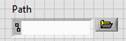
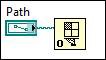
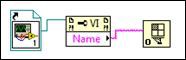
Alternatively, especially if the file path to the VI may change, open the reference by name. To open the reference by name, create a Property Node and right click on it to choose Select Class»VI Server» VI»VI. (or create a String Control containing the full delimited name of the VI in memory)
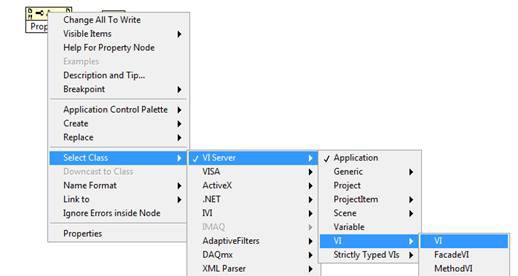
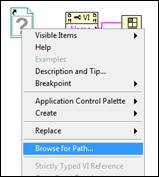
Now, click on Property to select VI Name. Add a static VI reference to the block diagram and right click on it to select Browse for Path… to choose the desired VI. Wire everything up as shown below. The Open VI Reference VI will now search memory for the VI with the designated name.
On this call of Open VI Reference, we will make use of the "type specifier VI refnum" to specify what type of VI we are opening. By "type" we mean what the connector looks like. Wire up to the type specifier any VI refnum that has the same connector type as the VI that we are opening. Usually this is done by creating a constant VI refnum and selecting a VI with the appropriate connector. This extracts the connector information and stores it in the control, as shown.
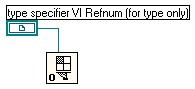
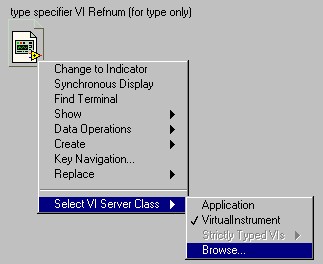
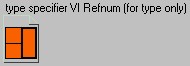
The type specifier forces the refnum to carry the connector type information with it. This is important for the Call By Reference Node, available on the Application Control palette, which allows us to call the dynamically loaded subVI from the main VI, as shown.
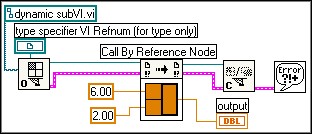
Note that when we finish the call, we close the VI reference. The advantage of making this sort of call is that the subVI is in memory only from the open to the close, rather than during the entire execution of the program.
Another advantage of this method is that multiple subVIs can be called from the same node, as long as they all have the same connector type. For example, suppose that we have a set of data files where each contains a VI name and two numbers.
doc1.op
| doc2.op
| doc3.op
|
| add.vi 4.3 2.5 | subtract.vi 5.6 3.4 | multiply.vi 2.0 6.0 |
The two numbers should be passed to the specified VI. We want to process all of the data files at once. We can write a VI that loops around and dynamically loads and executes each file, as shown.
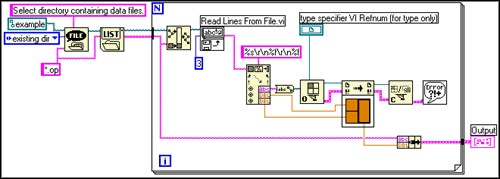
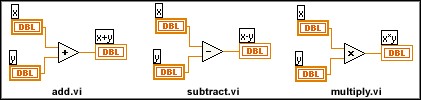
After allowing the user to select a directory in which the .op files exist, the VI gets a list of all .op files in the directory. For each file, inside the loop, it reads the first three lines of the file and passes the data to a Scan from String function that extracts the VI name (first line) and the two numbers. We can then dynamically load the Add, Subtract, or Multiply VI, compute the result of the specified operation, and display it via the output indicator.
Not only does this simplify the code for the VI, since the statically linked method would require a case structure, but it also allows us to easily expand the functionality if any new operations are necessary in the future, such as a Divide VI. All that is necessary is to create the new function, making sure that it has the same connector type, and to place it in the same location as the other function VIs. The main VI's code would remain identical.