Understanding RAID Levels, Configurations & More
Overview
Contents
Different RAID Configurations
One of the bottlenecks for data streaming is the read/write speed of the actual hard drive. As data is being written to a hard drive, the movement of the disk head, as well as the bus speed for the hard drive, limits the rate at which data can be transferred to the physical disk. This factor is the main limitation to streaming rates with single hard drive systems. RAID arrays combines a number of hard disks into one logical unit through hardware or software transparently. The array looks like a single drive to the user as well as the operating system.
Different RAID Levels
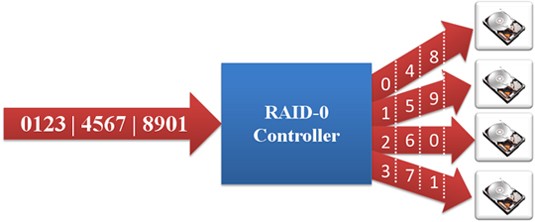
RAID 0: Striped Set without Parity (Requires Minimum 2 Disks) – Data is equally divided into fragments across a number of disks. The maximum read and write rates of the RAID array is theoretically equal to the number of drives in the array and the read and write rate of an individual drive. This is because the data is equally split and written to or read from all disks simultaneously. While this is the fastest RAID configuration, if any one drive fails, the entire array is corrupted and no data can be recovered.
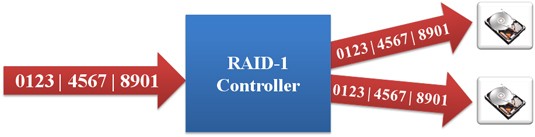
RAID 1: Mirrored Set (Requires Even Number, Minimum 2 Disks) – Focuses only on redundancy. Data is mirrored across all the drives in the RAID array. The read and write performance of a array configured as RAID 1 is the same as the read or write performance an individual drive. The array however offers the highest reliability as it continues operates as long as one drive is functioning.
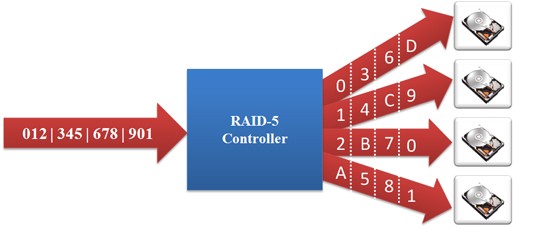
RAID 5: Striped Set (Requires Minimum 3 Disks) with Distributed Parity – Parity information is stored on the drives allowing the reconstruction of the array if one disk fails. The parity information is rotated through all disks. Performance increase is just below RAID 0 but increased fault protection makes RAID 5 an ideal choice over RAID 0.
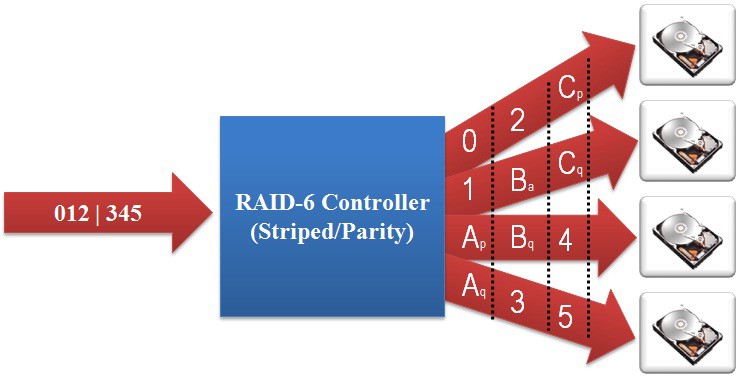
RAID 6: Double distributed parity. Similar to RAID 5 it stripes blocks of data and parity across an array of drives like RAID 5, except that is calculates two set of parity information for each set of data. RAID 6 can withstand multiple drive failures.
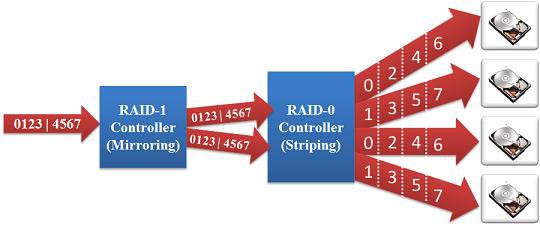
RAID 1+0 (also called RAID 10):
RAID levels can be nested in order to increase performance while providing redundancy. RAID 1+0 mirrors the data first, and then stripes them. This allows for a performance increase, with the added feature of fault tolerance.
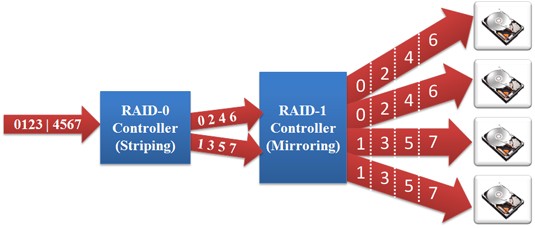
RAID 0+1 (RAID 01):
RAID 01 is similar to RAID 10 except that the RAID levels are reversed. RAID01 stripes the data first and then mirrors them. The performance increase is similar to that of RAID0, with the added feature of redundancy.
The following table summaries the different RAID configurations.
| RAID mode | Min. number of drives | Description | Advantages | Disadvantages |
| 0 | 2 drives | Data striping | Fastest speeds | Data is lost if one drive fails |
| 1 | 2 drives | Disk mirroring | Highest reliability | No read or write performance improvement |
| 5 | 3 drives | Block-level data striping with distributed parity | Very fast speeds and high reliability, best performance vs reliability compromise | Write speeds slower than RAID 0 |
| 6 | 4 drives | Block-level data striping with double distributed parity | Can withstand multiple drive failures | Writes speeds slower than RAID 5 |
|
1+0 0+1 | 4 drives | Combination of mirroring and striping | Fast speeds and high reliability | High costs, minimum of 4 drives required |
Sample Benchmarks
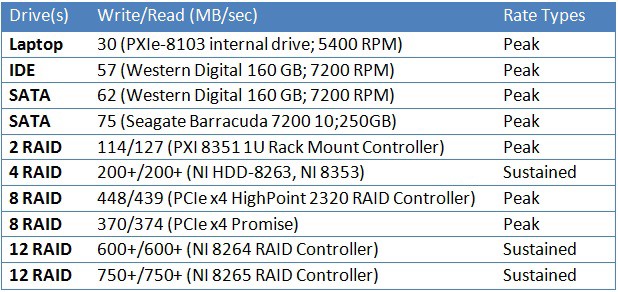
Following table compares the maximum write and read rates for various hard drives and RAID arrays. All RAID arrays were configured as RAID 0. Numbers marked as peak show outer rim rates that cannot be sustained across the whole drive/array.
NI RAID Solutions
The Seagate Lyve Mobile Array can be configured for RAID 0 and RAID 5 (Default). It offers up to 92 TB of data storage in a fully-enclosed RAID array.
The NI PXIe-8267 data storage module offers up to 4 TB of storage. With M.2 solid-state drives, the PXIe-8267 is ideal for stream-to-disk or stream-from-disk applications.
Conclusion
RAID is an effective mass storage scheme for improving speeds for streaming application purposes and increasing redundancy to ensure data safety. RAID 0 is best suited for applications that require high-speed data streaming. RAID5, RAID1+0 and RAID 0+1 are suitable for applications that require a combination of high-speed steaming and redundancy. RAID 1 is best for applications that are not speed intensive but require high data integrity.