Write 2D DBL (NChan NSamples) VI
- 已更新2025-11-20
- 閱讀時間為 2 分鐘
Write channel data to FlexLogger as a 2D array of samples. The order of the data written should reflect the order of the plugin's valid channels, which is typically the order in which the channels were created. The timing information for this data is defined by Set Stream Timing.vi.
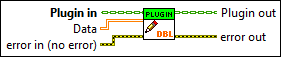
Inputs/Outputs
 Plugin in
—
Plugin in
—
Plugin In is the instance of the user's Plugin.lvclass being passed in.  Data
—
Data
—
Data is the data in the specified format.  error in (no error)
—
error in (no error)
—
The error in cluster can accept error information wired from VIs previously called. Use this information to decide if any functionality should be bypassed in the event of errors from other VIs. The pop-up option Explain Error (or Explain Warning) gives more information about the error displayed.  Plugin out
—
Plugin out
—
Plugin out is the instance of the user's Plugin.lvclass being passed out.  error out
—
error out
—
The error out cluster passes error or warning information out of a VI to be used by other VIs. The pop-up option Explain Error (or Explain Warning) gives more information about the error displayed. |