일반 에러 핸들러
- 업데이트 날짜:2026-02-04
- 5분 (읽기 시간)
에러가 발생했는지의 여부를 나타냅니다. 에러가 발생한 경우, 이 VI는 에러의 설명을 반환하고 선택적으로 대화 상자를 디스플레이합니다.
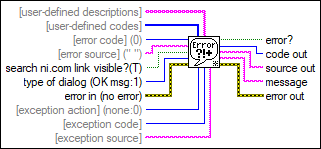
입력/출력
 [사용자 정의 설명]
—
[사용자 정의 설명]
—
[사용자 정의 설명]은 사용자 정의 코드에 대한 설명의 배열입니다. 전달된 에러가 사용자 정의 코드 중 하나와 일치할 경우, VI는 사용자 정의 설명으로부터 해당하는 설명을 메시지에 반환합니다.  [사용자 정의 코드]
—
[사용자 정의 코드]
—
[사용자 정의 코드]는 VI에 대한 에러 코드와 메시지를 정의하는데 이용할 수 있는 숫자 에러 코드의 배열입니다. VI는 에러 코드의 내부 데이터베이스를 검색한 후에 이 배열을 검색합니다. 에러 코드 5000 ~ 9999, -8999 ~ -8000, 500,000 ~ 599,999는 사용자 에러 메시지 정의를 위해서 남겨져 있습니다.  [에러 코드](0)
—
[에러 코드](0)
—
[에러 코드]는 숫자 에러 코드입니다. 에러 입력이 에러를 나타낼 경우, VI는 에러 코드를 무시합니다. 그렇지 않을 경우, VI는 그것을 테스트합니다. 제로가 아닌 값은 에러를 의미합니다.  [에러 소스](" ")
—
[에러 소스](" ")
—
[에러 소스]는 에러 코드의 소스를 나타내는데 이용할 수 있는 선택적인 문자열입니다.  ni.com 검색 링크 보이기? (참)
—
ni.com 검색 링크 보이기? (참)
—
ni.com 검색 링크 보이기?는 대화 상자에 ni.com에서 에러 검색 하이퍼링크를 보일지 나타냅니다. 하이퍼링크를 보이려면 참으로 설정합니다. 이 하이퍼링크를 클릭하면 ni.com의 에러 코드 검색 결과가 기본 웹 브라우저에 나타납니다. 이 하이퍼링크는 개발 환경에서 LabVIEW로 정의된 에러 코드에 대해서만 나타납니다. 기본값은 참입니다.  대화 상자 타입 (확인 메시지:1)
—
대화 상자 타입 (확인 메시지:1)
—
대화 상자 타입은 어떠한 타입의 대화 상자를 표시할지 결정합니다. 값에 관계없이, VI는 에러 정보와 에러를 기술한 메시지를 출력합니다.
 에러 입력(에러 없음)
—
에러 입력(에러 없음)
—
에러 입력은 이 노드의 실행 전에 발생한 에러 조건을 설명합니다. 이 입력에는 상태, 코드, 소스가 포함되어 있으며, 표준 에러 입력 클러스터 원소 기능을 제공합니다.
[예외 동작](없음:0)
—
[예외 동작]은 에러 핸들링에 예외를 만들 수 있는 방법입니다. 에러 코드와 에러 소스가 예외 코드와 예외 소스와 일치한다면 VI는 예외 동작을 수행합니다. 예외 소스에 기본값을 사용하는 경우, 예외 코드만이 VI가 예외 동작을 수행하도록 해야 합니다.
[예외 코드]
—
[예외 코드]는 예외로 취급하려는 에러 코드입니다. 기본값은 0입니다.
[예외 소스]
—
[예외 소스]는 예외를 테스트하는데 사용하려는 에러 메시지입니다. 기본값은 빈 문자열입니다.  에러?
—
에러?
—
에러?는 에러가 발생하면 참을 반환합니다. 이 VI가 에러를 발견할 경우, VI는 에러 클러스터의 파라미터를 설정합니다.  코드 출력
—
코드 출력
—
코드 출력은 에러 입력 또는 에러 코드에 의해서 표시되는 에러 코드입니다.  소스 출력
—
소스 출력
—
소스 출력은 에러의 소스를 나타냅니다. 소스 출력 문자열은 에러 입력 입력의 소스 문자열보다 좀 더 기술적인 문자열입니다.
메시지
—
메시지는 발생한 에러 코드, 에러의 소스, 에러에 대한 설명을 나타냅니다. VI가 에러의 설명을 반환하지 않은 경우, 에러 코드 설명을 찾기 위한 몇가지 동작을 취할 수 있습니다. 동일한 오류 코드에 대해 두 개 이상의 설명이 있는 경우 VI는 모든 설명을 또는로 구분하여 표시합니다.  에러 출력
—
에러 출력
—
에러 출력은 에러 정보를 포함합니다. 이 출력은 표준 에러 출력 기능을 제공합니다. |