RFmxSpecAn Spur Configure Range RBW (Array) VI
- Updated2025-10-13
- 3 minute(s) read
Configures the resolution bandwidth (RBW) filter.
Supported devices: PXIe-5665, PXIe-5668
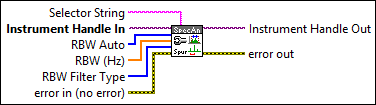
Inputs/Outputs
 Selector String
—
Selector String
—
Selector String specifies a selector string comprising of the signal name. If you do not specify the signal name, the default signal instance is used. The default value is "" (empty string). Example: "" "signal::sig1" You can use the RFmxSpecAn Build Signal String VI to build the selector string.  Instrument Handle In
—
Instrument Handle In
—
Instrument Handle In specifies the RFmx session refnum. Instrument Handle In is obtained from the RFmxInstr Initialize NIRFSA VI.  RBW Auto
—
RBW Auto
—
RBW Auto specifies whether the measurement computes the RBW. Refer to the Spectrum topic for details on RBW and sweep time. The default value is True.
 RBW (Hz)
—
RBW (Hz)
—
RBW specifies the array of bandwidths, in Hz, of the RBW filter used to sweep the acquired range, when you set the RBW Auto parameter to False. The default value is 10 kHz.
RBW Filter Type
—
RBW Filter Type specifies the shape of the digital RBW filter. The default value is Gaussian.
 error in (no error)
—
error in (no error)
—
error in describes error conditions that occur before this node runs. This input provides standard error in functionality.  Instrument Handle Out
—
Instrument Handle Out
—
Instrument Handle Out passes a reference of your RFmx session to the next VI.  error out
—
error out
—
error out contains error information. This output provides standard error out functionality. |