Traverse for GObjects VI
- Updated2025-07-30
- 3 minute(s) read
Searches a target for objects of a particular type and returns an array of references to those objects. The target can be a front panel, a block diagram, or any object that can contain other objects, such as a For Loop, a cluster, or a user-defined control. This VI also recursively finds objects nested within other container objects.
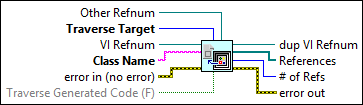
Inputs/Outputs
 Other Refnum
—
Other Refnum
—
Other Refnum is a reference to the container object you want to search if you specify the Traverse Target as Other. The reference must be a VI Server class that inherits from GObject, FlatSequenceFrame, or Page. LabVIEW ignores this input if Traverse Target is either FP or BD.  Traverse Target
—
Traverse Target
—
Traverse Target indicates the type of container object that you want to traverse. The following table contains the possible values for this input:
 VI Refnum
—
VI Refnum
—
VI Refnum is the reference to the VI you want to traverse. LabVIEW uses this input when Traverse Target is either FP or BD. LabVIEW ignores this input if you wire a reference to a specific container object to Other Refnum.  Class Name
—
Class Name
—
Class Name is the VI Server class name of the object for which you are searching.  error in (no error)
—
error in (no error)
—
error in describes error conditions that occur before this node runs. This input provides standard error in functionality.  Traverse Generated Code (F)
—
Traverse Generated Code (F)
—
Traverse Generated Code specifies whether to traverse code that LabVIEW generates in the process of implementing certain functions. The default is FALSE.  dup VI Refnum
—
dup VI Refnum
—
dup VI Refnum returns VI Refnum unchanged.  References
—
References
—
References is an array of GObject references to the objects this VI finds. Use the To More Specific Class function to downcast each reference if necessary.  # of Refs
—
# of Refs
—
# of Refs is the number of references in the References array.  error out
—
error out
—
error out contains error information. This output provides standard error out functionality. |
To use this VI, specify a Traverse Target of BD for block diagram or FP for front panel and the Class Name of the object you want to find. To traverse a specific container object instead of a front panel or block diagram, specify the target as Other and wire a reference to the specific object to the Other Refnum input.
Examples
Refer to the following example files included with LabVIEW.
- labview\examples\Application Control\VI Scripting\Finding and Modifying Objects\Using Traverse.vi