XNET UDP Socket Multicast Open (Read Only) VI
- Updated2025-10-07
- 3 minute(s) read
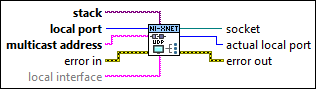
Subscribes to a UDP multicast group with read-only access on the port you specify.
Inputs/Outputs
 stack
—
stack
—
stack is the XNET IP Stack in which the new socket is opened.  local port
—
local port
—
local port is the local port you want to use to receive UDP datagrams. By default (0), this VI dynamically chooses an available UDP port for communication.  multicast address
—
multicast address
—
multicast address is the IP address of the multicast group you want to join. This terminal is required and returns an error if you do not specify an address. Multicast group addresses are in the 224.0.0.0 to 239.255.255.255 range.  error in
—
error in
—
The error in cluster can accept error information wired from VIs previously called. Use this information to decide if any functionality should be bypassed in the event of errors from other VIs. The pop-up option Explain Error (or Explain Warning) gives more information about the error displayed.
local interface
—
local interface identifies a specific virtual interface in the IP Stack on which to bind the socket. The virtual interface is identified using one of the following (as returned from XNET IP Stack Get Info.vi):
This input is optional. If local interface is empty (default), the socket is bound to any virtual interface in the IP stack.  socket
—
socket
—
socket is a network connection refnum that uniquely identifies the connection. Use this value to refer to this connection in subsequent VI calls.  actual local port
—
actual local port
—
local port is the local port you want to use to receive UDP datagrams. By default (0), this VI dynamically chooses an available UDP port for communication.  error out
—
error out
—
The error out cluster passes error or warning information out of a VI to be used by other VIs. The pop-up option Explain Error (or Explain Warning) gives more information about the error displayed. |