Creates an XNET session at run time for the Frame Output Stream mode.
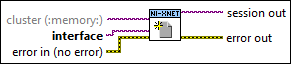

icon

Inputs/Outputs

  • cgenclassrntag.png cluster (:memory:)

    cluster is the XNET Cluster I/O Name to use for interface configuration. The default value is :memory:, the in-memory database. There are five options:
    • Empty in-memory database: cluster is unwired, and the in-memory database is empty (the XNET Database Create Object VI is not used). This option is supported for CAN and Ethernet only (not FlexRay or LIN). For CAN, after you create the session, you must set the XNET Session Interface:64bit Baud Rate property using a Session node. You must set the baud rate prior to starting the session. For Ethernet, before you create the session, use NI MAX or the System Configuration API to set the Port Mode and PHY state for the interface. These properties relate to the physical connection to your ECU network and they apply to all sessions. If you are using IEEE Std 802.1AS for time synchronization, after you create the session, configure BMCA Enabled? as desired, and then use Protocol Enabled? to enable the protocol.
    • Pre-defined CAN FD in-memory database: Pass in special in-memory databases :can_fd: and :can_fd_brs:, as the cluster (the XNET Database Create Object VI is not used). These databases are similar to the empty in-memory database (:memory:), but configure the cluster in either CAN FD or CAN FD+BRS mode, respectively. After you create the session, you must set the XNET Session Interface:64bit Baud Rate and Interface:CAN:64bit FD Baud Rate properties using a Session node. You must set these baud rates prior to starting the session.
    • Pre-defined SAE J1939 Database: Pass in the special in-memory database :can_j1939:. This database is similar to the empty in-memory database (:memory:), but configures the cluster in CAN SAE J1939 application protocol mode. After you create the session, you must set the XNET Session Interface:64bit Baud Rate property using a Session node. You must set this baud rate prior to starting the session.
    • Cluster within database file: cluster specifies a cluster within a database file. For CANdb files, although the file itself does not specify a CAN baud rate, you provide this when you add an alias to the file within NI-XNET.
    • Nonempty in-memory database: Call the XNET Database Create Object VI to create a cluster within the in-memory database, use the Cluster node to set properties (such as baud rate), then wire from the Cluster node to this cluster.
  • cgenclassrntag.png interface

    interface is the XNET Interface to use for this session.

  • cerrcodeclst.png error in (no error)

    The error in cluster can accept error information wired from VIs previously called. Use this information to decide if any functionality should be bypassed in the event of errors from other VIs. The pop-up option Explain Error (or Explain Warning) gives more information about the error displayed.

  • igenclassrntag.png session out

    session out is the created session.

  • ierrcodeclst.png error out

    The error out cluster passes error or warning information out of a VI to be used by other VIs. The pop-up option Explain Error (or Explain Warning) gives more information about the error displayed.