RFmxVNA Calset Save to File VI
- Updated2025-10-13
- 4 minute(s) read
Saves to a calset file (*.ncst), either the default calset of the specified signal or a named calset accessible across all signals and corresponding relevant stimulus settings that were used to perform calibration.
Behaviors for different combinations of Calset Name and Signal Name strings are as follows:
- Calset Name is "" (empty string): RFmx saves to file, the default calset of the signal instance specified in the Selector String. If you do not specify a Signal Name, then default RFmxVNA signal instance is used.
- Calset Name is non-empty string: If you do not specify a Signal Name, then RFmx saves the named calset to file. RFmx returns an error if you specify both Calset Name and Signal Name as non-empty strings.
Apart from error correction terms, important stimulus settings used to perform calibration are also saved as part of the calset. When you select an active calset for a signal using RFmxVNA Select Active Calset VI, specify whether you want to change the signal settings to match the stimulus settings of the selected calset, using the Restore Configuration input parameter set to ‘Stimulus’. The following stimulus settings are saved as part of the calset:
- SweepType
- List Sweep Type: IF Bandwidth, Power Level per Port, Test Receiver Attenuation per Port, Frequency List
- Linear Sweep Type: IF Bandwidth, Power Level per Port, Test Receiver Attenuation per Port, Start Frequency, Stop Frequency and Number of Frequency Points
- Segment Sweep Type: Segment IF Bandwidth, Segment Power Level per Port, Segment Test Receiver Attenuation per Port, Segment Start Frequency, Segment Stop Frequency and Segment Number of Frequency Points
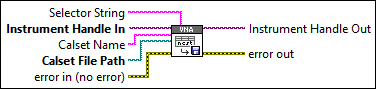
Inputs/Outputs
 Selector String
—
Selector String
—
Selector String specifies a selector string comprising of the signal name. If you do not specify the signal name, the default signal instance is used. The default value is "" (empty string). Example: "" "signal::mysignal1" You can use the RFmxVNA Build Signal String VI to build the selector string.  Instrument Handle In
—
Instrument Handle In
—
Instrument Handle In specifies the RFmx session refnum.
Calset Name
—
Calset Name specifies the name of the calset. If you do not specify this parameter, the calset is saved as default calset for the specified signal and is not available for use in other signals. If you specify non-empty Calset Name string, calset is saved as a named calset available for use across all signals and is also selected as the active calset for the current signal.  Calset File Path
—
Calset File Path
—
Calset File Path specifies the absolute path to the calset file (*.ncst). If the path you specified does not end with '.ncst' file extension, then RFmx automatically adds the extension before saving the file to disk. If the path you specify points to an already existing calset file, then RFmx overwrites that file without warning.  error in (no error)
—
error in (no error)
—
error in describes error conditions that occur before this node runs.  Instrument Handle Out
—
Instrument Handle Out
—
Instrument Handle Out passes a reference of your RFmx session to the next VI.  error out
—
error out
—
error out returns error information. |