PXIe-8822/8842/8862 Specifications
- Updated2025-09-22
- 7 minute(s) read
PXIe-8822/8842/8862 Specifications
These specifications apply to the PXIe-8822, PXIe-8842, and PXIe-8862 controllers.
Revision History
| Version | Date changed | Description |
|---|---|---|
| 378928C-01 | October 2025 | Added front panels for variants without GPIB ports. |
| 378928B-01 | August 2025 | Updated memory specification, added front panels. |
| 378928A-01 | October 2022 | Initial release. |
Looking For Something Else?
For information not found in the specifications for your product, such as operating instructions, browse Related Information.
PXIe-8822/8842/8862 Front Panel
The following figures show the PXIe-8822/8842/8862 front panel layouts.

- RS-232 Serial
- DisplayPort 1.4
- Ethernet
- USB 2.0
- USB 3.2
- Trigger
- Reset Button
- LEDs

- GPIB
- RS-232 Serial
- DisplayPort 1.4
- Ethernet
- Thunderbolt 4
- USB 2.0
- USB 3.2
- Trigger
- Reset Button
- LEDs

- RS-232 Serial
- DisplayPort 1.4
- Ethernet
- Thunderbolt 4
- USB 2.0
- USB 3.2
- Trigger
- Reset Button
- LEDs

- GPIB
- RS-232 Serial
- DisplayPort 1.4
- Ethernet
- Thunderbolt 4
- USB 2.0
- DisplayPort 1.4
- USB 3.2
- Trigger
- Reset Button
- LEDs

- RS-232 Serial
- DisplayPort 1.4
- Ethernet
- Thunderbolt 4
- USB 2.0
- DisplayPort 1.4
- USB 3.2
- Trigger
- Reset Button
- LEDs

- GPIB
- RS-232 Serial
- DisplayPort 1.4
- Ethernet
- Thunderbolt 4
- USB 2.0
- Removable Hard Drive
- DisplayPort 1.4
- USB 3.2
- Trigger
- Reset Button
- LEDs

- RS-232 Serial
- DisplayPort 1.4
- Ethernet
- Thunderbolt 4
- USB 2.0
- Removable Hard Drive
- DisplayPort 1.4
- USB 3.2
- Trigger
- Reset Button
- LEDs
Front Panel Connectors
The following table lists various peripherals and their corresponding PXIe-8822/8842/8862 external connectors, bus interfaces, and functions.
| Peripheral | External Connector | Description |
|---|---|---|
| Video (DisplayPort 1.4) | DisplayPort | Intel HD Graphics |
| Thunderbolt 4 | USB Type C (2 ports) | Thunderbolt 4 compliant, supports USB, PCI Express, and DisplayPort |
| Serial | COM1 (9-pin DSUB) | RS-232 serial port |
| Ethernet Port 0 | LAN (RJ45) | 10M/100M/1000M/2.5G Ethernet connection Intel I225 Wake on LAN supported |
| Ethernet Port 1 | LAN (RJ45) | 10M/100M/1000M/2.5G Ethernet connection Intel I225 Wake on LAN supported |
| USB 2.0 | USB 4-pin Series A stacked receptacle (4 ports) | Hi-Speed USB 2.0 |
| USB 3.2 Gen 1 | USB 9-pin Series A stacked receptacle (2 ports) | SuperSpeed USB, backwards compatible with USB 2.0 |
| PXI trigger | Trigger (SMB) | Routing PXI triggers to or from the backplane trigger bus |
| GPIB | GPIB (25-pin Micro D) | General-Purpose Interface Bus, IEEE 488.2 |
Controller Features and Characteristics
| Feature | PXIe-8822 | PXIe-8842 | PXIe-8862 | PXIe-8862 with Removable Drive |
|---|---|---|---|---|
| CPU | Intel® Core™ i3-11100HE |
Intel® Core™ i5-11500HE |
Intel® Core™ i7-11850HE |
|
| Cache | 8 MB Smart Cache | 12 MB Smart Cache | 24 MB Smart Cache | |
| Memory | 8 GB standard (16 GB maximum), single channel DDR4-3200 MHz, non-ECC SODIMM | 2 x 8 GB standard (2 x 16 GB maximum), dual channel DDR4-3200 MHz, non-ECC SODIMM | ||
| Storage | 512 GB (or greater) M.2, NVMe SSD | 960 GB U.2, NVMe SSD | ||
| Video | 1 DisplayPort 1.4 | 2 DisplayPort 1.4 | ||
| Ethernet | 1 i225 port, 1588, 10M/100M/1000M/2.5G Base-T | 2 i225 port, 1588, 10M/100M/1000M/2.5G Base-T | ||
| PCI Express Link Speed | 2.5 GT/s | 5.0 GT/s | 8.0 GT/s | |
| PXI Express 4 Link Configuration | x4, x4, x4, x4 | |||
| PXI Express 2 Link Configuration | x8, x8 | |||
| GPIB (IEEE 488 Controller) | N/A | 1 mini-GPIB (optional) | ||
| Serial Port (RS-232) | 1 DB-9 | |||
| Thunderbolt 4 Ports | N/A | 1 Type-C | 2 Type-C | |
| Hi-Speed USB (2.0) Ports | 2 Type-A | 4 Type-A | ||
| SuperSpeed USB (3.0) Ports | 2 Type-A | |||
| PXI Trigger Bus Input/Output | 1 SMB | |||
| Installed Operating System | Windows 10 IOT, Windows 11 IOT, or Linux RT | |||
| Trusted Platform Module | Optional TPM 2.0 (Infineon/ST TPM for global market, NationsTech TPM for China market) | |||
Electrical
| Voltage (V) | Current (Amps) Typical | Current (Amps) Maximum |
|---|---|---|
| +3.3 V | 1.2 A | 2.6 A |
| +5 V | 0.5 A | 2.5 A |
| +12 V | 4.5 A | 7 A |
| +5 Vaux | 0.3 A | 0.6 A |
| Voltage (V) | Current (Amps) Typical | Current (Amps) Maximum |
|---|---|---|
| +3.3 V | 1.2 A | 2.6 A |
| +5 V | 0.9 A | 3 A |
| +12 V | 5.1 A | 7.1 A |
| +5 Vaux | 0.4 A | 0.7 A |
| Voltage (V) | Current (Amps) Typical | Current (Amps) Maximum |
|---|---|---|
| +3.3 V | 1.4 A | 3.3 A |
| +5 V | 1.2 A | 3 A |
| +12 V | 7.1 A | 8.5 A |
| +5 Vaux | 0.4 A | 0.9 A |
| Voltage (V) | Current (Amps) Typical | Current (Amps) Maximum |
|---|---|---|
| +3.3 V | 0.7 A | 1.7 A |
| +5 V | 1.2 A | 3 A |
| +12 V | 7.7 A | 8.5 A |
| +5 Vaux | 0.4 A | 0.9 A |
Physical Characteristics
| Board dimensions | Four-wide 3U PXI Express module |
| Slot requirements | One system slot plus three controller expansion slots |
| Compatibility | Fully compatible with PXI Express Specification 1.0 |
| PXIe-8822 | 728 g (1.60 lb) typical |
| PXIe-8842 | 753 g (1.66 lb) typical |
| PXIe-8862 | 783 g (1.73 lb) typical |
| PXIe-8862 with removable drive | 906 g (2.00 lb) typical |
Front Panel Dimensions
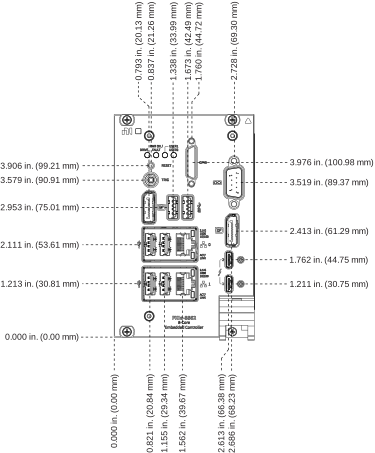
The following figures show the front panel layout and dimensions of the PXIe-8822/8842/8862. Dimensions are in inches (millimeters).




Environmental
| Maximum altitude | 4,600 m (570 mbar) (at 25°C ambient) with chassis fans on high |
| Pollution Degree | 2 |
| Indoor use only. | |
Operating Environment
| Ambient temperature range | 0 °C to 55 °C |
| Relative humidity range | 10% to 90%, noncondensing |
Storage Environment
Shock and Vibration
| Operating shock | 30 g peak, half-sine, 11 ms pulse |
| Random vibration, operating | 5 Hz to 500 Hz, 0.3 grms (with solid-state hard drive) |
| Random vibration, nonoperating[2]2 CPU performance may decrease for some workloads if a unit is stored at the extreme ambient temperature range and then subjected to max nonoperating random vibration limits. | 5 Hz to 500 Hz, 2.4 grms |
1 CPU performance may decrease for some workloads if a unit is stored at the extreme ambient temperature range and then subjected to max nonoperating random vibration limits.
2 CPU performance may decrease for some workloads if a unit is stored at the extreme ambient temperature range and then subjected to max nonoperating random vibration limits.