Replacing a Simulation Module with a Device Module
- Updated2025-12-16
- 2 minute(s) read
Replacing a Simulation Module with a Device Module
To verify a test under genuine conditions, replace the simulation module in PAtools with a real device module.
To do so, use the device mapping table in PAconfigurator to replace simulated input and output variable names with real device variable names. You also must update the communication interface between the application and the device.
A simulation module is used to create and verify tests when you do not have access to the real device. Ideally, simulation and real device modules have a similar set of input and output variables.
- Use WCUSimu to simulate a water conditioning unit (chiller).
- Use CCSimu to simulate a climate chamber.
- Use PSSimu to simulate a power supply.
- Use DCCycler_Sim to simulate a DC cycler.
Consider the scenario of replacing a WCUSimu module with a CTS water conditioning unit device module. These modules are similar but contain key differences.
| WCUSimu | CTS | Description |
|---|---|---|
| WCUSimu_On.ACT | WCUC_Start.ACT | Controls the device. |
| WCUSimu_On.STS | WCUC_Start.STS | Returns the device status. |
The simulated module has four channels. Each channel can be set to different temperature values. The CTS module only has two channels that must use the same setpoint.
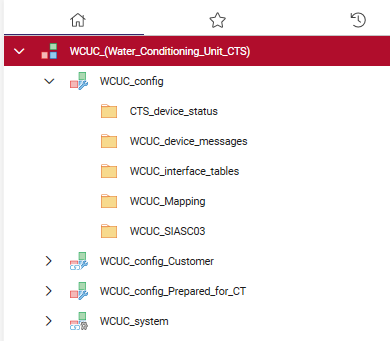
A simulated module does not have an interface to communicate with a simulated device. However, a real device module does have an interface. When updating a module to communicate with a device, you must update the interface parameters in the WCU_config folder.
For example, the CTS device uses a SIASC interface. To use the device, you must update the interface to the folder according to the parameterization of the specified interface in the PCUconfig. For more information, refer to the WCUC folder as seen in the following image.