niRFSA Initialize VI
- Updated2025-10-14
- 3 minute(s) read
Creates a new session for the device. This VI sends initialization commands to reset all hardware modules to a known state necessary for NI-RFSA operation.
To create a new session, wire the downconverter resource name for the RF vector signal analyzer to the resource name parameter.
You can access the device session this VI creates using the NI-RFSA Soft Front Panel (SFP). Accessing the device session with the SFP can help you debug your code. Refer to Debugging Your Application Using SFP Session Access for more information about accessing your session with the SFP.
Supported Devices: PXI-5600, PXIe-5601/5603/5605/5606 (external digitizer mode), PXIe-5644/5645/5646, PXI-5661, PXIe-5663/5663E/5665/5667/5668, PXIe-5693/5694/5698, PXIe-5820/5830/5831/5832/5840/5841/5842/5860
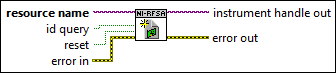
Inputs/Outputs
 resource name
—
resource name
—
resource name specifies the resource name of the device to initialize. For NI-RFSA devices, the syntax is the device name specified in MAX. The typical default name for your device in MAX is PXI1Slot2. You can rename your devices by right-clicking the name in MAX, selecting Rename from the drop-down menu, and entering a new name. You can also pass in the name of an IVI logical name configured with the IVI Configuration utility. For additional information, refer to the Installed Products»IVI topic of the Measurement & Automation Explorer Help. Note
Device names are not case-sensitive. However, IVI logical names are case-sensitive. If you use an IVI logical name, verify the name is identical to the name shown in the IVI Configuration Utility.
Note
For multichannel devices such as the PXIe-5860, the resource name must include the channel number to use. The channel number is specified by appending /ChannelNumber
to the device name, where ChannelNumber is the channel number (0, 1, etc.). For example, if the device name is PXI1Slot2 and you want to use channel 0, use the resource name PXI1Slot2/0.
 id query
—
id query
—
id query specifies whether NI-RFSA performs an ID query. When you perform an ID query, NI-RFSA verifies the device you initialize is supported. The default value is TRUE.
reset
—
reset specifies whether the NI-RFSA device is reset during the initialization procedure. The default value is FALSE.
 error in
—
error in
—
error in describes error conditions that occur before this node runs. This input provides standard error in functionality.  instrument handle out
—
instrument handle out
—
instrument handle out identifies your instrument session.  error out
—
error out
—
error out contains error information. This output provides standard error out functionality. |