Database Programming for the C API
- Updated2026-02-02
- 3 minute(s) read
The NI-XNET software provides various methods for creating your application database configuration. The following figure shows a process for deciding the database source. A description of each step in the process follows the flowchart.
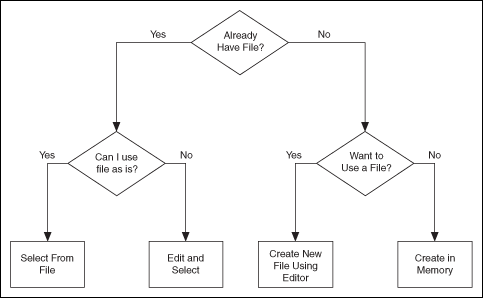
Already Have File?
If you are testing an ECU used within a vehicle, the vehicle maker (or the maker's supplier) already may have provided a database file. This file likely would be in CANdb, FIBEX, AUTOSAR, or LDF format. When you have this file, using NI-XNET is relatively straightforward.
Can I Use File As Is?
Is the file up to date with respect to your ECU(s)?
If you do not know the answer to this question, the best choice is to assume Yes and begin using NI-XNET with the file. If you encounter problems, you can use the techniques discussed in "Edit and Select" to update your application without significant redesign.
Select From File
You can simply pass the names of objects from the database to the List parameter and the database name (alias or filepath) itself to the DatabaseName parameter of nxCreateSession. This uses the selected objects from the database in the session created.
Edit and Select
There are two options for editing the database objects to use for NI-XNET sessions: edit in memory and edit the file.
- Edit in Memory: Use nxdbFindObject and nxdbSetProperty to change properties of selected objects. This changes the representation in memory, but does not save the change to the file. When you pass the object into nxCreateSession, the changes in memory (not the original file) are used.
- Edit the File: The NI-XNET Database Editor is a tool for editing
database files for use with NI-XNET. Using this tool, you open an existing file, edit the
objects, and save those changes. You can save the changes to the existing file or a new
file.
When you have a file with the changes you need, you select objects in your application as described in "Select From File."
Want to Use a File?
If you do not have a usable database file, you can choose to create a file or avoid files altogether for a self-contained application.
Create New File Using Editor
You can use the NI-XNET Database Editor to create a new database file. Once you have a file, you select objects in your application as described in "Select From File."
As a general rule, for FlexRay applications, using a FIBEX file is recommended. FlexRay communication configuration requires a large number of complex properties, and storage in a file makes this easier to manage. The NI-XNET Database Editor has features that facilitate this configuration.
Create in Memory
You can use nxdbCreateObject to create new database objects in memory. Using this technique, you can avoid files entirely and make your application self contained.
You configure each object you create using the property node. Each class of database object contains required properties that you must set (refer to "Required Properties").
The database name is :memory:. This special database name specifies a database that does not originate from a file.
After you create and configure objects in memory, you can use nxdbSaveDatabase to save the objects to a file. This enables you to implement a database editor within your application.
Multiple Databases Simultaneously
NI-XNET allows up to 63 database sessions to be open at the same time. You can open any database from a database file or in memory. To open multiple in-memory databases, use the name :memory[<digit>]:; for example, :memory:, :memory1:, :memory2:.
Related Information
- Creating a Built NI-XNET Application with a LabVIEW Project
NI-XNET supports building applications using LabVIEW projects. You typically distribute these executables to multiple end users, which means you copy the executable to multiple computers (targets).
- Choosing How to Create NI-XNET Sessions
NI-XNET includes two methods for creating sessions: a LabVIEW project and the NI-XNET Create Session function. You typically use only one method to create all sessions for your application; each method is best suited to different situations.
- CAN Overview