IMAQ FPGA SimpleEdge VI
- Updated2023-02-21
- 11 minute(s) read
Requires: NI Vision Development Module FPGA
Finds edges along a line. This VI can return the first, both the first and the last, or all the edges found.
Once the entire line is traversed, Output Valid is set to TRUE. If no edges are found, Output Valid is TRUE for one cycle, the Number of Edges is set to 0, and the Edge Coordinates are set to (0, 0, 0). If edges are found along the line, Output Valid is TRUE for a number of cycles equal to the Number of Edges found. In each cycle, the Edge Coordinates are output in the search direction.
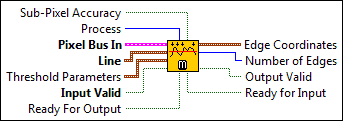
IMAQ FPGA SimpleEdge U8x1
Finds edges along a line.
Supported Image Types

 |
Sub-Pixel Accuracy determines the accuracy required for the location of the edge coordinates. Setting this control to FALSE enables fast edge detection. A subpixel localization of the edges is obtained when this control is TRUE. The subpixel result is computed using a local quadratic interpolation. The default is FALSE. |
||||||||||
 |
Process determines the type of search. Choose from the following values:
|
||||||||||
 |
Pixel Bus In when Input Valid is TRUE, contains one of the following: valid pixel data, an end of line signal, or an end of image signal.
|
||||||||||
 |
Line specifies the pixel coordinates of the input line. The maximum length allowed is 2600 pixels. The VI accepts new line coordinates at the first valid pixel (start) of each image. The coordinates of all the points along the line are recomputed for each new image.
|
||||||||||
|
Threshold Parameters is a cluster containing information used to determine whether a change in pixel value is considered as an edge.
|
||||||||||
|
Input Valid specifies whether the next data point has arrived for processing. Wire the Output Valid output of an upstream node to this input to transfer data from the upstream node to this node. |
||||||||||
|
Ready For Output specifies whether downstream nodes are ready for this node to return a new value. The default is TRUE. Use a Feedback Node to wire the Ready for Input output of a downstream node to this input of the current node.
|
||||||||||
 |
Edge Coordinates contains information about the edge that is found. This cluster returns the x- and y-coordinate of the edge and the position (ID) of the edge along the line. The edges found along the line are output after all the edges along the line have been detected. The detected edges are output in consecutive cycles and during this period Output Valid is TRUE.
|
||||||||||
 |
Number of Edges specifies the number of edges found. This output remains constant while Output Valid is TRUE. The maximum number of edges that can be found is 256. |
||||||||||
 |
Output Valid returns TRUE if this node has computed a result that downstream nodes can use. Wire this output to the Input Valid input of a downstream node to transfer data from the node to the downstream node. |
||||||||||
|
Ready for Input returns TRUE if this node is ready to accept new input data. Use a Feedback Node to wire this output to the Ready for Output input of an upstream node.
|


IMAQ FPGA SimpleEdge U8x1 Details
 |
Note Resource estimates are based on a 40 MHz clock. |
Virtex-5
Estimated Device Utilization
- Slice Registers: 1734
- Slice LUTs: 8614
- DSP48s: 12
- Block RAMs: 4
Estimated Performance
- Minimum Latency: 1
- Initiation Interval: 1
Spartan-6
Estimated Device Utilization
- Slice Registers: 1862
- Slice LUTs: 11562
- DSP48s: 12
- Block RAMs: 3
Estimated Performance
- Minimum Latency: 1
- Initiation Interval: 1
Zynq
Estimated Device Utilization
- Slice Registers: 1677
- Slice LUTs: 7631
- DSP48s: 12
- Block RAMs: 6
Estimated Performance
- Minimum Latency: 1
- Initiation Interval: 1
Kintex-7
Estimated Device Utilization
- Slice Registers: 1649
- Slice LUTs: 7784
- DSP48s: 12
- Block RAMs: 6
Estimated Performance
- Minimum Latency: 1
- Initiation Interval: 1
IMAQ FPGA SimpleEdge U16x1
Finds edges along a line.
Supported Image Types


|
Subpixel? determines the accuracy required for the location of the edge coordinates. Setting this control to FALSE enables fast edge detection. A subpixel localization of the edges is obtained when this control is TRUE. The subpixel result is computed using a local quadratic interpolation. The default is FALSE. |
||||||||||
|
Process determines the type of search. Choose from the following values:
|
||||||||||
|
Pixel Bus In when Input Valid is TRUE, contains one of the following: valid pixel data, an end of line signal, or an end of image signal.
|
||||||||||
|
Line specifies the pixel coordinates of the input line. The maximum length allowed is 2600 pixels. The VI accepts new line coordinates at the first valid pixel (start) of each image. The coordinates of all the points along the line are recomputed for each new image.
|
||||||||||
|
Threshold Parameters is a cluster containing information used to determine whether a change in pixel value is considered as an edge.
|
||||||||||
|
Input Valid specifies whether the next data point has arrived for processing. Wire the Output Valid output of an upstream node to this input to transfer data from the upstream node to this node. |
||||||||||
|
Ready For Output specifies whether downstream nodes are ready for this node to return a new value. The default is TRUE. Use a Feedback Node to wire the Ready for Input output of a downstream node to this input of the current node.
|
||||||||||
|
Edge Coordinates contains information about the edge that is found. This cluster returns the x- and y-coordinate of the edge and the position (ID) of the edge along the line. The edges found along the line are output after all the edges along the line have been detected. The detected edges are output in consecutive cycles and during this period Output Valid is TRUE.
|
||||||||||
|
Number of Edges specifies the number of edges found. This output remains constant while Output Valid is TRUE. The maximum number of edges that can be found is 256. |
||||||||||
|
Output Valid returns TRUE if this node has computed a result that downstream nodes can use. Wire this output to the Input Valid input of a downstream node to transfer data from the node to the downstream node. |
||||||||||
|
Ready for Input returns TRUE if this node is ready to accept new input data. Use a Feedback Node to wire this output to the Ready for Output input of an upstream node.
|

IMAQ FPGA SimpleEdge U16x1 Details
|
Note Resource estimates are based on a 40 MHz clock. |
Virtex-5
Estimated Device Utilization
- Slice Registers: 1635
- Slice LUTs: 8324
- DSP48s: 2
- Block RAMs: 4
Estimated Performance
- Minimum Latency: 1
- Initiation Interval: 1
Spartan-6
Estimated Device Utilization
- Slice Registers: 1815
- Slice LUTs: 12070
- DSP48s: 2
- Block RAMs: 5
Estimated Performance
- Minimum Latency: 1
- Initiation Interval: 1
Zynq
Estimated Device Utilization
- Slice Registers: 1594
- Slice LUTs: 7390
- DSP48s: 19
- Block RAMs: 7
Estimated Performance
- Minimum Latency: 1
- Initiation Interval: 1
Kintex-7
Estimated Device Utilization
- Slice Registers: 1567
- Slice LUTs: 7533
- DSP48s: 2
- Block RAMs: 8
Estimated Performance
- Minimum Latency: 1
- Initiation Interval: 1