IMAQ FPGA ParticleAnalysisReport VI
- Updated2023-02-21
- 23 minute(s) read
Requires: NI Vision Development Module FPGA
Returns information about the particles detected in an image.
 |
Note
This VI has variable latency, which is dependent on the image size. For the Particle Analysis Report x1 VI instance, use these values to calculate the latency.
For the Particle Analysis Report x8 VI instance, use these values to calculate the latency.
For the Particle Analysis Report with Holes x1 VI instance, use this formula to calculate the latency.
For the Particle Analysis Report with Holes x8 VI instance, use this formula to calculate the latency.
|
IMAQ FPGA Particle Analysis Report U1x1
Returns information about the particles detected in an image.
Supported Image Types

 |
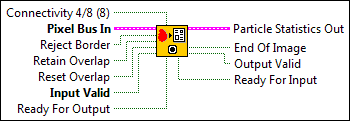
Connectivity 4/8 (8) specifies the type of connectivity used by the algorithm for particle detection. The connectivity mode directly determines whether an adjacent pixel belongs to the same particle or a different particle. The default is 8. The following values are possible:
|
||||||||||||||||||||||||
 |
Pixel Bus In when Input Valid is TRUE, contains one of the following: valid pixel data, an end of line signal, or an end of image signal.
|
||||||||||||||||||||||||
|
Reject Border specifies if the particles touching the border of the image should be removed from the results. |
||||||||||||||||||||||||
|
Retain Overlap should be enabled when you want to retain particle information that is spread across two or more images. The particle spread is considered from top to bottom but not when the particle is spread from left to right. If Reject Border is set to TRUE, the particles touching the left and right border will be omitted. |
||||||||||||||||||||||||
|
Reset Overlap should be enabled if Retain Overlap is FALSE for a particular frame. Reset Overlap is recognized only when there is transition from FALSE to TRUE, on its rising edge. If Reset Overlap is asserted at the transition of a frame, it will be considered during the same frame. Reset Overlap resets all internal counters and outputs all particles for the frame during which it is enabled. For this particular frame, Reset Overlap ignores the Retain Overlap functionality. Any particles touching the bottom border are treated as complete particles and the Particle Statistics information will be returned. If Reject Border is set to TRUE, the particles touching the left and right border will be omitted. |
||||||||||||||||||||||||
|
Input Valid specifies whether the next data point has arrived for processing. Wire the Output Valid output of an upstream node to this input to transfer data from the upstream node to this node. |
||||||||||||||||||||||||
|
Ready For Output specifies whether downstream nodes are ready for this node to return a new value. The default is TRUE. Use a Feedback Node to wire the Ready for Input output of a downstream node to this input of the current node.
|
||||||||||||||||||||||||
 |
Particle Statistics Out is an array that returns a set of pixel measurements from the detected particles. The internal buffer can hold a maximum of 1022 particles. After the particles are completed, they are removed from the internal buffer to accomodate newer particles.
|
||||||||||||||||||||||||
 |
End Of Image, when TRUE, indicates that the end of the image has been reached. |
||||||||||||||||||||||||
|
Output Valid returns TRUE if this node has computed a result that downstream nodes can use. Wire this output to the Input Valid input of a downstream node to transfer data from the node to the downstream node. |
||||||||||||||||||||||||
|
Ready for Input returns TRUE if this node is ready to accept new input data. Use a Feedback Node to wire this output to the Ready for Output input of an upstream node.
|


IMAQ FPGA Particle Analysis Report U1x1 Details
|
Note Resource estimates are based on a 40 MHz clock. |
Virtex-5
Estimated Device Utilization
- Slice Registers: 11058
- Slice LUTs: 12206
- DSP48s: 12
- Block RAMs: 15
Estimated Performance
- Minimum Latency: 1160
- Initiation Interval: 1
Spartan-6
Estimated Device Utilization
- Slice Registers: 4351
- Slice LUTs: 12546
- DSP48s: 12
- Block RAMs: 43
Estimated Performance
- Minimum Latency: 1160
- Initiation Interval: 1
Zynq
Estimated Device Utilization
- Slice Registers: 24600
- Slice LUTs: 9620
- DSP48s: 12
- Block RAMs: 22
Estimated Performance
- Minimum Latency: 1160
- Initiation Interval: 1
Kintex-7
Estimated Device Utilization
- Slice Registers: 25159
- Slice LUTs: 9920
- DSP48s: 12
- Block RAMs: 22
Estimated Performance
- Minimum Latency: 1160
- Initiation Interval: 1
IMAQ FPGA Particle Analysis Report U1x8
Returns information about the particles detected in an image.
Supported Image Types

|
Connectivity 4/8 (8) specifies the type of connectivity used by the algorithm for particle detection. The connectivity mode directly determines whether an adjacent pixel belongs to the same particle or a different particle. The default is 8. The following values are possible:
|
||||||||||||||||||||||||
|
Pixel Bus In when Input Valid is TRUE, contains one of the following: valid pixel data, an end of line signal, or an end of image signal.
|
||||||||||||||||||||||||
|
Reject Border specifies if the particles touching the border of the image should be removed from the results. |
||||||||||||||||||||||||
|
Retain Overlap should be enabled when you want to retain particle information that is spread across two or more images. The particle spread is considered from top to bottom but not when the particle is spread from left to right. If Reject Border is set to TRUE, the particles touching the left and right border will be omitted. |
||||||||||||||||||||||||
|
Reset Overlap should be enabled if Retain Overlap is FALSE for a particular frame. Reset Overlap is recognized only when there is transition from FALSE to TRUE, on its rising edge. If Reset Overlap is asserted at the transition of a frame, it will be considered during the same frame. Reset Overlap resets all internal counters and outputs all particles for the frame during which it is enabled. For this particular frame, Reset Overlap ignores the Retain Overlap functionality. Any particles touching the bottom border are treated as complete particles and the Particle Statistics information will be returned. If Reject Border is set to TRUE, the particles touching the left and right border will be omitted. |
||||||||||||||||||||||||
|
Input Valid specifies whether the next data point has arrived for processing. Wire the Output Valid output of an upstream node to this input to transfer data from the upstream node to this node. |
||||||||||||||||||||||||
|
Ready For Output specifies whether downstream nodes are ready for this node to return a new value. The default is TRUE. Use a Feedback Node to wire the Ready for Input output of a downstream node to this input of the current node.
|
||||||||||||||||||||||||
|
Particle Statistics Out is an array that returns a set of pixel measurements from the detected particles. The internal buffer can hold a maximum of 1022 particles. After the particles are completed, they are removed from the internal buffer to accomodate newer particles.
|
||||||||||||||||||||||||
|
End Of Image, when TRUE, indicates that the end of the image has been reached. |
||||||||||||||||||||||||
|
Output Valid returns TRUE if this node has computed a result that downstream nodes can use. Wire this output to the Input Valid input of a downstream node to transfer data from the node to the downstream node. |
||||||||||||||||||||||||
|
Ready for Input returns TRUE if this node is ready to accept new input data. Use a Feedback Node to wire this output to the Ready for Output input of an upstream node.
|
IMAQ FPGA Particle Analysis Report U1x8 Details
|
Note Resource estimates are based on a 40 MHz clock. |
Kintex-7
Estimated Device Utilization
- Slice Registers: 25597
- Slice LUTs: 10542
- DSP48s: 12
- Block RAMs: 22
Estimated Performance
- Minimum Latency: 1
- Initiation Interval: 1
IMAQ FPGA Particle Analysis Report with Holes U1x1
Returns information about the particles and holes detected in an image.
Supported Image Types

|
Connectivity 4/8 (8) specifies the type of connectivity used by the algorithm for particle detection. The connectivity mode directly determines whether an adjacent pixel belongs to the same particle or a different particle. The default is 8. The following values are possible:
|
||||||||||||||||||||||||||||
|
Pixel Bus In when Input Valid is TRUE, contains one of the following: valid pixel data, an end of line signal, or an end of image signal.
|
||||||||||||||||||||||||||||
|
Reject Border specifies if the particles touching the border of the image should be removed from the results. |
||||||||||||||||||||||||||||
|
Retain Overlap should be enabled when you want to retain particle information that is spread across two or more images. The particle spread is considered from top to bottom but not when the particle is spread from left to right. If Reject Border is set to TRUE, the particles touching the left and right border will be omitted. |
||||||||||||||||||||||||||||
|
Reset Overlap should be enabled if Retain Overlap is FALSE for a particular frame. Reset Overlap is recognized only when there is transition from FALSE to TRUE, on its rising edge. If Reset Overlap is asserted at the transition of a frame, it will be considered during the same frame. Reset Overlap resets all internal counters and outputs all particles for the frame during which it is enabled. For this particular frame, Reset Overlap ignores the Retain Overlap functionality. Any particles touching the bottom border are treated as complete particles and the Particle Statistics information will be returned. If Reject Border is set to TRUE, the particles touching the left and right border will be omitted. |
||||||||||||||||||||||||||||
|
Input Valid specifies whether the next data point has arrived for processing. Wire the Output Valid output of an upstream node to this input to transfer data from the upstream node to this node. |
||||||||||||||||||||||||||||
|
Ready For Output specifies whether downstream nodes are ready for this node to return a new value. The default is TRUE. Use a Feedback Node to wire the Ready for Input output of a downstream node to this input of the current node.
|
||||||||||||||||||||||||||||
|
Particle Statistics is an array that returns a set of pixel measurements from the detected particles. The internal buffer can hold a maximum of 1022 particles and 1023 holes. After the particles and holes are completed, they are removed from the internal buffer to accomodate newer particles and holes.
|
||||||||||||||||||||||||||||
|
End Of Image, when TRUE, indicates that the end of the image has been reached. |
||||||||||||||||||||||||||||
|
Output Valid returns TRUE if this node has computed a result that downstream nodes can use. Wire this output to the Input Valid input of a downstream node to transfer data from the node to the downstream node. |
||||||||||||||||||||||||||||
|
Ready for Input returns TRUE if this node is ready to accept new input data. Use a Feedback Node to wire this output to the Ready for Output input of an upstream node.
|
IMAQ FPGA Particle Analysis Report with Holes U1x1 Details
|
Note Resource estimates are based on a 40 MHz clock. |
Virtex-5
Estimated Device Utilization
- Slice Registers: 13805
- Slice LUTs: 20055
- DSP48s: 3
- Block RAMs: 24
Estimated Performance
- Minimum Latency: 6221
- Initiation Interval: 1
Spartan-6
Estimated Device Utilization
- Slice Registers: 16225
- Slice LUTs: 21595
- DSP48s: 3
- Block RAMs: 84
Estimated Performance
- Minimum Latency: 6221
- Initiation Interval: 1
Zynq
Estimated Device Utilization
- Slice Registers: 29970
- Slice LUTs: 15475
- DSP48s: 3
- Block RAMs: 44
Estimated Performance
- Minimum Latency: 6221
- Initiation Interval: 1
Kintex-7
Estimated Device Utilization
- Slice Registers: 31089
- Slice LUTs: 15996
- DSP48s: 3
- Block RAMs: 44
Estimated Performance
- Minimum Latency: 6221
- Initiation Interval: 1
IMAQ FPGA Particle Analysis Report with Holes U1x8
Returns information about the particles and holes detected in an image.
Supported Image Types

|
Connectivity 4/8 (8) specifies the type of connectivity used by the algorithm for particle detection. The connectivity mode directly determines whether an adjacent pixel belongs to the same particle or a different particle. The default is 8. The following values are possible:
|
||||||||||||||||||||||||||||
|
Pixel Bus In when Input Valid is TRUE, contains one of the following: valid pixel data, an end of line signal, or an end of image signal.
|
||||||||||||||||||||||||||||
|
Reject Border specifies if the particles touching the border of the image should be removed from the results. |
||||||||||||||||||||||||||||
|
Retain Overlap should be enabled when you want to retain particle information that is spread across two or more images. The particle spread is considered from top to bottom but not when the particle is spread from left to right. If Reject Border is set to TRUE, the particles touching the left and right border will be omitted. |
||||||||||||||||||||||||||||
|
Reset Overlap should be enabled if Retain Overlap is FALSE for a particular frame. Reset Overlap is recognized only when there is transition from FALSE to TRUE, on its rising edge. If Reset Overlap is asserted at the transition of a frame, it will be considered during the same frame. Reset Overlap resets all internal counters and outputs all particles for the frame during which it is enabled. For this particular frame, Reset Overlap ignores the Retain Overlap functionality. Any particles touching the bottom border are treated as complete particles and the Particle Statistics information will be returned. If Reject Border is set to TRUE, the particles touching the left and right border will be omitted. |
||||||||||||||||||||||||||||
|
Input Valid specifies whether the next data point has arrived for processing. Wire the Output Valid output of an upstream node to this input to transfer data from the upstream node to this node. |
||||||||||||||||||||||||||||
|
Ready For Output specifies whether downstream nodes are ready for this node to return a new value. The default is TRUE. Use a Feedback Node to wire the Ready for Input output of a downstream node to this input of the current node.
|
||||||||||||||||||||||||||||
|
Particle Statistics is an array that returns a set of pixel measurements from the detected particles. The internal buffer can hold a maximum of 1022 particles and 1023 holes. After the particles and holes are completed, they are removed from the internal buffer to accomodate newer particles and holes.
|
||||||||||||||||||||||||||||
|
End Of Image, when TRUE, indicates that the end of the image has been reached. |
||||||||||||||||||||||||||||
|
Output Valid returns TRUE if this node has computed a result that downstream nodes can use. Wire this output to the Input Valid input of a downstream node to transfer data from the node to the downstream node. |
||||||||||||||||||||||||||||
|
Ready for Input returns TRUE if this node is ready to accept new input data. Use a Feedback Node to wire this output to the Ready for Output input of an upstream node.
|
IMAQ FPGA Particle Analysis Report with Holes U1x8 Details
|
Note Resource estimates are based on a 40 MHz clock. |
Kintex-7
Estimated Device Utilization
- Slice Registers: 30991
- Slice LUTs: 16083
- DSP48s: 2
- Block RAMs: 44
Estimated Performance
- Minimum Latency: 1
- Initiation Interval: 1
Examples
Refer to the following for an example that uses this VI.
- LabVIEW\examples\Vision FPGA\Particle Analysis Report on FPGA