IMAQ FPGA LineProfile VI
- Updated2023-02-21
- 21 minute(s) read
Requires: NI Vision Development Module FPGA
Calculates the profile of a line of pixels.
 |
Note This VI has variable latency, which is dependent on the image size. Plug the Minimum Latency value from the Estimated Performance section into the following formula to determine the total latency.
Total Latency = [End Y * (Image Width + 1)] + [(End Y - Start Y) * 2] + End X + 7 |
IMAQ FPGA LineProfile U8x1
Calculates the profile of a line of pixels. The relevant pixel information is taken from the specified vector (line).
Supported Image Types


 |
Pixel Bus In when Input Valid is TRUE, contains one of the following: valid pixel data, an end of line signal, or an end of image signal.
|
||||||||||
 |
Line specifies the pixel coordinates of the input line. The maximum length allowed is 2600 pixels. The VI accepts new line coordinates at the first valid pixel (start) of each image. The coordinates of all the points along the line are recomputed for each new image.
|
||||||||||
 |
Input Valid specifies whether the next data point has arrived for processing. Wire the Output Valid output of an upstream node to this input to transfer data from the upstream node to this node. |
||||||||||
|
Ready For Output specifies whether downstream nodes are ready for this node to return a new value. The default is TRUE. Use a Feedback Node to wire the Ready for Input output of a downstream node to this input of the current node.
|
||||||||||
 |
Pixel Coordinate is the point along the line represented by its x- and y-coordinates. The VI outputs the points along the line starting from the Line start point until the Line end point in consecutive cycles after all the pixel values along the line have been obtained. Output Valid is set to TRUE during the period when the VI outputs the points.
|
||||||||||
 |
Pixel Value returns the pixel value in the Image at the Pixel Coordinate. |
||||||||||
|
Statistics contains information about the pixels found along the line.
|
||||||||||
 |
Output Valid returns TRUE if this node has computed a result that downstream nodes can use. Wire this output to the Input Valid input of a downstream node to transfer data from the node to the downstream node. |
||||||||||
|
Ready for Input returns TRUE if this node is ready to accept new input data. Use a Feedback Node to wire this output to the Ready for Output input of an upstream node.
|


IMAQ FPGA LineProfile U8x1 Details
|
Note Resource estimates are based on a 40 MHz clock. |
Virtex-5
Estimated Device Utilization
- Slice Registers: 1382
- Slice LUTs: 10662
- DSP48s: 1
- Block RAMs: 0
Estimated Performance
- Minimum Latency: 1
- Initiation Interval: 1
Spartan-6
Estimated Device Utilization
- Slice Registers: 968
- Slice LUTs: 5350
- DSP48s: 1
- Block RAMs: 2
Estimated Performance
- Minimum Latency: 1
- Initiation Interval: 1
Zynq
Estimated Device Utilization
- Slice Registers: 1250
- Slice LUTs: 6512
- DSP48s: 4
- Block RAMs: 6
Estimated Performance
- Minimum Latency: 1
- Initiation Interval: 1
Kintex-7
Estimated Device Utilization
- Slice Registers: 1348
- Slice LUTs: 9740
- DSP48s: 3
- Block RAMs: 2
Estimated Performance
- Minimum Latency: 1
- Initiation Interval: 1
IMAQ FPGA LineProfile U16x1
Calculates the profile of a line of pixels. The relevant pixel information is taken from the specified vector (line).
Supported Image Types


|
Pixel Bus In when Input Valid is TRUE, contains one of the following: valid pixel data, an end of line signal, or an end of image signal.
|
||||||||||
|
Line specifies the pixel coordinates of the input line. The maximum length allowed is 2600 pixels. The VI accepts new line coordinates at the first valid pixel (start) of each image. The coordinates of all the points along the line are recomputed for each new image.
|
||||||||||
|
Input Valid specifies whether the next data point has arrived for processing. Wire the Output Valid output of an upstream node to this input to transfer data from the upstream node to this node. |
||||||||||
|
Ready For Output specifies whether downstream nodes are ready for this node to return a new value. The default is TRUE. Use a Feedback Node to wire the Ready for Input output of a downstream node to this input of the current node.
|
||||||||||
|
Pixel Coordinate is the point along the line represented by its x- and y-coordinates. The VI outputs the points along the line starting from the Line start point until the Line end point in consecutive cycles after all the pixel values along the line have been obtained. Output Valid is set to TRUE during the period when the VI outputs the points.
|
||||||||||
 |
Pixel Value returns the pixel value in the Image at the Pixel Coordinate. |
||||||||||
|
Statistics contains information about the pixels found along the line.
|
||||||||||
|
Output Valid returns TRUE if this node has computed a result that downstream nodes can use. Wire this output to the Input Valid input of a downstream node to transfer data from the node to the downstream node. |
||||||||||
|
Ready for Input returns TRUE if this node is ready to accept new input data. Use a Feedback Node to wire this output to the Ready for Output input of an upstream node.
|


IMAQ FPGA LineProfile U16x1 Details
|
Note Resource estimates are based on a 40 MHz clock. |
Virtex-5
Estimated Device Utilization
- Slice Registers: 1622
- Slice LUTs: 11477
- DSP48s: 1
- Block RAMs: 0
Estimated Performance
- Minimum Latency: 1
- Initiation Interval: 1
Spartan-6
Estimated Device Utilization
- Slice Registers: 1177
- Slice LUTs: 5717
- DSP48s: 1
- Block RAMs: 3
Estimated Performance
- Minimum Latency: 1
- Initiation Interval: 1
Zynq
Estimated Device Utilization
- Slice Registers: 1492
- Slice LUTs: 6771
- DSP48s: 16
- Block RAMs: 8
Estimated Performance
- Minimum Latency: 1
- Initiation Interval: 1
Kintex-7
Estimated Device Utilization
- Slice Registers: 1588
- Slice LUTs: 10538
- DSP48s: 10
- Block RAMs: 3
Estimated Performance
- Minimum Latency: 1
- Initiation Interval: 1
IMAQ FPGA LineProfile RGB32x1
Calculates the profile of a line of pixels. The relevant pixel information is taken from the specified vector (line).
Supported Image Types


|
Pixel Bus In when Input Valid is TRUE, contains one of the following: valid pixel data, an end of line signal, or an end of image signal.
|
||||||||||||||||||
|
Line specifies the pixel coordinates of the input line. The maximum length allowed is 2600 pixels. The VI accepts new line coordinates at the first valid pixel (start) of each image. The coordinates of all the points along the line are recomputed for each new image.
|
||||||||||||||||||
|
Input Valid specifies whether the next data point has arrived for processing. Wire the Output Valid output of an upstream node to this input to transfer data from the upstream node to this node. |
||||||||||||||||||
|
Ready For Output specifies whether downstream nodes are ready for this node to return a new value. The default is TRUE. Use a Feedback Node to wire the Ready for Input output of a downstream node to this input of the current node.
|
||||||||||||||||||
|
Pixel Coordinate is the point along the line represented by its x- and y-coordinates. The VI outputs the points along the line starting from the Line start point until the Line end point in consecutive cycles after all the pixel values along the line have been obtained. Output Valid is set to TRUE during the period when the VI outputs the points.
|
||||||||||||||||||
|
Pixel Value returns the grayscale pixel value in the Image at the Pixel Coordinate. |
||||||||||||||||||
|
Statistics contains information about the pixels found along the line.
|
||||||||||||||||||
|
Output Valid returns TRUE if this node has computed a result that downstream nodes can use. Wire this output to the Input Valid input of a downstream node to transfer data from the node to the downstream node. |
||||||||||||||||||
|
Ready for Input returns TRUE if this node is ready to accept new input data. Use a Feedback Node to wire this output to the Ready for Output input of an upstream node.
|
IMAQ FPGA LineProfile RGB32x1 Details
|
Note Resource estimates are based on a 40 MHz clock. |
Virtex-5
Estimated Device Utilization
- Slice Registers: 1407
- Slice LUTs: 10736
- DSP48s: 5
- Block RAMs: 0
Estimated Performance
- Minimum Latency: 1
- Initiation Interval: 1
Spartan-6
Estimated Device Utilization
- Slice Registers: 993
- Slice LUTs: 5448
- DSP48s: 3
- Block RAMs: 2
Estimated Performance
- Minimum Latency: 1
- Initiation Interval: 1
Zynq
Estimated Device Utilization
- Slice Registers: 1274
- Slice LUTs: 6608
- DSP48s: 8
- Block RAMs: 6
Estimated Performance
- Minimum Latency: 1
- Initiation Interval: 1
Kintex-7
Estimated Device Utilization
- Slice Registers: 1372
- Slice LUTs: 9850
- DSP48s: 7
- Block RAMs: 2
Estimated Performance
- Minimum Latency: 1
- Initiation Interval: 1
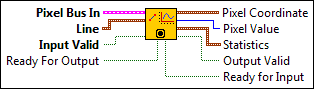
IMAQ FPGA LineProfile HSL32x1
Calculates the profile of a line of pixels. The relevant pixel information is taken from the specified vector (line).
Supported Image Types

|
Pixel Bus In when Input Valid is TRUE, contains one of the following: valid pixel data, an end of line signal, or an end of image signal.
|
||||||||||||||||||
|
Line specifies the pixel coordinates of the input line. The maximum length allowed is 2600 pixels. The VI accepts new line coordinates at the first valid pixel (start) of each image. The coordinates of all the points along the line are recomputed for each new image.
|
||||||||||||||||||
|
Input Valid specifies whether the next data point has arrived for processing. Wire the Output Valid output of an upstream node to this input to transfer data from the upstream node to this node. |
||||||||||||||||||
|
Ready For Output specifies whether downstream nodes are ready for this node to return a new value. The default is TRUE. Use a Feedback Node to wire the Ready for Input output of a downstream node to this input of the current node.
|
||||||||||||||||||
|
Pixel Coordinate is the point along the line represented by its x- and y-coordinates. The VI outputs the points along the line starting from the Line start point until the Line end point in consecutive cycles after all the pixel values along the line have been obtained. Output Valid is set to TRUE during the period when the VI outputs the points.
|
||||||||||||||||||
|
Pixel Value returns the grayscale pixel value in the Image at the Pixel Coordinate. |
||||||||||||||||||
|
Statistics contains information about the pixels found along the line.
|
||||||||||||||||||
|
Output Valid returns TRUE if this node has computed a result that downstream nodes can use. Wire this output to the Input Valid input of a downstream node to transfer data from the node to the downstream node. |
||||||||||||||||||
|
Ready for Input returns TRUE if this node is ready to accept new input data. Use a Feedback Node to wire this output to the Ready for Output input of an upstream node.
|
IMAQ FPGA LineProfile HSL32x1 Details
|
Note Resource estimates are based on a 40 MHz clock. |
Virtex-5
Estimated Device Utilization
- Slice Registers: 1406
- Slice LUTs: 10673
- DSP48s: 1
- Block RAMs: 0
Estimated Performance
- Minimum Latency: 1
- Initiation Interval: 1
Spartan-6
Estimated Device Utilization
- Slice Registers: 992
- Slice LUTs: 5358
- DSP48s: 1
- Block RAMs: 2
Estimated Performance
- Minimum Latency: 1
- Initiation Interval: 1
Zynq
Estimated Device Utilization
- Slice Registers: 1274
- Slice LUTs: 6514
- DSP48s: 4
- Block RAMs: 6
Estimated Performance
- Minimum Latency: 1
- Initiation Interval: 1
Kintex-7
Estimated Device Utilization
- Slice Registers: 1372
- Slice LUTs: 9765
- DSP48s: 3
- Block RAMs: 2
Estimated Performance
- Minimum Latency: 1
- Initiation Interval: 1