IMAQ FPGA ColorHistogram VI
- Updated2023-02-21
- 30 minute(s) read
Requires: NI Vision Development Module FPGA
Calculates the histograms extracted from the three planes of an image.
 |
Note This VI has variable latency, which is dependent on the image size. Plug the Minimum Latency value from the Estimated Performance section into the following formula to determine the total latency.
Total Latency = Minimum Latency + (Image Width + 1) x Image Height + 1 |
IMAQ FPGA ColorHistogram with Number of Classes RGB32x1
Calculates the histograms extracted from the three planes of an image.
Supported Image Types


 |
Pixel Bus In when Input Valid is TRUE, contains one of the following: valid pixel data, an end of line signal, or an end of image signal.
|
||||||||||||||||||
|
Mask Pixel Bus In is an image specifying the region in the image to use for the calculation. Only those pixels in the original image that correspond to an equivalent non-zero pixel in the mask image are used for the calculation. The entire image is used in the calculation if Mask Pixel Bus In is not connected.
|
||||||||||||||||||
 |
Number of Classes specifies the number of classes used to classify the pixels. The default value is 256. |
||||||||||||||||||
 |
Input Valid specifies whether the next data point has arrived for processing. Wire the Output Valid output of an upstream node to this input to transfer data from the upstream node to this node. |
||||||||||||||||||
|
Ready For Output specifies whether downstream nodes are ready for this node to return a new value. The default is TRUE. Use a Feedback Node to wire the Ready for Input output of a downstream node to this input of the current node.
|
||||||||||||||||||
 |
Red Histogram returns the red histogram value. |
||||||||||||||||||
|
Green Histogram returns the green histogram value. |
||||||||||||||||||
|
Blue Histogram returns the blue histogram value. |
||||||||||||||||||
 |
Output Valid returns TRUE if this node has computed a result that downstream nodes can use. Wire this output to the Input Valid input of a downstream node to transfer data from the node to the downstream node. |
||||||||||||||||||
|
Ready for Input returns TRUE if this node is ready to accept new input data. Use a Feedback Node to wire this output to the Ready for Output input of an upstream node.
|


IMAQ FPGA ColorHistogram with Number of Classes RGB32x1 Details
|
Note Resource estimates are based on a 40 MHz clock. |
Virtex-5
Estimated Device Utilization
- Slice Registers: 3008
- Slice LUTs: 4386
- DSP48s: 3
- Block RAMs: 3
Estimated Performance
- Minimum Latency: 17
- Initiation Interval: 1
Spartan-6
Estimated Device Utilization
- Slice Registers: 2276
- Slice LUTs: 3972
- DSP48s: 3
- Block RAMs: 15
Estimated Performance
- Minimum Latency: 17
- Initiation Interval: 1
Zynq
Estimated Device Utilization
- Slice Registers: 3969
- Slice LUTs: 3924
- DSP48s: 3
- Block RAMs: 9
Estimated Performance
- Minimum Latency: 13
- Initiation Interval: 1
Kintex-7
Estimated Device Utilization
- Slice Registers: 887
- Slice LUTs: 1228
- DSP48s: 2
- Block RAMs: 3
Estimated Performance
- Minimum Latency: 13
- Initiation Interval: 1
IMAQ FPGA ColorHistogram with Number of Classes HSL32x1
Calculates the histograms extracted from the three planes of an image.
Supported Image Types

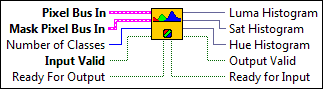
|
Pixel Bus In when Input Valid is TRUE, contains one of the following: valid pixel data, an end of line signal, or an end of image signal.
|
||||||||||||||||||
|
Mask Pixel Bus In is an image specifying the region in the image to use for the calculation. Only those pixels in the original image that correspond to an equivalent non-zero pixel in the mask image are used for the calculation. The entire image is used in the calculation if Mask Pixel Bus In is not connected.
|
||||||||||||||||||
|
Number of Classes specifies the number of classes used to classify the pixels. The default value is 256. |
||||||||||||||||||
|
Input Valid specifies whether the next data point has arrived for processing. Wire the Output Valid output of an upstream node to this input to transfer data from the upstream node to this node. |
||||||||||||||||||
|
Ready For Output specifies whether downstream nodes are ready for this node to return a new value. The default is TRUE. Use a Feedback Node to wire the Ready for Input output of a downstream node to this input of the current node.
|
||||||||||||||||||
|
Luma Histogram returns the luma histogram value. |
||||||||||||||||||
|
Sat Histogram returns the saturation histogram value. |
||||||||||||||||||
|
Hue Histogram returns the hue histogram value. |
||||||||||||||||||
|
Output Valid returns TRUE if this node has computed a result that downstream nodes can use. Wire this output to the Input Valid input of a downstream node to transfer data from the node to the downstream node. |
||||||||||||||||||
|
Ready for Input returns TRUE if this node is ready to accept new input data. Use a Feedback Node to wire this output to the Ready for Output input of an upstream node.
|
IMAQ FPGA ColorHistogram with Number of Classes HSL32x1 Details
|
Note Resource estimates are based on a 40 MHz clock. |
Virtex-5
Estimated Device Utilization
- Slice Registers: 3008
- Slice LUTs: 4386
- DSP48s: 3
- Block RAMs: 3
Estimated Performance
- Minimum Latency: 17
- Initiation Interval: 1
Spartan-6
Estimated Device Utilization
- Slice Registers: 2276
- Slice LUTs: 3970
- DSP48s: 3
- Block RAMs: 15
Estimated Performance
- Minimum Latency: 17
- Initiation Interval: 1
Zynq
Estimated Device Utilization
- Slice Registers: 3969
- Slice LUTs: 3922
- DSP48s: 3
- Block RAMs: 9
Estimated Performance
- Minimum Latency: 13
- Initiation Interval: 1
Kintex-7
Estimated Device Utilization
- Slice Registers: 887
- Slice LUTs: 1227
- DSP48s: 2
- Block RAMs: 3
Estimated Performance
- Minimum Latency: 13
- Initiation Interval: 1
IMAQ FPGA ColorHistogram RGB32x1
Calculates the histograms extracted from the three planes of an image.
Supported Image Types

|
Pixel Bus In when Input Valid is TRUE, contains one of the following: valid pixel data, an end of line signal, or an end of image signal.
|
||||||||||||||||||
|
Mask Pixel Bus In is an image specifying the region in the image to use for the calculation. Only those pixels in the original image that correspond to an equivalent non-zero pixel in the mask image are used for the calculation. The entire image is used in the calculation if Mask Pixel Bus In is not connected.
|
||||||||||||||||||
|
Input Valid specifies whether the next data point has arrived for processing. Wire the Output Valid output of an upstream node to this input to transfer data from the upstream node to this node. |
||||||||||||||||||
|
Ready For Output specifies whether downstream nodes are ready for this node to return a new value. The default is TRUE. Use a Feedback Node to wire the Ready for Input output of a downstream node to this input of the current node.
|
||||||||||||||||||
|
Red Histogram returns the red histogram value. |
||||||||||||||||||
|
Green Histogram returns the green histogram value. |
||||||||||||||||||
|
Blue Histogram returns the blue histogram value. |
||||||||||||||||||
|
Output Valid returns TRUE if this node has computed a result that downstream nodes can use. Wire this output to the Input Valid input of a downstream node to transfer data from the node to the downstream node. |
||||||||||||||||||
|
Ready for Input returns TRUE if this node is ready to accept new input data. Use a Feedback Node to wire this output to the Ready for Output input of an upstream node.
|
IMAQ FPGA ColorHistogram RGB32x1 Details
|
Note Resource estimates are based on a 40 MHz clock. |
Virtex-5
Estimated Device Utilization
- Slice Registers: 518
- Slice LUTs: 1318
- DSP48s: 0
- Block RAMs: 3
Estimated Performance
- Minimum Latency: 2
- Initiation Interval: 1
Spartan-6
Estimated Device Utilization
- Slice Registers: 514
- Slice LUTs: 1072
- DSP48s: 0
- Block RAMs: 12
Estimated Performance
- Minimum Latency: 2
- Initiation Interval: 1
Zynq
Estimated Device Utilization
- Slice Registers: 552
- Slice LUTs: 963
- DSP48s: 0
- Block RAMs: 6
Estimated Performance
- Minimum Latency: 2
- Initiation Interval: 1
Kintex-7
Estimated Device Utilization
- Slice Registers: 1325
- Slice LUTs: 2263
- DSP48s: 0
- Block RAMs: 15
Estimated Performance
- Minimum Latency: 2
- Initiation Interval: 1
IMAQ FPGA ColorHistogram HSL32x1
Calculates the histograms extracted from the three planes of an image.
Supported Image Types

|
Pixel Bus In when Input Valid is TRUE, contains one of the following: valid pixel data, an end of line signal, or an end of image signal.
|
||||||||||||||||||
|
Mask Pixel Bus In is an image specifying the region in the image to use for the calculation. Only those pixels in the original image that correspond to an equivalent non-zero pixel in the mask image are used for the calculation. The entire image is used in the calculation if Mask Pixel Bus In is not connected.
|
||||||||||||||||||
|
Input Valid specifies whether the next data point has arrived for processing. Wire the Output Valid output of an upstream node to this input to transfer data from the upstream node to this node. |
||||||||||||||||||
|
Ready For Output specifies whether downstream nodes are ready for this node to return a new value. The default is TRUE. Use a Feedback Node to wire the Ready for Input output of a downstream node to this input of the current node.
|
||||||||||||||||||
|
Luma Histogram returns the luma histogram value. |
||||||||||||||||||
|
Sat Histogram returns the saturation histogram value. |
||||||||||||||||||
|
Hue Histogram returns the hue histogram value. |
||||||||||||||||||
|
Output Valid returns TRUE if this node has computed a result that downstream nodes can use. Wire this output to the Input Valid input of a downstream node to transfer data from the node to the downstream node. |
||||||||||||||||||
|
Ready for Input returns TRUE if this node is ready to accept new input data. Use a Feedback Node to wire this output to the Ready for Output input of an upstream node.
|
IMAQ FPGA ColorHistogram HSL32x1 Details
|
Note Resource estimates are based on a 40 MHz clock. |
Virtex-5
Estimated Device Utilization
- Slice Registers: 518
- Slice LUTs: 1318
- DSP48s: 0
- Block RAMs: 3
Estimated Performance
- Minimum Latency: 2
- Initiation Interval: 1
Spartan-6
Estimated Device Utilization
- Slice Registers: 514
- Slice LUTs: 1135
- DSP48s: 0
- Block RAMs: 12
Estimated Performance
- Minimum Latency: 2
- Initiation Interval: 1
Zynq
Estimated Device Utilization
- Slice Registers: 552
- Slice LUTs: 962
- DSP48s: 0
- Block RAMs: 6
Estimated Performance
- Minimum Latency: 2
- Initiation Interval: 1
Kintex-7
Estimated Device Utilization
- Slice Registers: 530
- Slice LUTs: 905
- DSP48s: 0
- Block RAMs: 6
Estimated Performance
- Minimum Latency: 2
- Initiation Interval: 1
IMAQ FPGA ColorHistogram with Number of Classes NoMask RGB32x1
Calculates the histograms extracted from the three planes of an image.
Supported Image Types
|
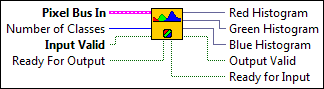
Pixel Bus In when Input Valid is TRUE, contains one of the following: valid pixel data, an end of line signal, or an end of image signal.
|
||||||||||||||||||
|
Number of Classes specifies the number of classes used to classify the pixels. The default value is 256. |
||||||||||||||||||
|
Input Valid specifies whether the next data point has arrived for processing. Wire the Output Valid output of an upstream node to this input to transfer data from the upstream node to this node. |
||||||||||||||||||
|
Ready For Output specifies whether downstream nodes are ready for this node to return a new value. The default is TRUE. Use a Feedback Node to wire the Ready for Input output of a downstream node to this input of the current node.
|
||||||||||||||||||
|
Red Histogram returns the red histogram value. |
||||||||||||||||||
|
Green Histogram returns the green histogram value. |
||||||||||||||||||
|
Blue Histogram returns the blue histogram value. |
||||||||||||||||||
|
Output Valid returns TRUE if this node has computed a result that downstream nodes can use. Wire this output to the Input Valid input of a downstream node to transfer data from the node to the downstream node. |
||||||||||||||||||
|
Ready for Input returns TRUE if this node is ready to accept new input data. Use a Feedback Node to wire this output to the Ready for Output input of an upstream node.
|
IMAQ FPGA ColorHistogram with Number of Classes NoMask RGB32x1 Details
|
Note Resource estimates are based on a 40 MHz clock. |
Virtex-5
Estimated Device Utilization
- Slice Registers: 663
- Slice LUTs: 1666
- DSP48s: 3
- Block RAMs: 3
Estimated Performance
- Minimum Latency: 17
- Initiation Interval: 1
Spartan-6
Estimated Device Utilization
- Slice Registers: 662
- Slice LUTs: 1556
- DSP48s: 3
- Block RAMs: 12
Estimated Performance
- Minimum Latency: 17
- Initiation Interval: 1
Zynq
Estimated Device Utilization
- Slice Registers: 2472
- Slice LUTs: 2991
- DSP48s: 3
- Block RAMs: 6
Estimated Performance
- Minimum Latency: 13
- Initiation Interval: 1
Kintex-7
Estimated Device Utilization
- Slice Registers: 5397
- Slice LUTs: 7666
- DSP48s: 8
- Block RAMs: 15
Estimated Performance
- Minimum Latency: 13
- Initiation Interval: 1
IMAQ FPGA ColorHistogram with Number of Classes NoMask HSL32x1
Calculates the histograms extracted from the three planes of an image.
Supported Image Types

|
Pixel Bus In when Input Valid is TRUE, contains one of the following: valid pixel data, an end of line signal, or an end of image signal.
|
||||||||||||||||||
|
Number of Classes specifies the number of classes used to classify the pixels. The default value is 256. |
||||||||||||||||||
|
Input Valid specifies whether the next data point has arrived for processing. Wire the Output Valid output of an upstream node to this input to transfer data from the upstream node to this node. |
||||||||||||||||||
|
Ready For Output specifies whether downstream nodes are ready for this node to return a new value. The default is TRUE. Use a Feedback Node to wire the Ready for Input output of a downstream node to this input of the current node.
|
||||||||||||||||||
|
Luma Histogram returns the luma histogram value. |
||||||||||||||||||
|
Sat Histogram returns the saturation histogram value. |
||||||||||||||||||
|
Hue Histogram returns the hue histogram value. |
||||||||||||||||||
|
Output Valid returns TRUE if this node has computed a result that downstream nodes can use. Wire this output to the Input Valid input of a downstream node to transfer data from the node to the downstream node. |
||||||||||||||||||
|
Ready for Input returns TRUE if this node is ready to accept new input data. Use a Feedback Node to wire this output to the Ready for Output input of an upstream node.
|
IMAQ FPGA ColorHistogram with Number of Classes NoMask HSL32x1 Details
|
Note Resource estimates are based on a 40 MHz clock. |
Virtex-5
Estimated Device Utilization
- Slice Registers: 1657
- Slice LUTs: 3357
- DSP48s: 3
- Block RAMs: 3
Estimated Performance
- Minimum Latency: 17
- Initiation Interval: 1
Spartan-6
Estimated Device Utilization
- Slice Registers: 1608
- Slice LUTs: 3230
- DSP48s: 3
- Block RAMs: 12
Estimated Performance
- Minimum Latency: 17
- Initiation Interval: 1
Zynq
Estimated Device Utilization
- Slice Registers: 2552
- Slice LUTs: 3101
- DSP48s: 3
- Block RAMs: 6
Estimated Performance
- Minimum Latency: 13
- Initiation Interval: 1
Kintex-7
Estimated Device Utilization
- Slice Registers: 2159
- Slice LUTs: 3066
- DSP48s: 3
- Block RAMs: 6
Estimated Performance
- Minimum Latency: 13
- Initiation Interval: 1
IMAQ FPGA ColorHistogram NoMask RGB32x1
Calculates the histograms extracted from the three planes of an image.
Supported Image Types

|
Pixel Bus In when Input Valid is TRUE, contains one of the following: valid pixel data, an end of line signal, or an end of image signal.
|
||||||||||||||||||
|
Input Valid specifies whether the next data point has arrived for processing. Wire the Output Valid output of an upstream node to this input to transfer data from the upstream node to this node. |
||||||||||||||||||
|
Ready For Output specifies whether downstream nodes are ready for this node to return a new value. The default is TRUE. Use a Feedback Node to wire the Ready for Input output of a downstream node to this input of the current node.
|
||||||||||||||||||
|
Red Histogram returns the red histogram value. |
||||||||||||||||||
|
Green Histogram returns the green histogram value. |
||||||||||||||||||
|
Blue Histogram returns the blue histogram value. |
||||||||||||||||||
|
Output Valid returns TRUE if this node has computed a result that downstream nodes can use. Wire this output to the Input Valid input of a downstream node to transfer data from the node to the downstream node. |
||||||||||||||||||
|
Ready for Input returns TRUE if this node is ready to accept new input data. Use a Feedback Node to wire this output to the Ready for Output input of an upstream node.
|
IMAQ FPGA ColorHistogram NoMask RGB32x1 Details
|
Note Resource estimates are based on a 40 MHz clock. |
Virtex-5
Estimated Device Utilization
- Slice Registers: 498
- Slice LUTs: 1301
- DSP48s: 0
- Block RAMs: 3
Estimated Performance
- Minimum Latency: 2
- Initiation Interval: 1
Spartan-6
Estimated Device Utilization
- Slice Registers: 494
- Slice LUTs: 1070
- DSP48s: 0
- Block RAMs: 12
Estimated Performance
- Minimum Latency: 2
- Initiation Interval: 1
Zynq
Estimated Device Utilization
- Slice Registers: 530
- Slice LUTs: 960
- DSP48s: 0
- Block RAMs: 6
Estimated Performance
- Minimum Latency: 2
- Initiation Interval: 1
Kintex-7
Estimated Device Utilization
- Slice Registers: 508
- Slice LUTs: 885
- DSP48s: 0
- Block RAMs: 6
Estimated Performance
- Minimum Latency: 2
- Initiation Interval: 1
IMAQ FPGA ColorHistogram NoMask HSL32x1
Calculates the histograms extracted from the three planes of an image.
Supported Image Types
|
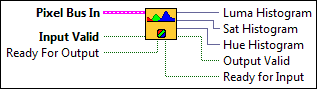
Pixel Bus In when Input Valid is TRUE, contains one of the following: valid pixel data, an end of line signal, or an end of image signal.
|
||||||||||||||||||
|
Input Valid specifies whether the next data point has arrived for processing. Wire the Output Valid output of an upstream node to this input to transfer data from the upstream node to this node. |
||||||||||||||||||
|
Ready For Output specifies whether downstream nodes are ready for this node to return a new value. The default is TRUE. Use a Feedback Node to wire the Ready for Input output of a downstream node to this input of the current node.
|
||||||||||||||||||
|
Luma Histogram returns the luma histogram value. |
||||||||||||||||||
|
Sat Histogram returns the saturation histogram value. |
||||||||||||||||||
|
Hue Histogram returns the hue histogram value. |
||||||||||||||||||
|
Output Valid returns TRUE if this node has computed a result that downstream nodes can use. Wire this output to the Input Valid input of a downstream node to transfer data from the node to the downstream node. |
||||||||||||||||||
|
Ready for Input returns TRUE if this node is ready to accept new input data. Use a Feedback Node to wire this output to the Ready for Output input of an upstream node.
|
IMAQ FPGA ColorHistogram NoMask HSL32x1 Details
|
Note Resource estimates are based on a 40 MHz clock. |
Virtex-5
Estimated Device Utilization
- Slice Registers: 498
- Slice LUTs: 1302
- DSP48s: 0
- Block RAMs: 3
Estimated Performance
- Minimum Latency: 2
- Initiation Interval: 1
Spartan-6
Estimated Device Utilization
- Slice Registers: 494
- Slice LUTs: 1073
- DSP48s: 0
- Block RAMs: 12
Estimated Performance
- Minimum Latency: 2
- Initiation Interval: 1
Zynq
Estimated Device Utilization
- Slice Registers: 530
- Slice LUTs: 960
- DSP48s: 0
- Block RAMs: 6
Estimated Performance
- Minimum Latency: 2
- Initiation Interval: 1
Kintex-7
Estimated Device Utilization
- Slice Registers: 508
- Slice LUTs: 886
- DSP48s: 0
- Block RAMs: 6
Estimated Performance
- Minimum Latency: 2
- Initiation Interval: 1