IMAQ Learn Pattern 5
- Updated2023-02-21
- 13 minute(s) read
Requires: NI Vision Development Module
Creates a description of the template image for which you want to search during the matching phase of pattern matching. This description data is appended to the input template image. During the matching phase, the template descriptor is extracted from the template image and used to search for the template in the inspection image.
For more information on Pattern Matching, refer to Advanced Pattern Matching Concepts.
Supported Image Types


 |
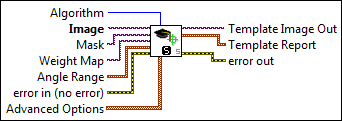
Algorithm specifies the pattern matching algorithm to use to search the Template Image in Image. Refer to the NI Vision Concepts Help for in-depth information about each algorithm.
|
||||||||||||||||||||||||||||||||||||||||||||
 |
Image is a reference to the template image for which you want to search in the inspection image. |
||||||||||||||||||||||||||||||||||||||||||||
|
Mask is an optional mask image. This image must be a U8 image. The VI learns only those pixels in the source image whose corresponding pixels in the mask are zero. Non-zero pixels are ignored. Do not set this parameter to learn the whole image. |
||||||||||||||||||||||||||||||||||||||||||||
|
Weight Map is the image to specify weights to suppress noise and false defects in the defect map. Pixels with lower weights are enhanced and pixels with higher weights are suppressed in the defect map. Weight Map is used with the IMAQ Calculate Defect Map VI. |
||||||||||||||||||||||||||||||||||||||||||||
 |
Angle Range specifies the range of angles for which the template should be learned. Passing an empty array will cause the VI to only search for shift-invariant matches.
|
||||||||||||||||||||||||||||||||||||||||||||
 |
error in (no error) describes the error status before this VI or function runs. The default is no error. If an error occurred before this VI or function runs, the VI or function passes the error in value to error out. This VI or function runs normally only if no error occurred before this VI or function runs. If an error occurs while this VI or function runs, it runs normally and sets its own error status in error out. Use the Simple Error Handler or General Error Handler VIs to display the description of the error code. Use error in and error out to check errors and to specify execution order by wiring error out from one node to error in of the next node.
|
||||||||||||||||||||||||||||||||||||||||||||
 |
Advanced Options sets a variety of algorithm-related options to use during the learning phase.
|
||||||||||||||||||||||||||||||||||||||||||||
 |
Template Image Out is a reference to the template. This template image contains the data that defines the template pattern for the matching phase. |
||||||||||||||||||||||||||||||||||||||||||||
 |
Template Report contains information describing the parameters used while learning the template.
|
||||||||||||||||||||||||||||||||||||||||||||
 |
error out contains error information. If error in indicates that an error occurred before this VI or function ran, error out contains the same error information. Otherwise, it describes the error status that this VI or function produces. Right-click the error out indicator on the front panel and select Explain Error from the shortcut menu for more information about the error.
|


Examples
Refer to the following for an example that uses this VI.
- LabVIEW\examples\Vision\Pattern Matching\Pattern Matching (All).vi
- LabVIEW\examples\Vision\Pattern Matching\Pattern Matching.vi