IMAQ Learn Binocular Stereo Calibration VI
- Updated2023-02-21
- 6 minute(s) read
Requires: NI Vision Development Module
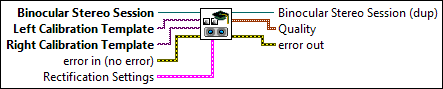
Learns binocular stereo information. This VI takes the calibrated template images from the left and right cameras as input, and computes the calibration information required for binocular stereo vision. The calibration process computes the rotation matrix and translation vector between the two cameras. It also computes the essential and fundamental matrices. During the learn process, this VI will also compute the lookup tables required to rectify the left and right images and identifies the regions in the left and right images that overlap.
This VI assumes that both the calibrated templates have been learned from the same set of grid images (or points). This VI will use the reference points stored in the two calibrated templates to learn the binocular stereo calibration information. It will use the points from the first set (the first grid image or points) to select the origin of the real world coordinate system.
 |
Binocular Stereo Session is the reference to the binocular stereo vision session on which this VI operates. |
||||||||
 |
Left Calibration Template is the calibrated image that represents the single camera information from the left camera in the binocular stereo setup. |
||||||||
|
Right Calibration Template is the calibrated image that represents the single camera information from the right camera in the binocular stereo setup. |
||||||||
 |
error in (no error) describes the error status before this VI or function runs. The default is no error. If an error occurred before this VI or function runs, the VI or function passes the error in value to error out. This VI or function runs normally only if no error occurred before this VI or function runs. If an error occurs while this VI or function runs, it runs normally and sets its own error status in error out. Use the Simple Error Handler or General Error Handler VIs to display the description of the error code. Use error in and error out to check errors and to specify execution order by wiring error out from one node to error in of the next node.
|
||||||||
 |
Rectification Settings specifies the information that is learned to rectify the left and right images.
|
||||||||
 |
Binocular Stereo Session (dup) is the reference to the stereo vision session on which this VI operates. |
||||||||
 |
Quality indicates the quality of the stereo calibration that is learned.
|
||||||||
 |
error out contains error information. If error in indicates that an error occurred before this VI or function ran, error out contains the same error information. Otherwise, it describes the error status that this VI or function produces. Right-click the error out indicator on the front panel and select Explain Error from the shortcut menu for more information about the error.
|


Examples
Refer to the following for examples that use this VI.
- LabVIEW\examples\Vision\Stereo Vision\Compute Depth Image\Compute Depth Image.vi