IMAQ Fit Contour VI
- Updated2023-02-21
- 16 minute(s) read
Requires: NI Vision Development Module
Fits a contour with an equation. The fit will occur in corrected space if the contour is calibrated.
IMAQ Fit Contour Line
Fits a contour with a line.

 |
Contour Image is a reference to the image containing a contour. |
||||||||||||
 |
Pixel Radius specifies the neighborhood pixel relationship for the initial subset of points being used. |
||||||||||||
 |
error in (no error) describes the error status before this VI or function runs. The default is no error. If an error occurred before this VI or function runs, the VI or function passes the error in value to error out. This VI or function runs normally only if no error occurred before this VI or function runs. If an error occurs while this VI or function runs, it runs normally and sets its own error status in error out. Use the Simple Error Handler or General Error Handler VIs to display the description of the error code. Use error in and error out to check errors and to specify execution order by wiring error out from one node to error in of the next node.
|
||||||||||||
 |
Contour Image Out is a reference to the image containing a contour. |
||||||||||||
 |
Line Segment represents the intersection of the line equation and the contour.
|
||||||||||||
 |
Line Equation is a cluster of three coefficients A, B, and C of the equation in the normal form (Ax + By + C=0) of the best fit line. |
||||||||||||
 |
error out contains error information. If error in indicates that an error occurred before this VI or function ran, error out contains the same error information. Otherwise, it describes the error status that this VI or function produces. Right-click the error out indicator on the front panel and select Explain Error from the shortcut menu for more information about the error.
|


IMAQ Fit Contour B-Spline
Fits a contour with a B-spline curve.

|
Contour Image is a reference to the image containing a contour. |
||||||
 |
Control Points specifies the number of control points on the B-spline curve. The default is 10. |
||||||
|
Degree specifies the order of polynomials that form the B-spline curve. The default is 3. |
||||||
|
error in (no error) describes the error status before this VI or function runs. The default is no error. If an error occurred before this VI or function runs, the VI or function passes the error in value to error out. This VI or function runs normally only if no error occurred before this VI or function runs. If an error occurs while this VI or function runs, it runs normally and sets its own error status in error out. Use the Simple Error Handler or General Error Handler VIs to display the description of the error code. Use error in and error out to check errors and to specify execution order by wiring error out from one node to error in of the next node.
|
||||||
|
Contour Image Out is a reference to the image containing a contour. |
||||||
 |
Best B-Spline Fit returns the points of the best-fit B-spline curve.
|
||||||
|
error out contains error information. If error in indicates that an error occurred before this VI or function ran, error out contains the same error information. Otherwise, it describes the error status that this VI or function produces. Right-click the error out indicator on the front panel and select Explain Error from the shortcut menu for more information about the error.
|

IMAQ Fit Contour Circle
Fits a contour with a circle.

|
Contour Image is a reference to the image containing a contour. |
||||||||
 |
Pixel Radius specifies the acceptable distance, in pixels, that a point determined to belong to the circle can be from the perimeter of the circle. |
||||||||
 |
Reject Outliers? controls whether to use every given radial point or only a subset of the points to fit the circle. If this control is TRUE, the algorithm determines the best subset of points to use and ignores the outliers (the points outside the subset). If this control is FALSE, the algorithm uses every given point. |
||||||||
|
error in (no error) describes the error status before this VI or function runs. The default is no error. If an error occurred before this VI or function runs, the VI or function passes the error in value to error out. This VI or function runs normally only if no error occurred before this VI or function runs. If an error occurs while this VI or function runs, it runs normally and sets its own error status in error out. Use the Simple Error Handler or General Error Handler VIs to display the description of the error code. Use error in and error out to check errors and to specify execution order by wiring error out from one node to error in of the next node.
|
||||||||
|
Contour Image Out is a reference to the image containing a contour. |
||||||||
|
Circle returns the best-fit circle.
|
||||||||
|
error out contains error information. If error in indicates that an error occurred before this VI or function ran, error out contains the same error information. Otherwise, it describes the error status that this VI or function produces. Right-click the error out indicator on the front panel and select Explain Error from the shortcut menu for more information about the error.
|
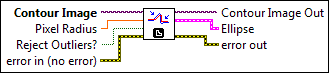
IMAQ Fit Contour Ellipse
Fits a contour with an ellipse.
|
Contour Image is a reference to the image containing a contour. |
||||||||||||
|
Pixel Radius specifies the acceptable distance, in pixels, that a point determined to belong to the ellipse can be from the perimeter of the ellipse. |
||||||||||||
|
Reject Outliers? controls whether to use every given radial point or only a subset of the points to fit the ellipse. If this control is TRUE, the algorithm determines the best subset of points to use and ignores the outliers (the points outside the subset). If this control is FALSE, the algorithm uses every given point. |
||||||||||||
|
error in (no error) describes the error status before this VI or function runs. The default is no error. If an error occurred before this VI or function runs, the VI or function passes the error in value to error out. This VI or function runs normally only if no error occurred before this VI or function runs. If an error occurs while this VI or function runs, it runs normally and sets its own error status in error out. Use the Simple Error Handler or General Error Handler VIs to display the description of the error code. Use error in and error out to check errors and to specify execution order by wiring error out from one node to error in of the next node.
|
||||||||||||
|
Contour Image Out is a reference to the image containing a contour. |
||||||||||||
|
Ellipse specifies the best-fit ellipse.
|
||||||||||||
|
error out contains error information. If error in indicates that an error occurred before this VI or function ran, error out contains the same error information. Otherwise, it describes the error status that this VI or function produces. Right-click the error out indicator on the front panel and select Explain Error from the shortcut menu for more information about the error.
|
IMAQ Fit Contour Polynomial
Fits a contour with a polynomial.

|
Contour Image is a reference to the image containing a contour. |
||||||
|
Polynomial Order specifies the order of the polynomial equation. |
||||||
|
error in (no error) describes the error status before this VI or function runs. The default is no error. If an error occurred before this VI or function runs, the VI or function passes the error in value to error out. This VI or function runs normally only if no error occurred before this VI or function runs. If an error occurs while this VI or function runs, it runs normally and sets its own error status in error out. Use the Simple Error Handler or General Error Handler VIs to display the description of the error code. Use error in and error out to check errors and to specify execution order by wiring error out from one node to error in of the next node.
|
||||||
|
Contour Image Out is a reference to the image containing a contour. |
||||||
|
Best Polynomial Fit returns the points of the best-fit polynomial.
|
||||||
 |
Polynomial Coefficients returns the coefficients of the polynomial equation. |
||||||
|
error out contains error information. If error in indicates that an error occurred before this VI or function ran, error out contains the same error information. Otherwise, it describes the error status that this VI or function produces. Right-click the error out indicator on the front panel and select Explain Error from the shortcut menu for more information about the error.
|
Examples
Refer to the following for an example that uses this VI.
- LabVIEW\examples\Vision\Contour\Contour Defect Inspection.vi