IMAQ FAST Feature Point Detector VI
- Updated2023-02-21
- 5 minute(s) read
Requires: NI Vision Development Module
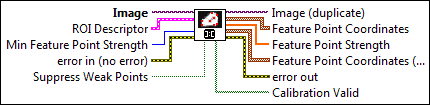
Detects corners in an image using the features from accelerated segment test (FAST) algorithm. FAST identifies all interesting features in an image, and selects features so that they are consistently detected across various transformations, such as blurring, rotation, and scale.
 |
Image is a reference to the source image. |
||||||||||
 |
ROI Descriptor is a descriptor that defines the region within which to search for corners.
|
||||||||||
 |
Min Feature Point Strength is the minimum strength required for a point to qualify as a feature point. The maximum strength value is determined by the bit depth of the image. The default value is 32. |
||||||||||
 |
error in (no error) describes the error status before this VI or function runs. The default is no error. If an error occurred before this VI or function runs, the VI or function passes the error in value to error out. This VI or function runs normally only if no error occurred before this VI or function runs. If an error occurs while this VI or function runs, it runs normally and sets its own error status in error out. Use the Simple Error Handler or General Error Handler VIs to display the description of the error code. Use error in and error out to check errors and to specify execution order by wiring error out from one node to error in of the next node.
|
||||||||||
 |
Suppress Weak Points suppresses insignificant feature points. Because FAST detects many features, redundant features of low strength will be found near features of high strength. Use this parameter to remove the redundant features. The default value is TRUE. |
||||||||||
 |
Image (duplicate) is the reference to the image that contains corners. |
||||||||||
 |
Feature Point Coordinates returns the locations of the feature points detected in the image.
|
||||||||||
 |
Feature Point Strength returns the strength of the feature points detected in the image. |
||||||||||
|
Feature Point Coordinates (Real) returns the read world locations of the feature points detected in the calibrated image.
|
||||||||||
 |
error out contains error information. If error in indicates that an error occurred before this VI or function ran, error out contains the same error information. Otherwise, it describes the error status that this VI or function produces. Right-click the error out indicator on the front panel and select Explain Error from the shortcut menu for more information about the error.
|
||||||||||
 |
Calibration Valid indicates if the calibration information associated with the corners found is valid. Invalid calibration information occurs when a pixel lies outside the area of the image that was calibrated. If the calibration information is invalid, Calibration Valid Boolean is FALSE. |


Examples
Refer to the following for an example that uses this VI.
- LabVIEW\examples\Vision\Feature Correspondence\Feature Matching.vi