IMAQ Draw Text VI
- Updated2023-02-21
- 7 minute(s) read
Requires: NI Vision Development Module
Inserts text in an image.
 |
Note This VI is not supported on ETS targets or VxWorks targets. |
Supported Image Types


 |
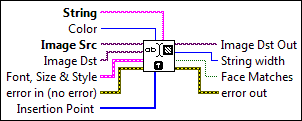
String is the text to write in an image. The string can be composed of multiple lines separated by a hard return. This control is empty by default . |
||||||||||||||||||||||||||||||||||||||||||||||||
 |
Color is the mode for writing the text. The default is 0, which specifies white. The following values are possible:
|
||||||||||||||||||||||||||||||||||||||||||||||||
 |
Image Src is a reference to the source image. |
||||||||||||||||||||||||||||||||||||||||||||||||
|
Image Dst is a reference to the destination image. |
||||||||||||||||||||||||||||||||||||||||||||||||
 |
Font, Size & Style is a cluster that enables the user to choose the font, size, style, and alignment of the text. This cluster contains the following elements:
|
||||||||||||||||||||||||||||||||||||||||||||||||
 |
error in (no error) describes the error status before this VI or function runs. The default is no error. If an error occurred before this VI or function runs, the VI or function passes the error in value to error out. This VI or function runs normally only if no error occurred before this VI or function runs. If an error occurs while this VI or function runs, it runs normally and sets its own error status in error out. Use the Simple Error Handler or General Error Handler VIs to display the description of the error code. Use error in and error out to check errors and to specify execution order by wiring error out from one node to error in of the next node.
|
||||||||||||||||||||||||||||||||||||||||||||||||
 |
Insertion Point is an array (x and y) specifying the location in which the text is inserted. The text position depends on the alignment mode chosen. The default is (0, 0). |
||||||||||||||||||||||||||||||||||||||||||||||||
 |
Image Dst Out is a reference to the destination image. If Image Dst is connected, Image Dst Out is the same as Image Dst. Otherwise, Image Dst Out refers to the image referenced by Image Src. |
||||||||||||||||||||||||||||||||||||||||||||||||
 |
String width returns the string length of the text. |
||||||||||||||||||||||||||||||||||||||||||||||||
 |
Face Matches returns TRUE if the user-specified font name was found. Returns FALSE if the font name was not found. Note that if the requested font name is not found, the operating system chooses the best match. |
||||||||||||||||||||||||||||||||||||||||||||||||
 |
error out contains error information. If error in indicates that an error occurred before this VI or function ran, error out contains the same error information. Otherwise, it describes the error status that this VI or function produces. Right-click the error out indicator on the front panel and select Explain Error from the shortcut menu for more information about the error.
|


