NI Vision for LabVIEW

IMAQ Classify Contour Distances VI

  • Updated2023-02-21
  • 5 minute(s) read
Owning Palette: Contour Analysis
Requires: NI Vision Development Module

Classifies the distance between a image containing a contour and a template image containing a contour.
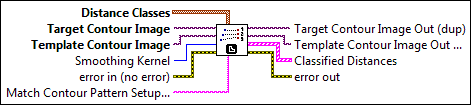
IMAQ Classify Contour Distances

c1dnclst.gif

Distance Classes is an array with one element for every distance class.

cdbl.gif

Minimum Distance is the minimum distance of the sample in the Target Contour Image to the sample in the Template Contour Image.

cdbl.gif

Maximum Distance is the maximum distance of the sample in the Target Contour Image to the sample in the Template Contour Image.

cu32.gif

Class Label specifies the class to which the sample belongs.

cgenclasstagrefflat.gif

Target Contour Image is a reference to the image containing the target contour.

cgenclasstagrefflat.gif

Template Contour Image is a reference to the template image.

cu32.gif

Smoothing Kernel specifies the size of the smoothing kernel.

cerrcodeclst.gif

error in (no error) describes the error status before this VI or function runs. The default is no error. If an error occurred before this VI or function runs, the VI or function passes the error in value to error out. This VI or function runs normally only if no error occurred before this VI or function runs. If an error occurs while this VI or function runs, it runs normally and sets its own error status in error out. Use the Simple Error Handler or General Error Handler VIs to display the description of the error code. Use error in and error out to check errors and to specify execution order by wiring error out from one node to error in of the next node.

cbool.gif

status is TRUE (X) if an error occurred before this VI or function ran or FALSE (checkmark) to indicate a warning or that no error occurred before this VI or function ran. The default is FALSE.

ci32.gif

code is the error or warning code. If status is TRUE, code is a nonzero error code. If status is FALSE, code is 0 or a warning code.

cstr.gif

source describes the origin of the error or warning and is, in most cases, the name of the VI or function that produced the error or warning. The default is an empty string.

cstr.gif

Match Contour Pattern Setup Data is a string that contains information from the IMAQ Setup Match Contour Pattern VI. If this input is not connected, the VI uses default parameters for all unconfigured options.

igenclasstagrefflat.gif

Target Contour Image Out (dup) is a reference to the image containing the target contour.

igenclasstagrefflat.gif

Template Contour Image Out (dup) is a reference to the template image.

i1dcclst.gif

Classified Distances is an array containing the classified distances.

idbl.gif

Length (pixel) specifies the length, in pixels, of the curves within the curvature range.

idbl.gif

Length (real) specifies the length, in calibrated units, of the curves within the curvature range.

idbl.gif

Maximum Distance (pixel) specifies the maximum distance, in pixels, between points along the selected contour and the template contour.

idbl.gif

Maximum Distance (real) specifies the maximum distance, in calibrated units, between points along the selected contour and the template contour.

iu32.gif

Class Label specifies the class to which the the sample belongs.

i1dnclst.gif

Template Subsection is an array of points that defines the boundary of the template.

idbl.gif

X is the x-coodrdinate of the point.

idbl.gif

Y is the y-coodrdinate of the point.

i1dnclst.gif

Target Subsection is an array of points that defines the boundary of the target.

idbl.gif

X is the x-coodrdinate of the point.

idbl.gif

Y is the y-coodrdinate of the point.

ierrcodeclst.gif

error out contains error information. If error in indicates that an error occurred before this VI or function ran, error out contains the same error information. Otherwise, it describes the error status that this VI or function produces. Right-click the error out indicator on the front panel and select Explain Error from the shortcut menu for more information about the error.

ibool.gif

status is TRUE (X) if an error occurred or FALSE (checkmark) to indicate a warning or that no error occurred.

ii32.gif

code is the error or warning code. If status is TRUE, code is a nonzero error code. If status is FALSE, code is 0 or a warning code.

istr.gif

source describes the origin of the error or warning and is, in most cases, the name of the VI or function that produced the error or warning. The default is an empty string.

Log in to get a better experience