NI Vision for LabVIEW

IMAQ Clamp Max VI

  • Updated2023-02-21
  • 12 minute(s) read
Owning Palette: Measure Distances
Requires: NI Vision Development Module

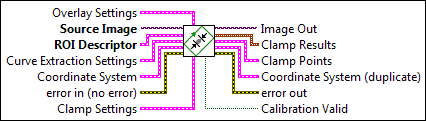
Finds edges along a region of interest (rotated rectangle only) and measures the distance between the furthest opposed points on the edges found. Edges are determined by extracting contours from the ROI and analyzing their order and geometry. When valid calibration information is present, the distance is measured in pixels and real-world units.

Examples

Supported Image Types

8-bit unsigned grayscale

IMAQ Clamp Max

ccclst.gif

Overlay Settings is a cluster defining the information that is to be overlaid on the result image.

cbool.gif

Show Search Area determines whether to overlay the ROI on the image.

cbool.gif

Show Curves determines whether to overlay the curves on the image.

cbool.gif

Show Clamp Locations determines whether to overlay the clamp locations on the image.

cbool.gif

Show Result determines whether to overlay the result of the clamp calculation on the result image.

cu32.gif

Search Area Color specifies the color to use to overlay the search area.

cu32.gif

Curves Color specifies the color to use to overlay the curves.

cu32.gif

Clamp Locations Color specifies the color to use to overlay the clamp locations.

cu32.gif

Result Color specifies the color to use to overlay the result.

cstr.gif

Overlay Group Name specifies the overlay group name for the step overlays.

cgenclasstagrefflat.gif

Source Image is a reference to the source image.

ccclst.gif

ROI Descriptor is the descriptor that defines the rotated rectangle within which to perform the clamp.

c1di32.gif

Global Rectangle contains the coordinates of the bounding rectangle.

c1dcclst.gif

Contours are each of the individual shapes that define an ROI.

cenum.gif

ID refers to whether the contour is the external or internal edge of an ROI.

cu32.gif

Type is the shape type of the contour.

c1di32.gif

Coordinates indicates the relative position of the contour.

ccclst.gif

Curve Extraction Settings is a cluster containing information about how curves are extracted from the image.

cu32.gif

Extraction Mode specifies how the VI identifies curves in the image. Choose from the following options:

Normal (0)

(Default) Select Normal if you want the VI to make no assumptions about the uniformity of objects in the image or the image background.

Uniform Regions (1)

Select Uniform Regions if you want the VI to assume that either the objects in the image or the image background consist of uniform pixel values. This allows the VI to more accurately calculate the external curves of the objects.

ci32.gif

Edge Threshold specifies the minimum contrast a seed point must have for it to begin a curve. Valid values range from 1 to 255. The default value is 75.

cu32.gif

Edge Filter Size specifies the width of the edge filter that the VI uses to identify curves in the image. The following options are available:

Fine (0)

Sets the Edge Filter Size to fine.

Normal (1)

(Default) Sets the Edge Filter Size to normal.

Contour Tracing (2)

Sets the Edge Filter Size to contour tracing, which provides the best results for contour extraction but increases the time required to process the image.

ci32.gif

Min Length specifies the length, in pixels, of the smallest curve that you want the VI to identify. The VI ignores any curves that have a length less than this value. The default value is 25.

ci32.gif

Row Search Step Size specifies the distance, in the y direction, between the image rows that the algorithm inspects for curve seed points. Valid values range from 1 to 255. The default value is 15.

ci32.gif

Col Search Step Size specifies the distance, in the x direction, between the image columns that the algorithm inspects for curve seed points. Valid values range from 1 to 255. The default value is 15.

ci32.gif

Max Endpoint Gap specifies the maximum gap, in pixels, between the endpoints of a curve that the VI identifies as a closed curve. If the gap is larger than this value, the VI identifies the curve as an open curve. The default value is 10.

cbool.gif

Closed specifies whether to identify only closed curves in the image. The default value is FALSE, which specifies that the VI should identify both open and closed curves.

cbool.gif

Subpixel specifies whether to detect curve points with subpixel accuracy. The default is FALSE.

ccclst.gif

Coordinate System specifies the coordinate system to which the ROI Descriptor is linked.

ccclst.gif

Reference System is a cluster containing the following elements.

cnclst.gif

Origin is a point cluster that specifies the origin of the base-reference coordinate system.

csgl.gif

X is the x-coordinate of the center of the circle.

csgl.gif

Y is the y-coordinate of the center of the circle.

csgl.gif

Angle (deg) is the angle the base-reference coordinate system makes with the image coordinate system.

cu32.gif

Axis Reference is defined as Direct or Indirect. Refer to Axis Type for more information.

ccclst.gif

Measurement System is a cluster containing the following elements.

cnclst.gif

Origin is a point cluster that specifies the origin of the base-reference coordinate system.

csgl.gif

X is the x-coordinate of the center of the circle.

csgl.gif

Y is the y-coordinate of the center of the circle.

csgl.gif

Angle (deg) is the angle the base-reference coordinate system makes with the image coordinate system.

cu32.gif

Axis Reference is defined as Direct or Indirect. Refer to Axis Type for more information.

cerrcodeclst.gif

error in (no error) describes the error status before this VI or function runs. The default is no error. If an error occurred before this VI or function runs, the VI or function passes the error in value to error out. This VI or function runs normally only if no error occurred before this VI or function runs. If an error occurs while this VI or function runs, it runs normally and sets its own error status in error out. Use the Simple Error Handler or General Error Handler VIs to display the description of the error code. Use error in and error out to check errors and to specify execution order by wiring error out from one node to error in of the next node.

cbool.gif

status is TRUE (X) if an error occurred before this VI or function ran or FALSE (checkmark) to indicate a warning or that no error occurred before this VI or function ran. The default is FALSE.

ci32.gif

code is the error or warning code. If status is TRUE, code is a nonzero error code. If status is FALSE, code is 0 or a warning code.

cstr.gif

source describes the origin of the error or warning and is, in most cases, the name of the VI or function that produced the error or warning. The default is an empty string.

ccclst.gif

Clamp Settings is a cluster that controls the behavior of the clamp. You can control the angle tolerance of the clamp and the edge polarity of the curves.

cdbl.gif

Angle Range (+/-) specifies the tolerance, in degrees, of the rotated rectangle ROI. This value can range from 0 to 180. The default is 5 degrees.

cnclst.gif

Edge Polarity specifies the polarity of the edges.

cu32.gif

Start is the starting polarity of the edge.

cu32.gif

End is the ending polarity of the edge.

igenclasstagrefflat.gif

Image Out is a reference to Image.

inclst.gif

Clamp Results is a cluster which shows the measured distances and angles for the applied clamp.

idbl.gif

Distance (Pixels) specifies the distance, in pixels, measured by the clamp.

idbl.gif

Distance (Real World) specifies the distance, in real world units, measured by the clamp. The VI provides this measurement when the input image is calibrated.

idbl.gif

Angle (Absolute) specifies the absolute angle of the clamp.

idbl.gif

Angle (Relative) specifies the angle of the clamp, with respect to the ROI angle.

icclst.gif

Clamp Points is a cluster specifying the locations of the clamp start and end points, both in pixel and real-world coordinates.

icclst.gif

Pixels specifies the start and end points of the clamp in pixels.

inclst.gif

Start is the start point of the clamp.

isgl.gif

X is the x-coordinate of the point.

isgl.gif

Y is the y-coordinate of the point.

inclst.gif

End is the end point of the clamp.

isgl.gif

X is the x-coordinate of the point.

isgl.gif

Y is the y-coordinate of the point.

icclst.gif

Real World specifies the start and end points of the clamp in real world units.

inclst.gif

Start is the start point of the clamp.

isgl.gif

X is the x-coordinate of the point.

isgl.gif

Y is the y-coordinate of the point.

inclst.gif

End is the end point of the clamp.

isgl.gif

X is the x-coordinate of the point.

isgl.gif

Y is the y-coordinate of the point.

icclst.gif

Coordinate System (duplicate) is a reference to the coordinate system.

icclst.gif

Reference System is a cluster containing the following elements.

inclst.gif

Origin is a point cluster that specifies the origin of the base-reference coordinate system.

isgl.gif

X is the x-coordinate of the center of the pattern.

isgl.gif

Y is the y-coordinate of the center of the pattern.

isgl.gif

Angle (deg) is the angle the base-reference coordinate system makes with the image coordinate system.

iu32.gif

Axis Reference is defined as Direct or Indirect. Refer to Axis Type for more information.

icclst.gif

Measurement System is a cluster containing the following elements.

inclst.gif

Origin is a point cluster that specifies the origin of the base-reference coordinate system.

isgl.gif

X is the x-coordinate of the center of the pattern.

isgl.gif

Y is the y-coordinate of the center of the pattern.

isgl.gif

Angle (deg) is the angle the base-reference coordinate system makes with the image coordinate system.

iu32.gif

Axis Reference is defined as Direct or Indirect. Refer to Axis Type for more information.

ierrcodeclst.gif

error out contains error information. If error in indicates that an error occurred before this VI or function ran, error out contains the same error information. Otherwise, it describes the error status that this VI or function produces. Right-click the error out indicator on the front panel and select Explain Error from the shortcut menu for more information about the error.

ibool.gif

status is TRUE (X) if an error occurred or FALSE (checkmark) to indicate a warning or that no error occurred.

ii32.gif

code is the error or warning code. If status is TRUE, code is a nonzero error code. If status is FALSE, code is 0 or a warning code.

istr.gif

source describes the origin of the error or warning and is, in most cases, the name of the VI or function that produced the error or warning. The default is an empty string.

ibool.gif

Calibration Valid indicates whether the calibration information in the image is valid. Returns TRUE if calibration information was available to compute the clamp in real-world units.

Examples

Refer to the following for an example that uses this VI.

  • LabVIEW\examples\Vision\Caliper\Clamp Max.vi