Configure DIO Module Example
- Updated2023-07-17
- 2 minute(s) read
Configure DIO Module Example
Learn how to use LabVIEW to configure a DIO module.
The hypothetical DIO module in this example has programmable line direction and a per-line voltage comparator for programmable input thresholds. This example is created by Example Modules Inc. that uses a vendor prefix of Example on all properties and commands. The actual DIO data does not go through the SLSC LabVIEW API. The module conditions inputs/outputs for a DAQmx or cRIO device.
Configure DIO Module Example Code

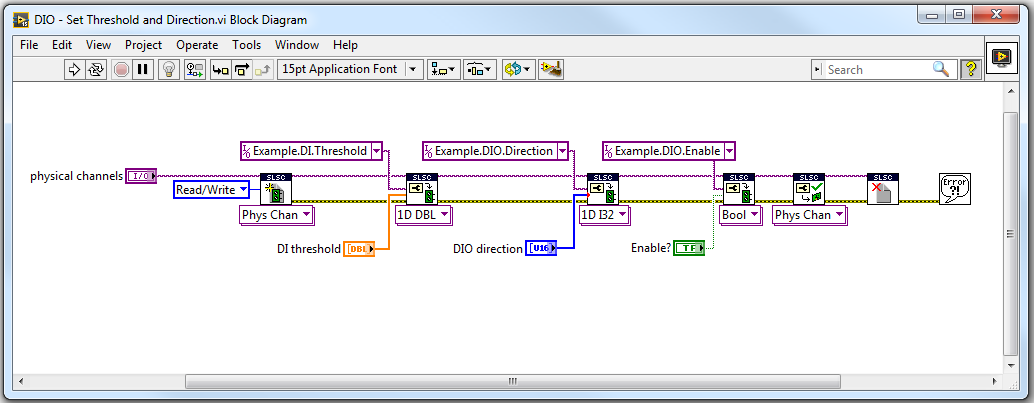
Configure DIO Module Example Discussion
This example can be broken down into the following steps:
- This example configures multiple physical channels, so the first step is to initialize a session for the desired physical channels using a colon-delimited range of channels. This example changes configuration so the reservation access must be read/write.
- Multiple channels are being configured, so the array instance of Set Phys Chan Property VI is used. The input array for both the threshold and direction settings must have the same size as the number of physical channels listed within the physical channels input.
- This module has an enable property that applies to all channels so only a single input is used with the final Set Property VI.
- After the property values are set, the Commit Properties for Phys Chans instance of the Commit Properties VI must be called. Only the session input is required because the session default physical channels include all of the channels used by the VI.
- Close the session when the VI exits.