niScope Fetch Measurement Stats VI
- Updated2025-10-21
- 3 minute(s) read
Obtains a waveform measurement and returns the measurement value for a single channel and record. Specify a particular measurement type, such as rise time, frequency, or voltage peak-to-peak. The waveform on which the digitizer calculates the waveform measurement is from an acquisition that you previously initiated. The statistics for the specified measurement are also returned, where the statistics are updated once every acquisition when the specified measurement is fetched by any of the Fetch/Read measurement VIs.
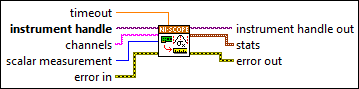
Inputs/Outputs
 timeout
—
timeout
—
timeout is the time (in seconds) to wait for the data to be acquired. Use 0 for this parameter to tell NI-SCOPE to fetch whatever is currently available. Using -1 for this parameter implies infinite timeout.  instrument handle
—
instrument handle
—
instrument handle identifies a particular instrument session.  channels
—
channels
—
channels specifies the channel(s) from which to acquire data. For more information, refer to Channel String Syntax.  scalar measurement
—
scalar measurement
—
scalar measurement is the measurement to perform on the waveform read from the digitizer. Refer to the list of NI-SCOPE Scalar Measurements for more information.  error in
—
error in
—
error in describes error conditions that occur before this node runs. This input provides standard error in functionality.  instrument handle out
—
instrument handle out
—
instrument handle out has the same value as the instrument handle.  stats
—
stats
—
stats contains the resulting measurement data.
 error out
—
error out
—
error out contains error information. This output provides standard error out functionality. |
 result
—
result
—
 num in stats
—
num in stats
—